Cracking the Roblox code: how a simple like button reshapes a game’s fate in 2025.
How to like a Roblox Game on PC
To like a Roblox game on PC, open the game, click the heart-shaped like button beneath the title or in the game’s menu, and confirm if prompted. Your like saves to your profile so you can find it later in your liked games list.
Liking a Roblox game on PC is the simplest method since the layout places everything right in front of you. Here is how to do it:
Website
- Open the Roblox website in your browser.
- Search for the game you want or open it from your home page.
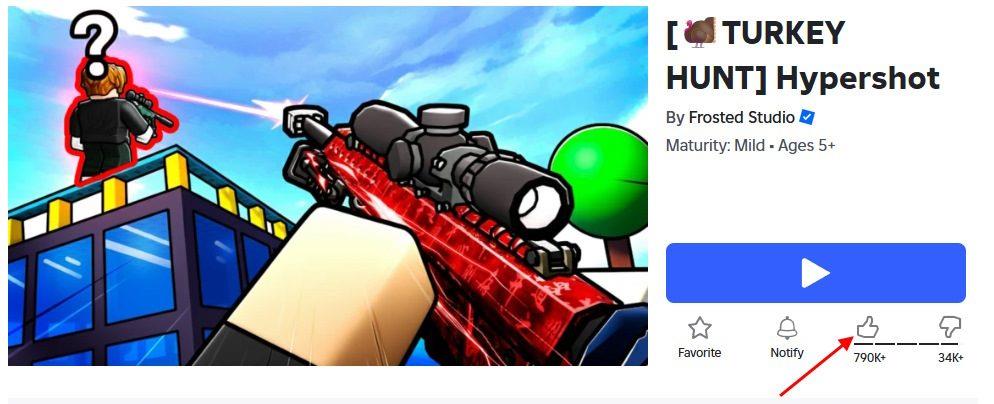
- Look for the Like button under the play button.
- Click the thumbs-up icon to like the game.
- Make sure it turns black to confirm your like went through.
App
- Open the official Roblox app on PC.
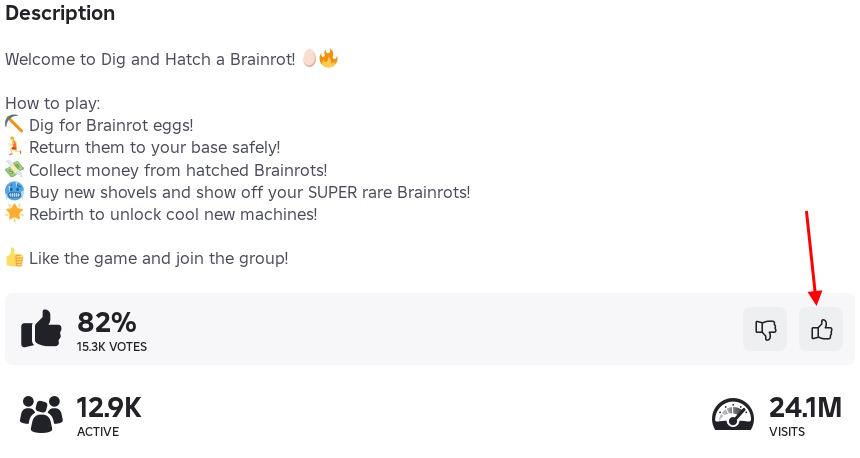
- Go to the game’s home page and scroll down.
- Click the thumbs-up button in the game stats section.
- Make sure it turns black to confirm your like went through.
How to like a Roblox Game on Mobile
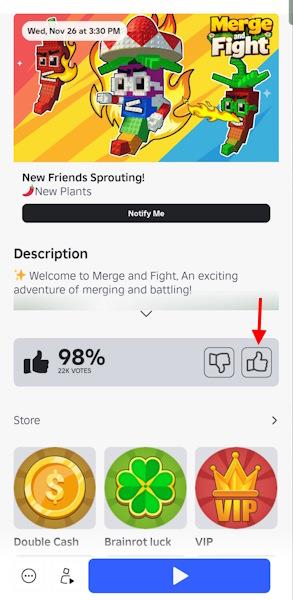
On mobile, open the Roblox app and sign in to your account. Find the game you want to rate and tap its thumbnail to open the game page. Scroll down until you see the thumbs-up and thumbs-down icons. Tap the thumbs-up icon to like the game. Your choice will be saved automatically, and you can change your rating later if you wish.
Both iOS and Android mobile users must install the Roblox app before they can like a game. Once you do so, below are the steps to like any game on the platform.
Android
- Open the Roblox app on your Android device.
- Find the game through search or your recommended list.
- Open the game page without starting it.
- Tap the Like button just below the title.
- Confirm the icon changes color to show it worked.
iOS
- Open the Roblox app on your iPhone or iPad.
- Search for the game or tap it from your home screen.
- Stay on the game’s main page.
- Tap the thumbs-up icon under the game title.
- Make sure the icon fills in to confirm your like.
How to like a Roblox Game on Console
On console, liking a Roblox game is quick and straightforward. After joining a game, press the Menu button on your controller to open the game’s menu. Navigate to the About tab or the area showing the game’s information. You’ll see a thumbs-up icon next to the play count or title-select it to like the game. Your vote is saved instantly, letting you support your favorite creators across Xbox or other supported consoles.
Console players can still like a Roblox game, although the cursor controls add one extra step. Follow the step-by-step process below:
Xbox
- Launch Roblox on your Xbox.
- Go to the game’s main page by pressing the Menu button on its tile.
- Use the left stick to move the cursor over the thumbs-up icon.
- Press A to like the game.
- Wait for the highlight change that shows your like is active.
PlayStation
- Start Roblox from your PS5/PS4 home screen.
- Open the game’s page through the search or your recently played list.
- Use the touchpad or stick to move the cursor to the Like button.
- Press X to like the game.
- Check for the small color change that confirms the like.
Find the Like button on Roblox mobile vs PC
Liking a game on Roblox requires accessing the thumbs-up (upvote) button on the game’s details page, with locations differing between mobile and PC for easier navigation on each platform. You must play the game first to unlock the option. Here’s how to locate it precisely.
PC Location
On the Roblox website or PC app, open the game’s page without joining- the thumbs-up icon sits directly under the large Play button, amid quick-action icons like Favorite (star). It turns filled or black when liked.
Mobile Location
In the Roblox mobile app (iOS/Android), tap the game to view its page, then scroll down past the title, creator, and description-the upvote/downvote arrows appear near the bottom, above passes/subscriptions. Tap the up arrow to like.
Key Differences
| Aspect | PC | Mobile |
|---|---|---|
| Position | Under Play button (top-center) | Scroll to bottom (below description) |
| Visibility | Always immediate | Requires scrolling |
| Controls | Mouse click | Finger tap |
The PC layout prioritizes desktop visibility, while mobile hides it lower to fit touch screens.
What rewards come from liking Roblox games
Liking Roblox games does not provide direct rewards like Robux or currency to the player from Roblox itself. Developers often implement custom in-game incentives, such as bonus coins, power-ups, or exclusive items, to encourage likes.
Developer Incentives
Many popular Roblox experiences reward players with temporary boosts (e.g., double coin earnings) or unlockable cosmetics upon liking via developer scripts. This boosts game popularity without Roblox-mandated payouts.
Platform Rewards
Roblox’s Creator Rewards focus on developers earning Robux from player engagement, not likes specifically-likes indirectly help by improving visibility and recommendations. No official player rewards tie to likes alone.
Event Exceptions
During limited-time events, liking participating games may unlock exclusive UGC or badges, as seen in past promotions. Check the game’s page or events hub for active offers.