Merge and Fight players can power up their game this November with fresh Roblox redeem codes offering free boosts, units, and in-game rewards. Grab them fast-these codes expire quickly, and every bonus counts in the arena.
And, to boost your progress, here is the list of all active Merge and Fight codes to help you earn free potions and buckets of water.
All New Merge and Fight Codes
Access these new Merge and Fight codes to boost your Roblox gameplay with fresh rewards and quick upgrades.
- pea: 2x Plant Attack Potion, 2x Seed Luck Potion, 3x Buckets of Water (NEW)
- plantsmerge: Brainrot Luck Potion, Brainrots (NEW)
- welcome: Plant Attack Potion, 2x Buckets of Water, Shuriken (NEW)
Expired Merge and Fight Codes
Currently, there are no expired codes in the game, so make sure you redeem the above ones right away.
Now that you’re here and you like such games, go ahead and play Plants vs Brainrots, Plant Evolution, and Garden Tower Defense. Apart from such games, you can also check out our Roblox game codes master list to find other better experiences on this platform.
How to Redeem Merge and Fight Codes
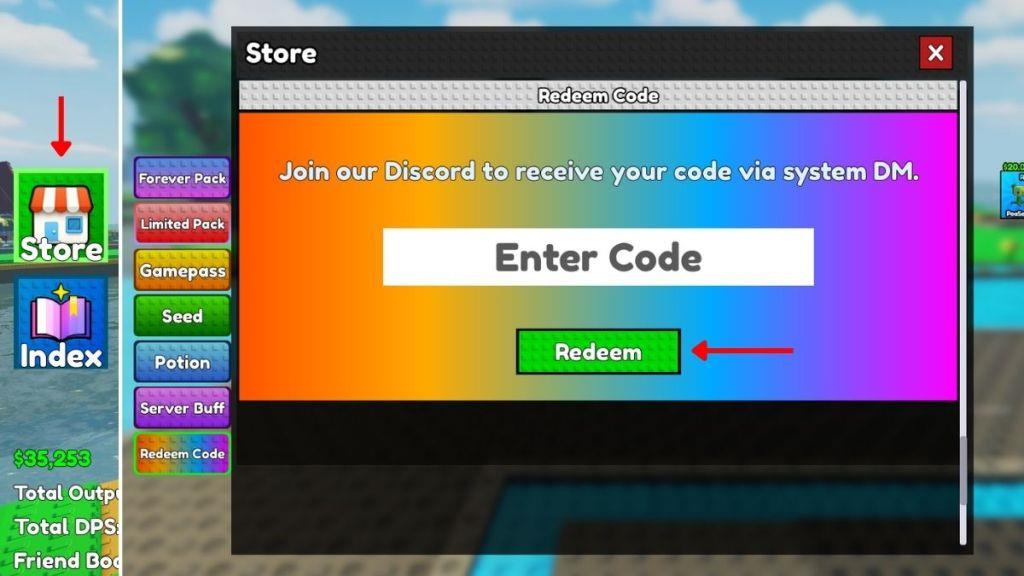
To redeem Merge and Fight codes, open Roblox and navigate to the Merge and Fight Codes page, enter your code in the provided field, and click Redeem to receive your rewards instantly.
So, if you can’t wait to get all the new rewards, check out the following steps to redeem the codes for Merge and Fight:
- Launch Merge and Fight on your Roblox app.
- Click the Store button on the left side of the screen.
- Select the Redeem Code tab and enter a working code in the text box.
- Click on the green Redeem button to claim your rewards.
How to Get More Merge and Fight Codes
Search for active codes in the game’s events and social channels, then redeem them promptly to maximize rewards; keep an eye on updated release notes and official announcements to catch new codes as they appear.
One way to find the latest codes for Merge and Fight is to go to the main game page on the Roblox site. The list of all active codes will be displayed in the description box of the game. Also, consider joining the Mom One More Minute community on Roblox to get an exclusive Plasma gun inside the game.
Next, you can join the official Merge and Fight Discord server to find the list of active codes in the ‘updates‘ channel. Finally, you can bookmark this page so that you never miss out on a new reward as soon as it gets dropped in the game.
Why Are My Merge and Fight Codes Not Working?
If your Merge and Fight codes aren’t working, they might have expired or been entered incorrectly. Roblox codes are usually case-sensitive, so double-check for small typos or extra spaces. Sometimes, server issues or outdated game versions can also prevent codes from being redeemed. Try closing and reopening the game before entering the code again to refresh the session and improve your chances of success.
At times, when you see that a certain code is not working in the game, close the player and restart the game. Ensure that you’re copying and pasting the right codes from the active section. If the codes still don’t work in the game, consider joining a new server; otherwise, it can happen that the codes have expired already.
How to redeem Merge and Fight codes
Redeeming codes in Merge and Fight requires a few simple steps within the Roblox game interface. Players access the redemption feature through the in-game store for quick rewards like potions and buckets.
Redemption Steps
Follow these steps to claim codes:
-
Launch Merge and Fight on Roblox and load into a server.
-
Click the Store button on the left side of the screen.
-
Select the Redeem Code tab or scroll to the bottom of the Store menu.
-
Enter the code exactly as shown in the text box (case-sensitive).
-
Press the green Redeem button to instantly receive rewards.
Troubleshooting Tips
Codes may fail if expired, mistyped, or due to server issues-restart the game or switch servers to resolve. Copy-paste codes directly to avoid errors, and check official sources for updates since new ones like “Christmas” and “update3” were active into early 2026. Rewards appear in your inventory for merging plants against Brainrots.
What are the active Merge and Fight codes
Active Merge and Fight codes as of January 2026 provide free potions, buckets, seeds, and gear to boost your plant defenses against Brainrots in the Roblox tycoon game.
Active Codes List
Redeem these working codes for rewards:
-
Christmas: 2 Christmas Potions, 2 Freeze Grenades, 2 Wooden Buckets, 2 Brainrot Potions.
-
update3: 2 Christmas Potions, 1 Christmas Tree, 5 Wooden Buckets, 2 Movement Speed Potions.
-
Quackula: 5 Damage Potions, 5 Speed Potions, 5 Range Potions, 10 Freeze Grenades.
-
update2: 3 Wooden Buckets, 1 Range Potion, 1 Bounty Potion, 1 Growth Potion.
-
TimCheese: 2 Damage Potions, 3 Wooden Buckets, 2 Corn Seeds, 1 Pulse Gun.
-
cactus: Attack Potions, 3 Golden Buckets, 5 Freeze Grenades, 2 Cactus Seeds.
-
sunflower: 5 Iron Buckets, 3 Small Speed Potions, 1 Sunflower Seed, 3 Freeze Grenades.
-
mushroom: 1 Golden Bucket, 3 Small Damage Potions, 1 Mushroom Seed, 3 Freeze Grenades.
-
plantsmerge: 1 Golden Bucket, 1 Gloves, 1 Brainrot Potion, 1 Cactus Seed.
-
pea: 3 Iron Buckets, 2 Small Damage Potions, 2 Small Seed Potions, 2 Freeze Grenades.
-
welcome: 2 Wooden Buckets, 1 Small Damage Potion, 1 Shuriken.
Redemption Notes
Codes are case-sensitive and may expire without notice-test them in the Store menu’s Redeem tab. No expired codes reported across sources.
