New secrets have surfaced in Roblox’s Destined Ascension-fresh November 2025 codes are live, offering rare boosts and exclusive rewards to power up your adventure. Don’t miss the chance to redeem them before they vanish.
As the game is very tied to using the correct items, you will need to stock your inventory with everything that can help you. Use Destined Ascension codes to obtain free items like tricks, passes, potions, weapons, and armors.
All New Destined Ascension Codes
The latest Destined Ascension Codes for November 2025 bring fresh rewards to boost your progress and enhance your character in Roblox. Players can redeem these exclusive codes for valuable in-game items, including boosts, coins, and special cosmetics. Make sure to use them before they expire, as new codes are added regularly to keep the experience exciting for dedicated fans.
- sorryforthe2shutdowns: 1 Cog Trick (NEW)
- mattygorillasucks: 1 Boom Pass (NEW)
- legionthegreatest: 1 Boom Pass (NEW)
- poyo: 1 Idol’s Heart (NEW)
- thefinaldatafix: 1 Recollection (NEW)
- imperfection: 1 Cog Trick (NEW)
- chocolate: 1 Cog Trick (NEW)
- mevostheforgotten: 1 Cog Trick (NEW)
- arvanyourmentor: 1 Recollection (NEW)
- WEHITFRONTPAGE!!!: 1 Cog Trick (NEW)
- worldcrystal: 1 Boom Pass (NEW)
- forgotten: 1 Boom Pass (NEW)
- shaqmaderecipes: 1 Boom Pass (NEW)
- arvanintense: 1 Salt (NEW)
- witchbrew: 1 Witch’s Brew (NEW)
- celiatheidol: 1 Idol’s Heart (NEW)
- 6klikes: 1 Cog Trick
- 5500likes: 1 Cog Trick
- 5klikes: 1 Cog Trick
- 1000players: 1 Capybara Trick
- pearlthegoat: 1 Developer Trick
- devteamtryingtomakemorecontentsoon: 1 Boom Pass
- mewgonetomorrow: 1 Solar Stone
- shaqtheultimatechef: 1 Star Matrix
- pureofheart: 1 Ultra Purity
- iwillgetvengeanceonnyx: 1 Energized Darkness
- DidYouForgetMeNyx: 1 Dark Energy Crystal
- bcwoisgoated: 1 Purpulite Blade
- GoodJobForReading: 1 Magical Narwhal
- TUTORIALCOMPLETED: 1 Cog Trick
- tablesalt: Salt
- thepeaceofdareturns: Refined Destinium
- freedomfromnyx: Solar Stone
Expired Destined Ascension Codes
- terrorfeels
- goodbyecryitehellosilver
Destined Ascension is a really fun game, but there are better dungeon fighters on Roblox. Try out Fabled Legacy, Legends ReWritten, and Elemental Dungeon to get a different experience. Not a fan of these games? Head to our Roblox game codes list to find over a hundred amazing Roblox games to pick from.
How to Redeem Destined Ascension Codes
To redeem Destined Ascension codes, open Roblox and launch the game. Once in the main menu, click on the gift or code button, usually found on the screen’s side. A text box will appear-enter your valid code exactly as shown, then press “Redeem” to claim your rewards. Make sure to use active codes quickly, as they often expire after a short period or during special events.
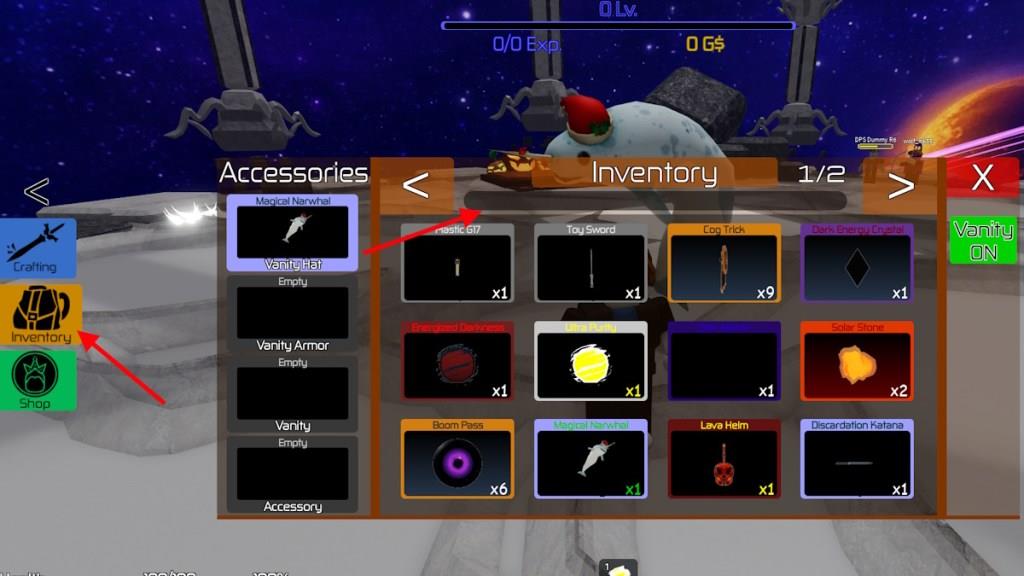
Redeeming the codes for Destined Ascension is somewhat unorthodox. The code system is actually mixed with the inventory search system, making it a bit confusing. Here is how you can claim the rewards:
- Launch Destined Ascension on Roblox.
- Click on the Inventory option on the left side of the screen.
- Type the active code in the search box.
- Press Enterto redeem the rewards.
How to Get More Destined Ascension Codes
Players can get more Destined Ascension Codes by following the game’s official Roblox page, social media accounts, and community Discord server, where new codes are released during updates or special events. It helps to check the developers’ posts regularly, since codes often expire quickly. Subscribing to creator channels or fan pages can also help you catch new codes early and avoid missing limited-time rewards.
Codes for Destined Ascension are released by devs on their social accounts. This makes it hard for normal users to track them every time. Missing these codes can lead to a major loss of materials, so we have the perfect fix for you right here. Bookmark our list here, and you will always find the latest codes without fault.
But if you prefer searching by yourself, head over to the official Destined Ascension Discord server or follow @PearlHercules93 on X. This is also a great way to connect with the community and find information on upcoming updates.
Why Are My Destined Ascension Codes Not Working?
Possible reasons include server-side delays with code activation, recent updates altering code validation rules, or regional restrictions affecting eligibility. Double-check the exact code format and ensure you’re redeeming within the specified time window and on the correct platform. If issues persist, contact support with your code and timestamp.
If the Destined Ascension codes are not working for you, then you need to first check if the copied code has a typo or not. The codes for this game are mostly released after a new update. When this happens, the newly released codes often only work in the new servers. Wait for the servers to refresh and retry, and it should work. If the error says that ‘limit is exceeded’, it means that you have already redeemed that code.
How to redeem codes step by step in Destined Ascension
Here is the simple step-by-step way to redeem codes in Destined Ascension on Roblox.
Step-by-step redemption
-
Launch Destined Ascension from Roblox and fully load into a game server.
-
If you are a new player, finish the short tutorial so the main UI (including Inventory) appears.
-
On the left side of your screen, click the Inventory button to open your inventory window.
-
Look for the search bar / text box just under the word Inventory in that window.
-
Carefully type or paste a working code into that search box (codes are case-sensitive and must have no extra spaces).
-
Press Enter/Return on your keyboard; if the code is valid and unused, the reward is added to your inventory instantly.
If the code doesn’t work
-
Double-check spelling, capitalization, and extra spaces.
-
If you see a “limit exceeded” message, that means you have already redeemed that code on your account.
-
If a new code should work but doesn’t, leave the game and rejoin to get into a more up-to-date server, then try again.
Open Destined Ascension inventory and locate the search box
In Destined Ascension, the inventory button and the search box are both on the main in-game UI once you’ve loaded into a server.
Opening the inventory
-
After you join Destined Ascension, look at the left side of your screen for the “Inventory” button/icon in the main HUD.
-
Click that Inventory button to open the inventory panel/window.
Finding the search box
-
At the top of the inventory panel, just under the word “Inventory”, there is a text field that looks like an item search bar.
-
That text field is the search box where you can type item names or paste codes; click inside it once to focus it before typing.