Fans of Uma Racing on Roblox are racing for fresh November 2025 codes that drop free Cash and in-game rewards. Here’s where to find the latest working codes and how to redeem them before they expire.
There are tons of emotes, MVPs, nametags, and opening scenes to choose from, but all of them require money, which you can only earn from winning matches. So, here are some Uma Racing codes that will give you free money to buy these items early in the game.
All New Uma Racing Codes
All new Uma Racing codes bring fresh rewards that can give players more cash, upgrades, and boosts for faster progress in the Roblox game. These updated codes help racers enhance their performance and enjoy an improved gameplay experience without spending extra Robux. Be sure to redeem them quickly, as some may expire or change with future game updates.
- IOOKMEMBERS: 3000 Cash (NEW)
- FIFTYTHOUSANDLIKES: 3000 Cash
- THANKFORSUPPORTIN: 4500 Cash
- FIRSTBUGFIX: 1500 Cash
- UFFUEWANTTOMATO: 1000 Cash
- MBFORANOTHERDELAYBRO: 2500 Cash
- RELEASECUH: 1500 Cash
Expired Uma Racing Codes
As of now, there aren’t any expired codes in the game, so make sure you get the free gifts from the active codes right away.
If you’re fond of such arcade games, try out Crash Bots, Tank Game, and Gone Hunting. Moreover, you can also find a whole list of cool games to pass your time on our Roblox game codes master list.
How to Redeem Uma Racing Codes
To redeem Uma Racing codes, open Roblox and launch the Uma Racing game. Once inside, look for the Twitter or Codes button on the main menu. Click it, then paste a valid code into the text box and hit the confirm or redeem button. If the code is active, your in-game rewards such as cash or boosts will appear immediately in your account. Always check that you’ve entered the code correctly, since expired or misspelled codes won’t work.
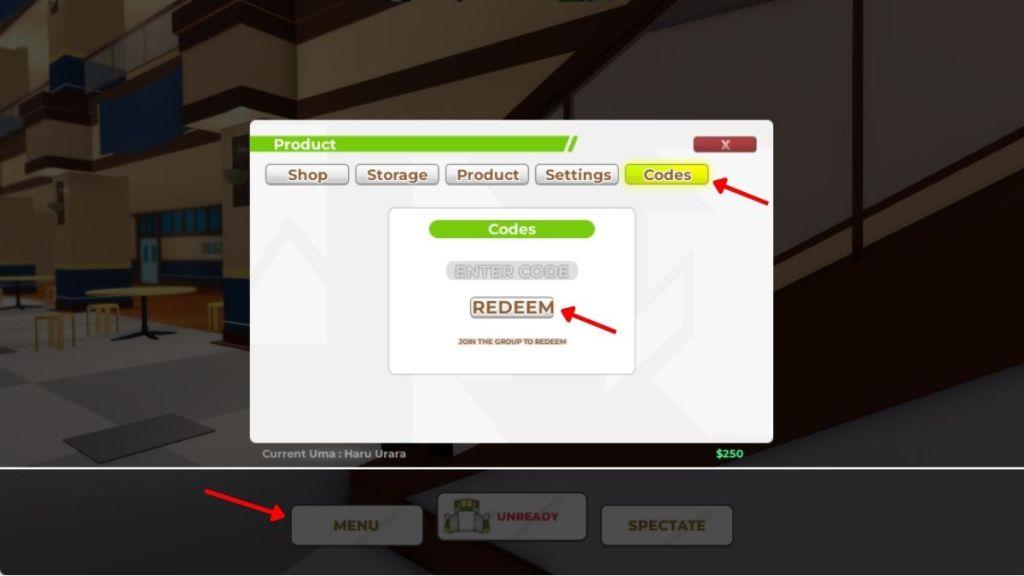
Before redeeming the codes for Uma Racing, you must join the Uma Racing Roblox Community. Once you have done it, follow the steps below and get the free rewards:
- Launch Uma Racing on your Roblox app.
- Click on the Menu button at the bottom of the screen
- Select the Codes tab at the top and then type a working code in the text box.
- Click on the Redeem button to claim your rewards.
How to Get More Uma Racing Codes
Players can find new Uma Racing codes through the game’s official Roblox page, verified community servers, and developer social media profiles. Checking these sources regularly helps you catch limited-time codes before they expire. You can also follow Uma Racing on platforms like Twitter or Discord, where announcements for updates and special events often include new rewards or bonuses.
The best way to find more codes in this game is by joining the official Uma Racing Discord. Here you will find the whole list of active ones in the codes channel. Moreover, you should join the Uma Racing Community in order to redeem the codes in the game.
The next way is to bookmark this page right now. Since we keep our list updated at all times, you will be notified as soon as there are changes in this list. With a simple click, you can find the new ones here and get the rewards sooner than anyone.
How to redeem codes in Uma Racing step by step
To redeem codes in Uma Racing on Roblox, first join the Uma Racing Community group, then launch the game and access the menu from the lobby. Enter codes exactly as listed (case-sensitive) to claim free cash rewards.
Step-by-Step Guide
Follow these precise steps, confirmed across multiple January 2026 guides:
-
Join the “Uma Racing Community” Roblox group (required for codes to work).
-
Launch Uma Racing via Roblox and wait for the main menu or lobby to load.
-
Tap the Menu button (bottom or side of screen).
-
Select the Codes tab.
-
Enter or paste a valid code into the text box.
-
Press Redeem or Enter to claim-rewards appear instantly if active.
Troubleshooting Tips
Codes fail due to typos, expiration, or not joining the group first-copy-paste exactly and rejoin the game if needed. Redeem only once per account, on any platform (PC, mobile, console).
Open the Codes tab in Uma Racing where is it located
The Codes tab in Uma Racing is located within the main Menu interface, accessible only from the lobby. Open the Menu button at the bottom of the screen, then select the Codes tab, which appears at the top or on the right side of the Menu window.
Visual Location Details
Multiple guides confirm the precise spot:
-
Menu button sits at the bottom center or side of the lobby screen.
-
Codes tab is one of the top tabs (e.g., next to other options like Settings) or right-side panel after opening Menu.
-
Enter code in the text box that appears below the tab, then hit Redeem or Enter.
Common Issues
If the tab is missing, ensure you’re in the lobby (not mid-race) and have joined the Uma Racing Community group first. On mobile, it may appear slightly shifted but follows the same layout.