New pets, surprise codes, and limited-time rewards await in Oh My Pet! Here’s every active code for October 2025 to help you boost your coins, grow your collection, and stay ahead of other trainers in Roblox’s cutest pet simulator.
Getting and upgrading pets can be tough as a new player, as they cost money. To help you out, we have listed all the active Oh My Pet codes that you can just redeem to get money, tickets, and other free rewards.
All New Oh My Pet Codes
The latest Oh My Pet codes bring players fresh rewards to boost their progress and expand their pet collections. These codes may grant coins, gems, or exclusive pets that help you develop faster in the game. Make sure to redeem them soon, as some codes can expire quickly or be replaced by new ones each month. Keep an eye on official updates or community pages so you don’t miss any future rewards.
- Welcome: 5 Energy (NEW)
- FRIENDS: 2x Coins Potion, 2x Luck Potion, and 3 Tickets (NEW)
- Relics: one random Relic (NEW)
Expired Oh My Pet Codes
Currently, there are no expired codes for this game. Once the active codes expire, we will move them to this part.
While you wait for new codes, try out some other Roblox simulator games like Grow a Garden or Plants vs Brainrot. You can also try some of the top Roblox games, like Steal a Brainrot and 99 Nights in the Forest. If you are bored with simulator games, then check out our Roblox game codes master list to find your next adventure.
How to Redeem Oh My Pet Codes
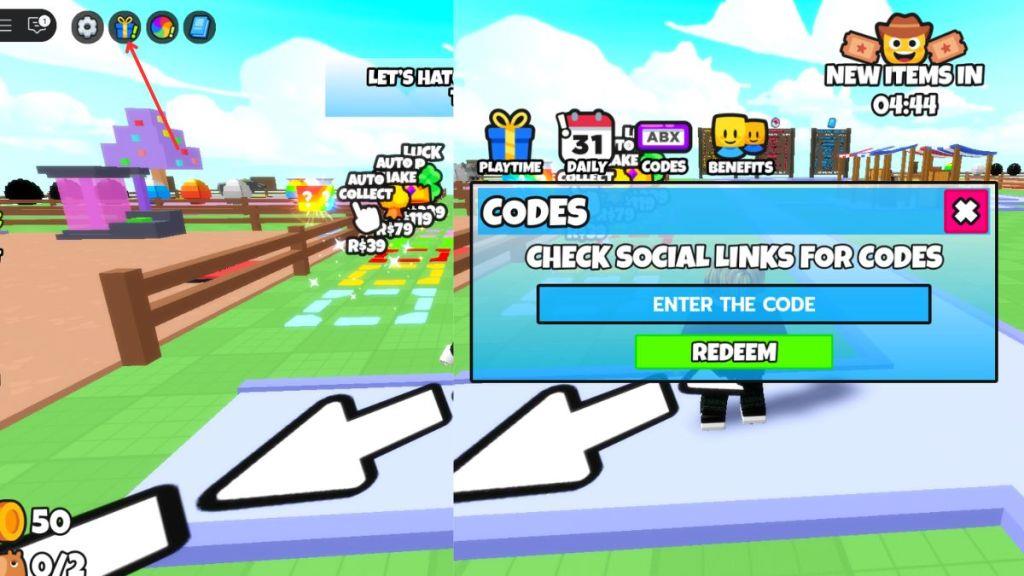
To redeem Oh My Pet codes, open the game in Roblox and tap the menu or settings icon on your screen. Find the “Codes” or “Gift” option, then type or paste a valid code into the text box. Press the confirm or redeem button to claim your rewards, which are added instantly to your account. Be sure to enter each code exactly as shown, since expired or incorrect entries won’t work.
Redeeming codes for On My Pet is easier than taming pets, and here’s how you can do it.
- Launch the Oh My Pets experience on Roblox.
- Click the gift icon in the upper-left corner.
- Now, click on the Codes option.
- Enter the code in the ‘ENTER THE CODE’ box.
- Click ‘REDEEM‘ to claim free rewards.
How to Get More Oh My Pet Codes
Players can find new Oh My Pet codes by following the game’s official Roblox page and social media accounts, where developers often share code updates during events or milestones. Joining the official Discord server can also help, as active community members and admins post the latest codes there. Checking fan pages, game wikis, or trusted gaming websites regularly can ensure players never miss fresh rewards.
You can get more codes for this game from the official Oh My Pets Discord Server. There is a separate #codes channel in the server where new codes are released. You can also join the official Pixel Riot Community for new codes.
Finding codes by yourself can be a challenge in itself, as there is no specific time or date for the codes’ release. Your best option will be to bookmark our post. Whenever developers release new code, we will be the first to add it to our list. So, if you want to find more codes for Oh My Pet, then this is the best place on the internet.
Redeem Oh My Pets code steps in Roblox
Redeeming Codes in Oh My Pet
Redeem codes in Oh My Pet on Roblox through a straightforward in-game menu. The process takes seconds and delivers rewards like energy or potions instantly.
Step-by-Step Guide
-
Launch Oh My Pet via the Roblox platform.
-
Click the gift box or present icon in the top-left corner of the screen.
-
Select the Codes tab (sometimes labeled ABX Codes) from the menu options.
-
Enter the code exactly as shown (case-sensitive) into the “Enter the Code” text field.
-
Press Redeem to claim rewards, which appear in your inventory right away.
Troubleshooting Tips
Codes must match precisely, including capitalization. If a code fails, it may have expired-check recent updates from sites like Pro Game Guides. Each code works once per account.
How to find the Codes tab in Oh My Pets menu
Finding the Codes Tab in Oh My Pets
Locate the Codes tab within the gift menu after accessing the main reward interface in Oh My Pets. Guides consistently describe it as a selectable option alongside similar features.
Access Steps
-
Launch Oh My Pets on Roblox and load into the game.
-
Click the gift box or present icon (blue or purple) in the top-left corner to open the reward menu.
-
In the menu, select the Codes tab (may appear as ABX Codes in some updates).
-
The text input box labeled “Enter the Code” confirms you’re in the right spot.
Common Issues
If the tab is missing, ensure the game is fully loaded or try rejoining the server, as updates can affect visibility. Copy-paste codes to avoid errors once open.
