New moves mean new rewards-The Move Machine is packed with fresh codes this October 2025, waiting to boost your Roblox experience with spins, coins, and exclusive surprises.
Luckily, some redemption codes are available, giving you free rewards and aiding your journey. Here is a list of latest the Move Machine codes that give you free blocks, metals, weapons, and other freebies.
All New The Move Machine Codes
All New The Move Machine codes bring fresh rewards for players eager to enhance their gameplay in Roblox. These codes can grant useful boosts, coins, and other in-game perks that make progress smoother. Each month brings new additions, so checking the latest October 2025 list ensures no rewards go unused. Players can apply these codes through the redemption section within the game to claim their bonuses instantly.
- LC: 5 Wood Blocks, 3 Block Metals, 2 Block Concretes, and 1 Crossbow Weapon (NEW)
- NP: 5 Wood Blocks, 3 Block Metals, 2 Block Concretes, and 1 Crossbow Weapon
Expired The Move Machine Codes
There are no expired codes in the game. Once the active codes expire, we will add them to this section.
While waiting for new codes, you can check some other popular games on Roblox, like Steal a Brainrot and Blox Fruits. If you are looking for more fun games, check our Roblox game codes list. You can also try some of the top Roblox games, like 99 Nights in the Forest and Plants vs Brainrot.
How to Redeem The Move Machine Codes
To redeem The Move Machine codes in Roblox, open the game and click on the “Gift” or “Codes” button, usually found on the main screen. Enter a working code into the text box that appears, then press the “Redeem” button to claim your reward. Make sure to type the code exactly as shown, since incorrect capitalization or extra spaces can cause errors. Once accepted, your rewards will automatically appear in your account.
Unlike killing Zombies, redeeming the codes for the Move Machine is very easy and quick. All you need to do is follow the steps we have listed below:
- Launch The Move Machine on Roblox.
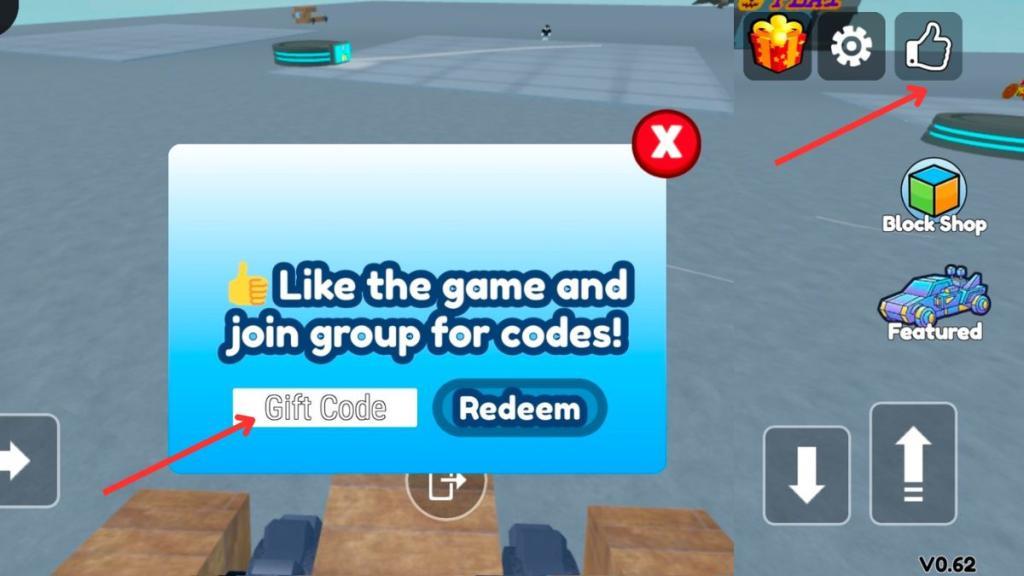
- Click the Thumbs Up button in the upper-right corner of the screen.
- Enter an active code from our list in the ‘Gift Code’ box.
- Press Redeem and enjoy your free rewards.
How to Get More The Move Machine Codes
Discover fresh Move Machine codes by checking official social channels, following Roblox community hubs, and watching creator livestreams for timely drops and redemption details.
The best way to get more codes for the Move Machine is by bookmarking this page. We are always on the lookout for new updates. So, when in doubt for new Roblox game codes, check back and you’ll find them here.
If you want to find the codes yourself, then you should join the official The Move Machine Community. The developers update the new codes in the community, so it will be your second-best option to find new codes. You can also join the official Move Machine Discord Server, but there is no specific channel for codes, which means you’ll have to ask around in the server or keep an eye out for the #game_discussion channel.
How to redeem LC code in The Move Machine
To redeem the LC code in Roblox’s The Move Machine, follow the in-game process using the thumbs-up button.
Redemption Steps
Launch The Move Machine on Roblox and join a server. Click the thumbs-up (Like) button in the upper-right corner to open the Gift Code input box.
Enter LC exactly as shown (case-sensitive) into the text field, then press the blue Redeem button.
Rewards like 5 Wood Blocks, 3 Metal Blocks, 2 Concrete Blocks, and 1 Crossbow appear instantly in your inventory if valid.
Troubleshooting Tips
If LC fails, verify spelling by copy-pasting, ensure you haven’t redeemed it before on that account, and rejoin the server.
Codes like LC remain active into early 2026 per recent guides, but expiration can occur without notice.
Where is the Codes or Gift Code button in the game menu
In Roblox’s The Move Machine, the Codes or Gift Code button is not in the standard game menu. Instead, it appears via a simple in-game action. Click the thumbs-up (Like) button in the upper-right corner of the screen after joining a server.
Exact Location
The thumbs-up icon sits prominently in the top-right area, often near other social buttons like chat or notifications. Tapping it directly opens the Gift Code input box-no menus or settings required.
Step-by-Step Access
-
Join any public server in The Move Machine.
-
Locate the thumbs-up/Like button at the upper-right of your screen.
-
Click it to reveal the code redemption field; enter your code (e.g., LC) and hit Redeem.
This design keeps redemption quick and accessible without navigating complex menus.