January’s Train Race codes bring a fresh wave of free rewards, from exclusive boosts to rare items that can speed up your progress on Roblox’s tracks. Grab the latest codes before they expire and race your way to the leaderboard’s top spots.
Use these free rewards and make your train run faster.
All New Train Race Codes
All New Train Race Codes unlock fresh rewards and boost your gameplay with faster races, exclusive boosts, and limited-time items across Roblox platforms.
- L4Q3: Get 10k Coins, 10 Train Potions and 10 Coin Potions (NEW)
- happy2000: Get 10k Coins, 10 Train Potions and 10 Coin Potions (NEW)
- happy500: Get 10k Coins and 10 Train Potions
- nicegame: Get 10k Coins
Expired Train Race Codes
- happy1k
While the developers add more codes to the game, you can check out such other games. For more RNG-style games, try Jujutsu Infinite or Anime Lootify. If you want to grind in a game and become stronger, try Blox Fruits. In case you want to find some fresh adventure, you can check our Roblox game codes master list.
How to Redeem Train Race Codes
To redeem Train Race codes, open Roblox and launch the game. Click the Codes button, usually found on the main screen or in the settings menu. Copy a valid code from the latest list and paste it into the text box. Press Redeem to claim your rewards instantly, such as coins, boosts, or other in-game items. Make sure to enter each code exactly as shown since they are case-sensitive.
Follow the step-by-step process below to learn how to redeem the codes for Train Race:
- Launch the Train Race experience on Roblox.
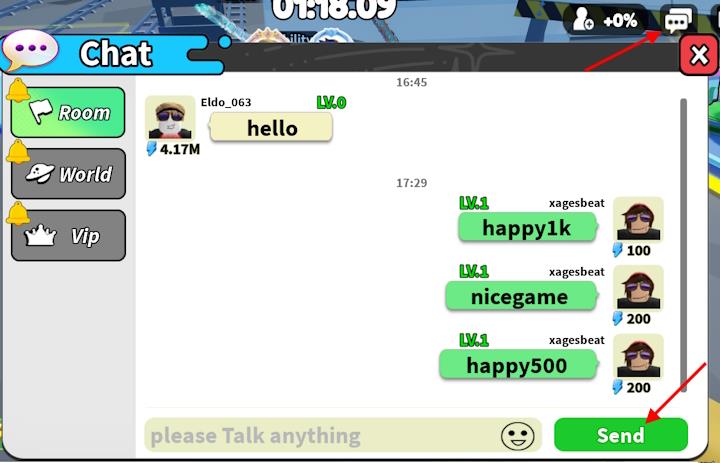
- Select the chat box from the right side of the screen.
- Type a working code in the ‘please Talk anything’ area.
- Click the Send button to claim rewards.
How to Get More Train Race Codes
New Train Race codes are often released through the game’s official social media pages, Discord server, and developer announcements on Roblox. Players can also check community sites and fan forums where updated code lists are shared frequently. Joining the game’s group and staying active during special events or updates can increase your chances of finding exclusive codes before they expire.
The only way to get more codes for this experience is through the game’s Roblox page. So, keeping track of these codes might take some time away from you. Do not worry. We frequently check through the page and other sources to find the latest Train Race codes. So, bookmark this page to stay up-to-date with the active freebies.
Developers give away new codes with every milestone, such as the like goals or game visit goals. If you want to compete with other players, you can connect with the community at the official Animal World Discord server. If the codes show some error, make sure you type it properly or copy it directly from our list. You can also restart the game to fix any invalid error issues.
How to redeem codes step by step in Train Race
To redeem codes in Roblox’s Train Race, open the in-game chat and enter them in the Room tab for instant rewards like coins and potions.
Step-by-Step Guide
Follow these exact steps to avoid errors, as codes must go in the specific Room chat, not global Roblox chat:
-
Launch Train Race on Roblox and join a server.
-
Click the chat icon (speech bubble or chatbox) in the top-right corner of the screen.
-
Switch to the “Room” tab at the top of the chat menu.
-
Type or paste the code exactly into the “please Talk anything” input field at the bottom.
-
Press the green “Send” button to claim; a reward notification appears if successful.
Troubleshooting
Codes are case-sensitive, so copy-paste from reliable lists. If nothing happens, verify you’re in Room chat and the code isn’t expired-double-check via game updates.
Open Train Race chat and where to paste codes
To open the chat in Roblox’s Train Race and paste codes, locate the chat icon in the top-right corner and use the Room tab’s input field.
Opening Chat
Click the speech bubble or chat box icon at the top-right of the screen, next to the update log-this opens the full chat menu.
Pasting Codes
Ensure the Room tab is selected (left side of the menu). Paste the code directly into the “please Talk anything” text box at the bottom, then press the green Send button.
Quick Tips
Copy-paste exactly to avoid case errors; rewards appear instantly if valid. Use only Room chat, not global Roblox chat.
