Fortnite’s Fruits vs Brainrots event brings a splash of chaos and competition, and the latest October 2025 codes can give you the boost you need to stand out. Whether you’re chasing rare items or stacking XP rewards, these limited-time codes are your ticket to getting ahead before they vanish.
And for an early head start, we have compiled the secret Fortnite Fruits vs Brainrots codes that will give free money, boosts, potions, and rare brainrots.
All New Fortnite Fruits vs Brainrots Codes
Fortnite Fruits vs Brainrots Codes offers a concise guide to October 2025 codes, detailing how to redeem items, outlining eligible platforms, and highlighting any seasonal limitations or cooldowns to help players maximize their in-game rewards.
- 371685: Redeem for $100,000 (NEW)
- 790021: Redeem for $100,000 (NEW)
Expired Fortnite Fruits vs Brainrots Codes
Fruits vs Brainrots is a new game on Fortnite, and all the mechanics are being added regularly. That is why the secret codes have been unveiled recently as well. This means you have enough time to redeem the codes before they expire. Once they do, we will move the inactive ones to this section.
Want more games where fighting brainrots is fun? Then go through our Roblox game codes list or grab the Plants vs Brainrots codes before you jump in. Prefer to stay in Fortnite? Then check out the latest Fortnite weapons and map changes in the battle royale mode.
How to Redeem Fortnite Fruits vs Brainrots Codes
To redeem Fortnite Fruits vs Brainrots codes, open the official Epic Games redemption page and sign in with your Epic account used for Fortnite. Enter the active code exactly as shown and confirm to apply it to your account. Once completed, launch Fortnite, and the related rewards will appear in your inventory or locker. Always check that the code is still valid, as many offers expire after a limited time.
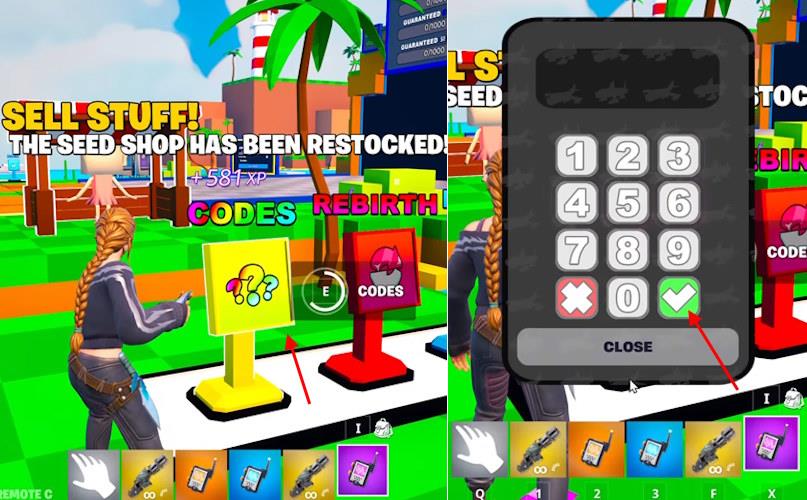
Before you get back to the game, you must know how to redeem the codes for Fruits vs Brainrots in Fortnite. Here are the steps you must follow to do it:
- Launch Fruits vs Brainrots on Fortnite from the homepage.
- Go toward the CODES area and hold the E key.
- Click the numbers on the dialling pad.
- Click the green tick mark to claim the rewards.
How to Get More Fortnite Fruits vs Brainrots Codes
Check official Fortnite social media channels and the Fruits vs Brainrots Discord server daily for new code announcements. Follow content creators who partner with Epic Games, as they often share exclusive drops during streams or videos. Join community forums like Reddit’s r/FortniteBR to spot player-shared codes before they expire. Set up notifications on code-tracking sites such as Pro Game Guides or Fortnite.GG for instant alerts. Redeem codes quickly through the in-game menu under the code exchange option to claim free rewards.
Finding the Fortnite secret codes for Fruits vs Brainrots can be a little difficult. The main reason behind that is that there is only one place where you can dig them out. Yes, the codes are only available in the official Fruits vs Brainrots Discord server. Once you are in the server, look for the ‘secret-codes’ channel. This is where the developers share the latest codes.
However, doing this every time a new code arrives will consume a significant amount of time. That is where we come in clutch. Remember when we said there is only one place to find the codes? Well, we go through the official sources daily to keep updating our list. So, if you want the Fruits vs Brainrots Fortnite codes early, bookmark this page and revisit during every update.
How to redeem Fruits vs Brainrots codes step by step
Redeeming codes in Fruits vs Brainrots (a Fortnite Creative map) happens directly in-game via an on-screen keypad, not through Fortnite’s standard code system.
Step-by-Step Guide
-
Launch Fortnite, go to Discover, and search for the Fruits vs Brainrots island using map code 4554-4413-1515. Load into the map.
-
Once in the map, head to the CODES area or panel (typically near your base, seed shop, or rebirth zone-look for a glowing box or interactable sign).
-
Approach the panel and interact (hold E on PC, or equivalent interact button on console/mobile).
-
Enter the full numeric code using the on-screen number pad (no letters or spaces).
-
Press the green tick/arrow/confirm button to submit.
-
Await a center-screen notification confirming the reward (e.g., cash, Brainrot, or seeds); rewards apply instantly to your inventory.
Troubleshooting Tips
-
Codes are session-based (reusable next match) but expire over time; test one at a time.
-
If invalid, double-check digits, reload the map, or verify server region.
-
No Epic account linking needed-purely map-specific.
Show where the Codes panel is located in the map
Codes Panel Location
The Codes panel in the Fruits vs Brainrots Fortnite map (code 4554-4413-1515) is located near the spawn area, typically right by the seed shop or rebirth chamber.
Finding It Easily
-
Spawn into the map and look for a glowing interactable box or sign labeled “CODES”-it’s often straight ahead or a short walk from your starting point, past the initial fruit/brainrot planters.
-
On the map overview (if available in-lobby), it’s marked near the central base hub, avoiding the outer PvP zones.
-
Common landmarks: Adjacent to the shop NPC or a keypad pedestal; scan for green glow or a computer terminal.
Once there, interact to open the numeric entry pad for redeeming codes like 001228 or 371685 from October 2025 lists.
