Break through the wall faster than ever with the latest Roblox Punch Wall codes for October 2025-grab your coin boosts, power-ups, and potions before they’re gone!
For some small boosts, you can consider having powerful companions by your side, too. So, to make this journey easier, here are some active Punch Wall codes that give you free coin potions and thereby increase your cash gain to buy new gloves as well as pets.
All New Punch Wall Codes
New Punch Wall codes bring fresh rewards for October 2025, giving players extra boosts like coins, potions, and power-ups to level up faster. These limited-time codes help you break walls more efficiently and climb the ranks in each stage. Keep an eye out for updates, as new codes often appear during events or special game milestones.
- k25lIkES: 2 Coin Potion (NEW)
- 12K_LiKes: 2 Coin Potion
- 5K_lIKes: 2 Coin Potion
- 1K_LiKes: 2 Coin Potion
- 100liKES: 2 Coin Potion
- NEW: 2 Coin Potion
Expired Punch Wall Codes
Currently, there aren’t any expired codes in the game, so make sure you get all the available rewards by using the active codes.
So, if this game suits your taste, consider playing Sisyphus Training, Train to Fight, and Prison Pump as well. For more amazing titles, you can check out our Roblox codes master list, as it has some of the best games on this platform.
How to Redeem Punch Wall Codes
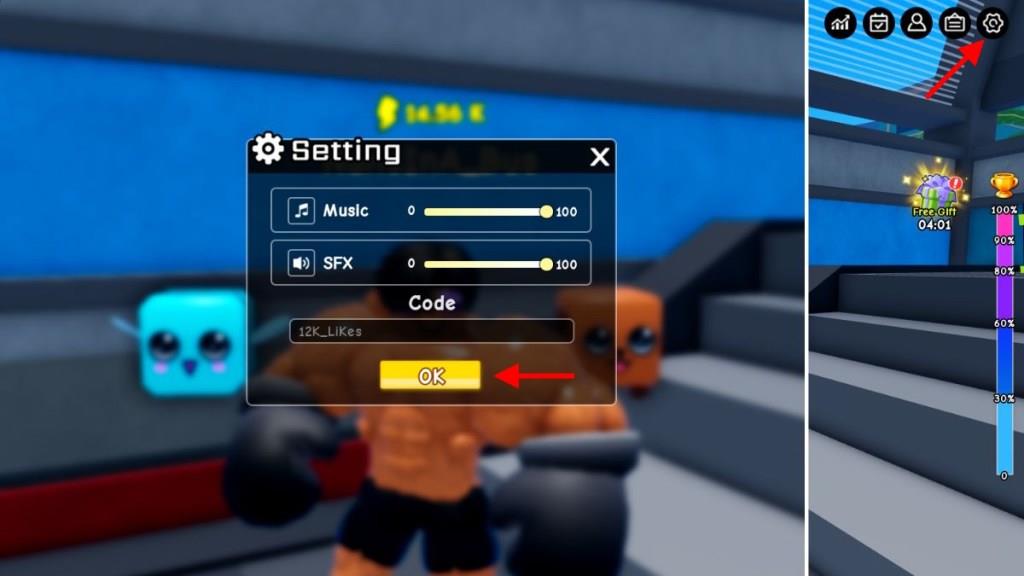
To redeem Punch Wall codes, open Roblox and launch the Punch Wall game. Tap the Codes button on the side of the screen, then enter an active code into the text box. Press Redeem to claim your rewards, such as coins or potions. If a code doesn’t work, it may have expired or been entered incorrectly, so double-check the spelling before trying again.
Redeeming the codes for Punch Wall is really simple, and you need to follow the given steps below:
- Launch Punch Wall on your Roblox app.
- Click on the Settings Cog Wheel on the top right of the screen.
- Enter any active code in the textbox of the pop-up window.
- Click on the yellow OK button to get your prizes.
How to Get More Punch Wall Codes
Codes for Punch Wall are usually shared through official Roblox channels, so keep an eye on the game’s social media accounts, Discord server, and developer posts. Joining community groups or following update announcements can help you spot new codes right after they’re released. It’s also useful to check fan sites and Roblox promo pages regularly, as they often list active and newly added codes before they expire.
One of the easiest ways to find all the latest working codes in this game is by joining their official Punch Wall Discord server. Here, you will find the list of codes in the ‘game-code‘ channel. Then, you can join their official Wuxus Punchman community to find all sorts of news around this game.
Finally, I would recommend bookmarking this page right now. Since we keep updating the code list frequently, you won’t miss out on any new rewards. You will have a one-stop destination for all the active and expired codes in this game.
How do I redeem codes in Punch Wall step by step
Redeem codes in Punch Wall by following these simple steps. Codes provide Coin Potions for faster progress, and the process works consistently across guides.
Step-by-Step Guide
Complete the tutorial first if you’re new, then:
-
Launch Punch Wall on Roblox.
-
Click the cogwheel (Settings) icon in the top-right corner.
-
Enter the code exactly as shown (case-sensitive) in the text box.
-
Press the yellow OK or Enter button to claim rewards.
Troubleshooting Tips
-
Codes must match precisely, like “50liKeS_k” (note lowercase L vs. uppercase i).
-
If invalid, it may have expired-check recent lists or developer updates.
-
Rewards appear in inventory; activate potions for 2x coins during training.
Show where the settings cog is located in-game
The settings cog in Punch Wall is located in the top-right corner of the game screen. It appears as a small gear icon once you’ve loaded into the main area after the tutorial.
Visual Location
Look above the right side of your character’s stats or shop buttons-it’s consistently positioned there for easy access. Tap or click it to open the code redemption menu.
Quick Access Tips
-
Ensure you’re not in the tutorial; the UI fully loads post-tutorial.
-
On mobile, it may be slightly smaller but remains top-right.
-
If hidden by UI scaling, adjust Roblox settings or zoom out.