Whip up your culinary empire in Roblox’s Anime Chefs with these fresh September 2025 codes-a sizzling mix of rewards, coins, and boosts to keep your kitchen bustling and your chef rank rising fast.
Here is a list of all the latest Anime Chefs codes that will provide you with free gems, potions, or other valuable rewards. So, grab the free ingredients and cook the hottest dish in the lobby.
All New Anime Chefs Codes
All New Anime Chefs Codes bring exciting rewards to help players upgrade their kitchens and perfect their cooking skills in Roblox’s fun restaurant simulator. These fresh codes can grant you free coins, boosts, or special ingredients to speed up your progress and expand your culinary empire. Check them out below and make sure to use them before they expire!
- EXECUTIVECHEF: 100 Gems (NEW)
- BALDURGOAT: 100 Gems (NEW)
- SORRYFORDELAY: 100 Gems (NEW)
- RELEASE: 100 Gems (NEW)
Expired Anime Chefs Codes
There are no expired codes in this Roblox game yet, as the game has just been released. Make sure you grab all the freebies before the chefs of Anime Chefs change their minds and choose different recipes.
While you wait for new codes, check out more fun anime games in our Roblox game codes master list for all experiences, including Jujutsu Infinite. If you are into anime tower defense games, you should try out Anime Vanguards and Anime Last Stand as well.
How to Redeem Anime Chefs Codes
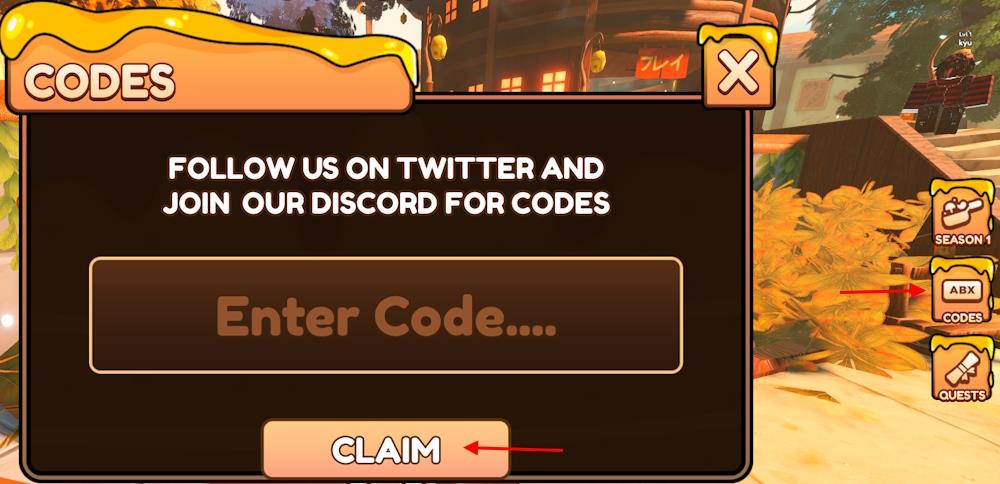
Open Roblox and launch Anime Chefs. Press the Codes button on the main screen to open the redemption window. Type or paste a valid code into the text box and hit Redeem to claim your rewards. Make sure each code is typed exactly as shown, since incorrect spelling or spacing can cause an error. If the code doesn’t work, it may have expired or been used already.
Redeeming the codes for Anime Chefs is as easy as eating a delicious ice cream on a hot summer day. Here is how to do it:
- Launch the Anime Chefs game on Roblox.
- Click the Codes button and hold the E key to interact with the NPC.
- Type a working code in the ‘Enter Code….’ area.
- Click the Claim button to obtain the rewards.
How to Get More Anime Chefs Codes
Check the official Anime Chefs Discord server and Roblox group for announcements on new codes. Follow the game’s developer on Twitter or X for updates posted there. Bookmark pages like Pro Game Guides or Roblox Den that track active codes monthly. Join the community on Reddit’s r/AnimeChefs or similar forums where players share fresh finds. Redeem codes quickly since they expire without notice.
Our page is the best place to get all the latest codes for this fun Roblox anime cooking game. We regularly check for new codes and update our list. Moreover, we weed out the expired codes to clear any confusion. But that’s not the only way you find the codes.
If you want to scavenger hunt the codes by yourself, you can check out the official socials for the game. Join the official Anime Chefs Discord server and check out the codes channel for the latest news and free rewards. Remember to regularly check the announcements as well, as the developers might attach the codes in the update log at times.
How to redeem Anime Chefs codes
To redeem codes in Anime Chefs on Roblox, launch the game and follow these steps in the lobby.
Redemption Steps
Click the Codes button (sometimes labeled ABX Codes) on the right side of the screen to teleport to the Codes NPC. Interact with the NPC by pressing and holding E (or tap on mobile), enter a valid code exactly as listed (case-sensitive) into the text box, and press Claim to receive rewards like gems instantly.
Troubleshooting Tips
Codes may fail due to typos, expiration, or prior redemption-double-check spelling by copying directly and try again. No group join is required, but check the official Discord for new codes if issues persist.
Where is the Codes NPC located in the lobby
In Anime Chefs on Roblox, the Codes NPC teleports automatically to the lobby center upon clicking the Codes button on the right sidebar.
Finding the NPC
This button (labeled “Codes” or “ABX Codes”) appears immediately in the main lobby spawn area, transporting players directly to the NPC-no manual search needed. The NPC stands prominently near the spawn point for easy interaction via the E key (or tap on mobile).
Quick Access Tips
Stay in the lobby before rounds begin, as codes work only there; avoid cooking stations or active games. If the button vanishes, rejoin the lobby or check for game updates via Discord.
