Tethered to shadows, Abyss Codes opens a new corridor of secrets in Roblox, where every clue hides a dare and every dare reshapes the map.
All New Abyss Codes
The February 2026 update introduces brand-new Abyss Codes that grant players fresh rewards and unique items. These codes can be redeemed within Roblox to gain bonuses such as coins, skins, or limited event gear. Each code has a short validity period, so players are encouraged to redeem them quickly before they expire. Keep an eye on official channels for new additions released throughout the month.
- RELEASE: Star Shards, Oxygen Pods, and Speed Potion (NEW)
Expired Abyss Codes
As of now, there are no expired codes in this Roblox game. However, that can change at any time, so grab the freebies right away.
While you wait for additional codes, try the anime-inspired games like Anime Weapons or Uma Racing. Tired of the typical anime games? Check out our Roblox game codes master list to find your next adventure.
How to Redeem Abyss Codes
To redeem Abyss Codes, open the Roblox app or website, navigate to the game’s main menu, click the Codes button, enter your code exactly as shown, and press Redeem to receive your reward.
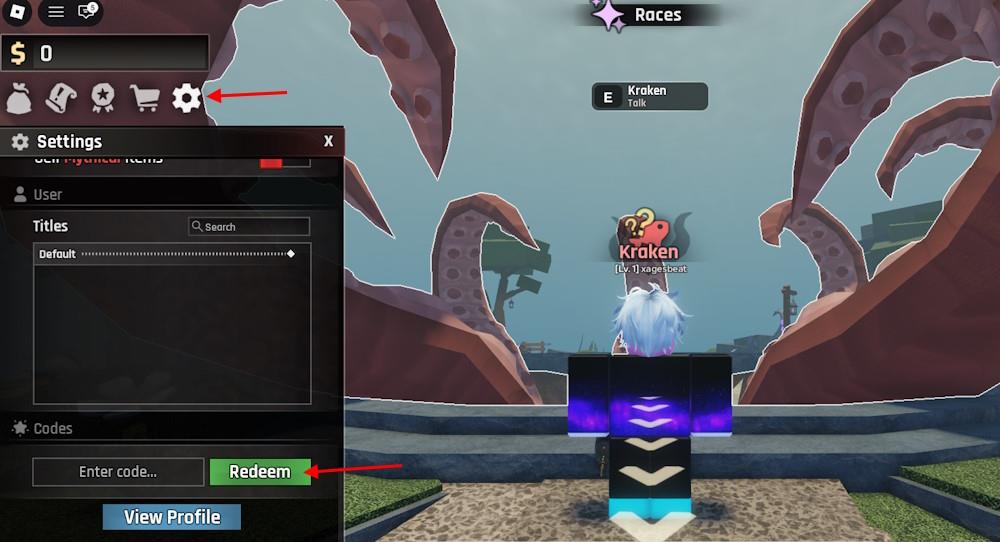
To redeem the codes for Abyss, follow the simple steps below. Some codes require a certain level, so make sure you are past the requirements. You must also complete the tutorial first to redeem the codes. That said, here is how you can acquire the rewards:
- Launch Abyss on the Roblox app.
- Click the Gear button on the left screen.
- Type a working code in the ‘Enter code’ area.
- Click the Redeem button to claim rewards.
How to Get More Abyss Codes
You can get more Abyss Codes by checking the game’s official social media pages, participating in limited-time events, and joining the developer’s Roblox group. Developers often share new codes during updates or seasonal celebrations, so keeping an eye on announcements helps you claim rewards quickly. Some creators also post bonus codes through exclusive livestreams or community milestones, making it worth following multiple sources.
Looking for the best way to get more codes for Abyss? Bookmarking this page is your best bet, as we are always on the lookout for new updates. So, when in doubt for new Roblox game codes, check back, and you’ll find them here.
If you want to take matters into your own hands, then you should join the official Abyss Discord server for the latest news on the game. You will find the latest codes in the ‘codes’ channel. And who knows? You might even find extra rewards here in the future.
Why Are My Abyss Codes Not Working?
Abyss Codes may fail because of server issues, outdated codes, or regional restrictions. Double-check the code format, ensure you’re on the latest Roblox client, and confirm the code is valid for the current February 2026 update. If problems persist, wait a moment and try again, or consult the official Abyss Codes page for any deactivations.
When Abyss codes arrive, the servers usually need a moment to refresh after the update rolls out, so give the client a short breather before trying anything. If a code refuses to work, look for simple mistakes because even a single wrong letter breaks it. The easiest method is to copy the codes straight from our list to avoid slips.
Abyss Codes February 2026 list and how to redeem them
Here’s the current Abyss code list for February 2026 and how to redeem it.
All working Abyss codes (February 2026)
As of mid-February 2026, there is one confirmed active code:
-
RELEASE – gives 100 Star Shards, 5 Small Oxygen Pods, and 1 Speed Potion.
There are no expired codes yet because Abyss only just launched, but this can change quickly, so redeem the code as soon as you can.
What the rewards do
-
Star Shards – used to reroll your Race at the hub.
-
Small Oxygen Pods – instantly restore oxygen while diving.
-
Speed Potion – temporarily boosts your tube’s movement speed.
How to redeem Abyss codes
Follow these steps in Roblox Abyss:
-
Launch Abyss through the Roblox app/launcher.
-
Press/tap the gear (cogwheel) icon on the left side of the screen to open Settings.
-
Scroll to or find the “Enter code” textbox in the Codes section.
-
Type the code exactly as shown (e.g., RELEASE) – codes are case-sensitive.
-
Click or tap Redeem to claim your rewards.
Requirements and tips:
-
You must complete the tutorial first (talk to the Kraken and catch three fish) before you can redeem codes.
-
Each code can only be used once per account.
-
If a code doesn’t work, double-check spelling and capitalization; if still invalid, it may have expired.
Quick reference table
| Code | Rewards | Status | Notes |
|---|---|---|---|
| RELEASE | 100 Star Shards, 5 Small Oxygen Pods, 1 Speed Potion | Active | Only active code as of Feb 11-12, 2026 |
If you want, I can also suggest a simple early-game route that uses this code’s rewards efficiently (for example, when to spend Star Shards on rerolls).
What do Star Shards do in Abyss
Star Shards are a premium progression currency in Roblox Abyss that you mainly use to improve your character’s power and flexibility.
Main uses of Star Shards
-
Reroll Races / Class: You spend Star Shards in the Race (or Class) gacha to roll for new Races that give passive bonuses like movement speed, oxygen, damage, and other buffs that make exploring and fishing easier.
-
Unlock extra Race slots: You can use a large amount of Star Shards (for example, 1,000 for a second slot) to unlock additional Race slots so you can equip more than one Race at a time.
-
Speeding up Geodes: At Virelia, you can spend Star Shards to speed up the timer when opening Geodes, letting you get their rewards instantly instead of waiting. Longer timers cost more Shards.
How you earn Star Shards
-
Completing main and side quests (Kraken and other NPCs).
-
Leveling up your character while playing.
-
Filling out the Bestiary by catching new fish, then claiming rewards from Richard.
-
Opening world chests and claiming Achievement rewards.
-
Redeeming codes (like RELEASE) or buying shard bundles with Robux if you choose.
Practical tip: early on, most players use 100-cost rerolls to get a solid Race first, then start saving toward extra slots or occasional Geode speed-ups once they’re happy with their Race.
