After weeks of frustration, Fortnite players can finally breathe easier – Epic has quietly rolled out a February 7 hotfix that targets the crash issues plaguing this season and hints at progress toward the much-delayed update.
Players have been experiencing such an issue in Chapter 7 Season 1 after the release of the recent Fortnite 39.40 update, with many coming forward to report frequent crashes. However, Epic Games has finally addressed these issues with an upcoming hotfix.
New Fortnite Hotfix Addresses Chapter 7 Season 1 Crashes
Epic Games has released a February 7 hotfix aimed at eliminating crash issues that have frustrated players since the launch of Chapter 7 Season 1. The update focuses on improving game stability, addressing unexpected shutdowns during matches, and reducing performance drops across platforms. Players have already reported smoother gameplay and fewer disconnections in competitive modes, signaling that the patch may finally bring stability back to Fortnite’s latest season.
While the Love and Legends update arrived only a couple of days ago, many players have reported that the content in the update was overshadowed by crashes and console freezes. Players have been experiencing crashes related to DirectX 11. While Epic has previously suggested switching to DX12 or Performance Mode to get around this issue, these options can often lead to even worse blue screen crashes.
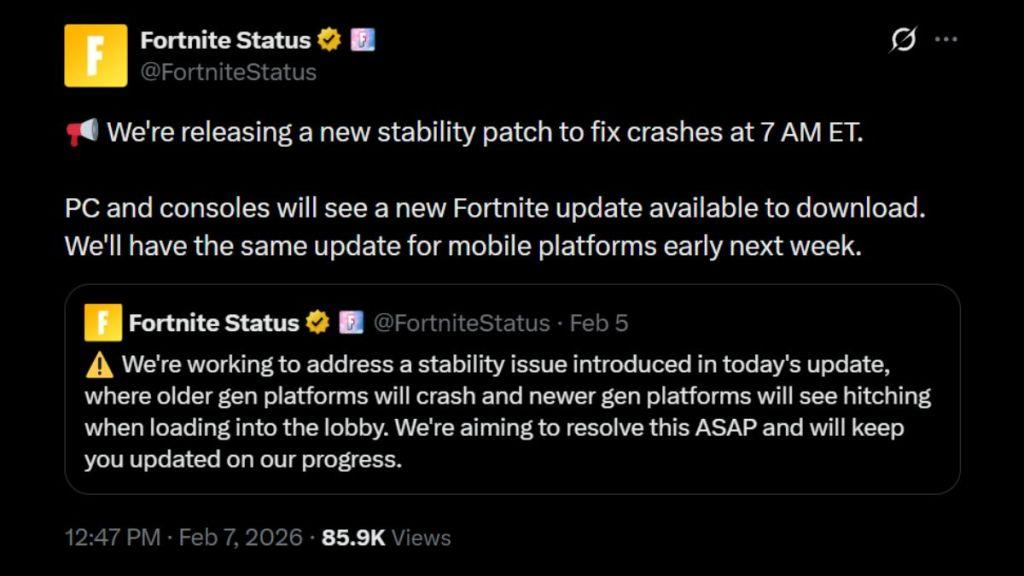
Thankfully, Epic Games has been listening to player complaints regarding the crashes. The Twitter to announce that they will be releasing a new hotfix that addresses these issues directly. The hotfix will be released for PC and console players on February 7, 2026, at 7 AM ET in the form of an update, with mobile platforms receiving the hotfix sometime early next week.
The release of the hotfix could not come at a better time, as Epic Games has also confirmed that the new Fortnite season, Chapter 7 Season 2, will be delayed by two weeks. This means that the next season will be released on March 19, 2026, instead of its initial March 5, 2026, release date. Since players will have two more weeks with the Pacific Break theme, this new hotfix should make the experience a lot smoother.
Did the February 7 hotfix fully resolve Chapter 7 Season 1 crashes
No. The February 7 hotfix improved stability for many players, but it did not fully resolve Chapter 7 Season 1 crashes, especially on PC.
What improved
-
The hotfix targeted major DirectX 11 crashes and some blue-screen and freezing issues, so a noticeable portion of players reported fewer crashes afterward.
-
It also reduced lobby/locker lag and some connection and stability problems that were introduced with earlier Chapter 7 updates.
What is still broken
-
Multiple PC players have continued to report “consistent crashing issues since start of chapter 7,” even after several updates, saying the game is still “unplayable” for them.
-
Reports mention crashes tied to certain events or items and that switching render modes (DX11 ↔ DX12 ↔ Performance) only works for some systems and can even cause other issues like blue screens.
What this means for you
-
If your crashes disappeared after February 7, you were in the group whose specific issue the hotfix addressed; if not, you are likely hitting one of the remaining engine or rendering bugs that still need a future patch.
-
Using DX12 or Performance Mode, verifying game files, and updating GPU drivers are still recommended workarounds, but they are not guaranteed fixes for everyone.
If you tell me your platform (PC specs or console) and exactly when the crashes happen (launch, loading, mid-match, specific POIs/items), I can walk you through targeted troubleshooting steps.
What remaining crashes persist after February 7 hotfix
The February 7 hotfix reduced several major crash patterns in Chapter 7 Season 1, but multiple types of crashes still persist, especially on PC and in specific in-match situations. The most commonly reported remaining issues fall into a few buckets:
1. Mid-match and end-game crashes
-
Crashes during or right after intense fights (build battles, large explosions, or many players in a small area) still occur for some users. These look like sudden desktop closes or crash reporter pop-ups with no clear error.
-
Some players report crashes on match end (Victory Royale screen, returning to lobby), suggesting lingering problems with post-match transitions and memory cleanup.
2. Rendering-related crashes (PC)
-
Even after the hotfix improved stability, a subset of players still see crashes tied to specific render modes (DX11, DX12, or Performance Mode) and certain GPUs or driver versions. Changing render mode can help some systems but trigger crashes on others, so there is no universal “safe” mode yet.
-
Crashes can be triggered when loading into a match, alt-tabbing, or switching between full screen and windowed, which points to unresolved graphics/driver interaction issues.
3. Map, POI, and asset loading crashes
-
A few users still experience crashes when landing at or rotating through specific high-detail POIs or when a lot of new assets stream in quickly (vehicles, decorations, event objects).
-
In some cases the first drop is stable, but subsequent matches in the same session become more crash-prone, hinting at memory leaks or asset unloading problems that the hotfix didn’t fully fix.
4. Platform-specific or configuration-specific crashes
-
Certain hardware combinations (older CPUs, mid-range GPUs, or particular driver versions) remain significantly less stable than others, even with the hotfix. Players with similar specs still report “consistent crashing since start of Chapter 7” that the February 7 patch only partially improves.
-
Overlays, capture software, or background apps (Discord overlay, GeForce Experience, etc.) can still trigger or worsen crashes for some users, so stability is uneven depending on individual setups.
5. What this means for you
-
If you still crash after February 7, you are likely hitting one of these remaining categories: mid-match load/asset issues, render-mode/GPU driver conflicts, or a platform-specific bug that Epic has not fully resolved yet.
-
The most practical steps until another patch lands are: keeping GPU drivers current (or rolling back one version if crashes started after a specific update), testing all three render modes, disabling overlays, and lowering textures/effects to reduce memory pressure.
If you tell me your platform and specs plus exactly when your crashes happen (launch, loading, first POI, mid-fight, end screen), I can suggest a more targeted set of changes to try.
