Roblox’s Cute Brainrot Evolution hides free rewards behind secret September 2025 codes-claim them before they vanish.
All New Cute Brainrot Evolution Codes
Grab the latest codes for Cute Brainrot Evolution, updated for September 2025. Redeem them now in Roblox to claim free rewards and boost your progress. These fresh codes offer exclusive items that help you advance faster through the game’s fun stages. Check back often for new releases as developers drop them regularly.
- welcome: 5 Exp Potion, 5 Wins Potion, 1k Wins, and 100 Diamond (NEW)
Expired Cute Brainrot Evolution Codes
Currently, there are no expired codes for this Roblox Experience. Once the above codes expire, we will move them to this section.
While you wait for more codes, why not take a look at other similar Roblox experiences? Check out Monster Evolution codes, AOT Evolution codes, and Collect All Pets codes, among others, from our Roblox game codes list.
How to Redeem Cute Brainrot Evolution Codes
Launch Cute Brainrot Evolution on Roblox. Tap the gear icon for settings in the top-right corner. Scroll to the code box at the bottom. Enter a valid code exactly as shown, without spaces. Hit redeem and check your inventory for the reward. Codes expire, so claim them fast.
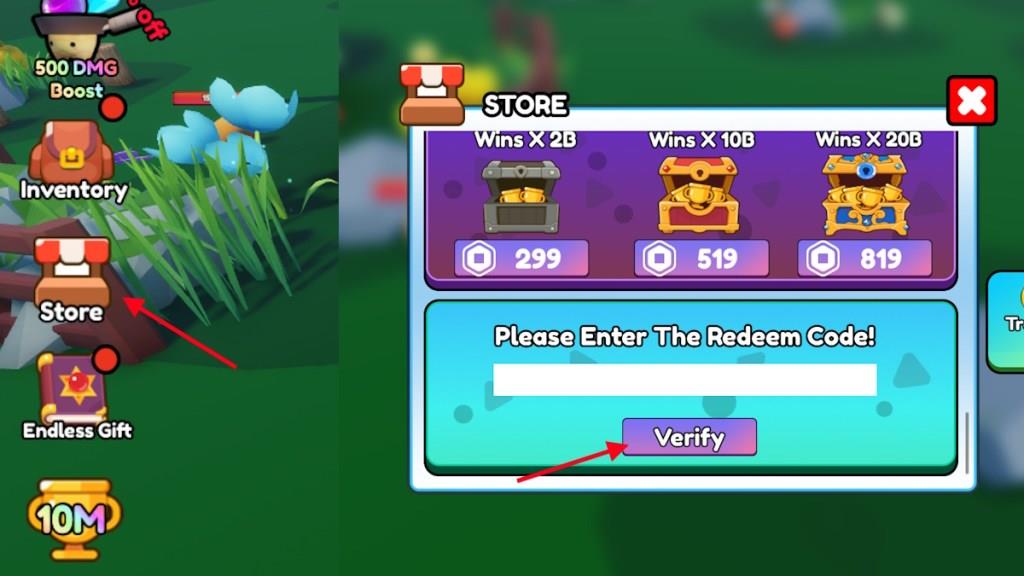
Growing your brainrot can be time-consuming, but redeeming codes for Cute Brainrot Evolution is as simple as it gets. Here is how you can do it:
- Launch Cute Brainrot Evolution on Roblox.
- Click on the Store option on the left side of the screen.
- Scroll down to the codes section.
- Type the active code in the text box.
- Click Verify to claim the rewards.
How to Get More Cute Brainrot Evolution Codes
You can find more Cute Brainrot Evolution codes by following the game’s official social media accounts, such as Twitter, Discord, and Roblox group pages, where new rewards are often posted. Developers usually share fresh codes during special updates, milestones, or seasonal events. Checking popular Roblox code websites and community forums can also help you catch new codes before they expire. To stay current, revisit these sources regularly and turn on notifications for announcements.
The easiest way to find codes for Cute Brainrot Evolution is to bookmark this post. We will add any newly released code here so that you can easily redeem them and grow your brainrots.
Cute Brainrot Evolution is a fun game, and you can track its future updates on the Cute Brainrot Evolution Discord server. The official Discord server also has a dedicated codes channel; however, that’s not the only place they post their active game codes. That is why it is better sticking to our list and staying on top of the codes.
How to redeem codes in Cute Brainrot Evolution step-by-step
To redeem codes in Cute Brainrot Evolution on Roblox, follow this straightforward step-by-step process based on standard game mechanics from recent guides.
Step-by-Step Guide
-
Launch Cute Brainrot Evolution through the Roblox player.
-
Locate and tap the Shop or Store button (typically a shopping basket icon) on the left side of the main screen.
-
In the shop menu, find the Codes icon or tab on the right side and click it to open the code entry field.
-
Carefully type or paste the exact code (case-sensitive) into the text box.
-
Press the Verify or Redeem button to claim your rewards, which appear instantly if valid.
Troubleshooting Tips
Codes may fail if expired, mistyped, or already redeemed-double-check spelling and try from the main menu if in-game doesn’t work. No rewards show until verified, and joining the developer group can unlock extras.
Open the in-game shop in Cute Brainrot Evolution where is it located
In Cute Brainrot Evolution on Roblox, the in-game shop is located on the left-hand side of the main screen, represented by a red shopping basket icon.
Accessing the Shop
Click the shop icon to open the full shop menu. Once inside, the codes section appears on the right-hand side of this menu, labeled as “Codes,” which takes you directly to the redemption input field.
Visual Location Tips
The left-side panel holds key UI elements like the shop button, often near buttons for inventory or other menus. It’s accessible right after spawning into the game lobby, before entering worlds or dungeons.
