Suspense blooms as Roblox’s enchanted codes reveal secret realms, where every redemption reshapes the game’s spellbound horizon.
All New Enchanted Codes
All new Enchanted codes bring players fresh rewards and bonuses for their adventures in Roblox’s Enchanted game. Each code provides valuable in-game items, boosts, or currency that help enhance progress and make gameplay more enjoyable. Reign Studios regularly updates these codes, so checking the latest list ensures players never miss the newest gifts.
- UPDATE3 (requires level 500) (NEW)
- SORRYFORINVENTORY (requires level 3500) (NEW)
- SORRYAGAIN (requires level 250) (NEW)
Expired Enchanted Codes
- RELEASE
- EZOLIVER
- APOLOGIESFORDELAY
- THANKYOU!
- UPDATE2
- MonkeyIsDeveloping
- RAAAAAAH
- LOVEYALL
- SORRYFORSHUTDOWNS!
If you like action games on Roblox, then you should also try out My Hero Academia Ultimate, Wagarashi, and Anime Last Stand. Other than these, you can find a variety of games in our Roblox game codes list.
How to Redeem Enchanted Codes
Enter the code in the Roblox app or website, confirm it, and you’ll receive your in-game rewards instantly.
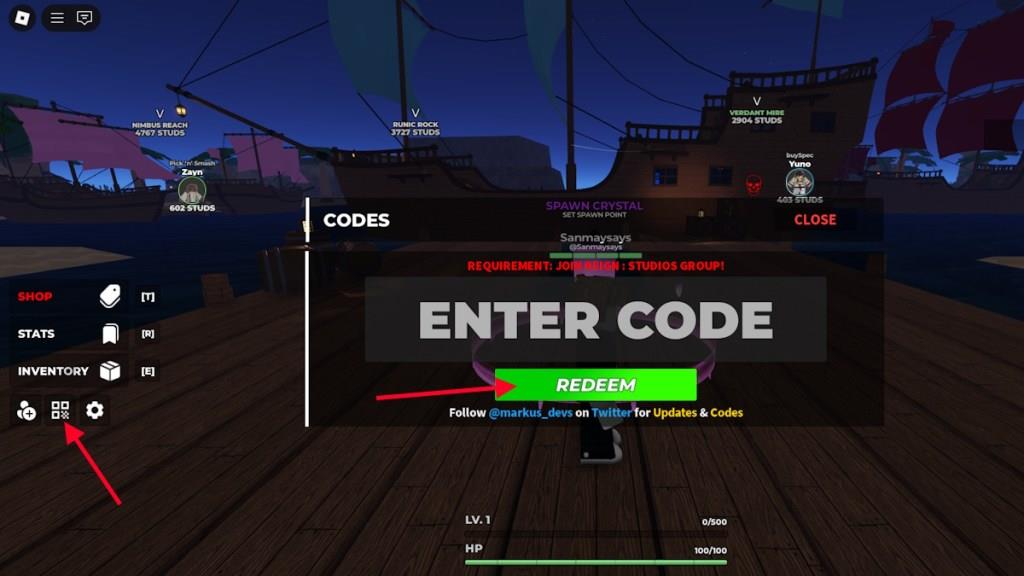
Before you can redeem the codes for Enchanted, you will have to first join the Reign: Studios Roblox community. Once you have done that, here is how you can redeem the codes.
- Launch Enchanted on Roblox.
- Click on the Codes icon on the left side of the screen.
- Type the active code in the ‘ENTER CODE’ box.
- Click Redeem to claim the rewards.
How to Get More Enchanted Codes
Master the process by combining multiple sources, staying alert for limited-time drops, and using automated check-ins to maximize your chances of securing fresh enchanted codes.
Looking for more codes for Enchanted? Well then, you are already at the correct place. Every active code has already been added to the list above. We make sure to add any new codes while removing the expired ones from our list. So, all you need to do is check our list when looking for freebies in Enchanted.
But if you want to search for codes by yourself, then here is what you need to do. Join the Enchanted Discord server and check their ‘announcement’ and ‘updates’ channels regularly. The developers mainly release their new code in these channels.
How to join REIGN : STUDIOS Roblox group for rewards
Joining the REIGN : STUDIOS Roblox group is required to redeem codes and access certain rewards in Enchanted.
Steps to join
Follow these steps from the Roblox website or app to join the group linked to Enchanted by REIGN : STUDIOS.
-
Go to the official Enchanted game page on Roblox or search for “REIGN : STUDIOS” in the Groups section.
-
On the game page, look under the creator info for the REIGN : STUDIOS group link-click it to visit the group page.
-
Click the green “Join Group” button (it may say “Join this group” or similar).
-
Confirm the join request; most groups like this approve instantly without manual review.
No Robux is needed for public groups like this one.
Verify membership
Return to Enchanted after joining.
-
Launch the game and check the codes menu-if it no longer prompts “Join the group,” you’re set.
-
Your profile’s Groups tab will list REIGN : STUDIOS once approved.
Troubleshooting
If the join button is missing or grayed out, ensure you’re logged in and not already a member.
-
Clear browser cache or try the Roblox mobile/desktop app.
-
Some games prompt joining directly in-game via a button near codes, but manual joining via the group page always works.
Steps to join a Roblox group from inside a game
Joining a Roblox group directly from inside a game isn’t natively supported by Roblox’s engine, as no built-in button or prompt exists for instant in-game joining.
Standard process
Players typically exit to the Roblox site or app to join groups manually.
-
Launch the game and note the developer group name (e.g., REIGN : STUDIOS under the game title or in the description).
-
Copy the group name or link shown in-game, then open Roblox.com in a browser or the app.
-
Search for the group (e.g., “REIGN : STUDIOS”), visit its page, and click “Join Group.”
-
Return to the game; membership updates automatically for rewards like code redemption.
In-game prompts workaround
Developers can script custom GUIs prompting players to join, often with a hyperlink to the group page.
-
Games like Enchanted may show a message like “Join REIGN : STUDIOS group to redeem codes” with a clickable link.
-
Clicking opens the group page in your browser; complete the join there.
-
No direct API allows one-click joining from within the game itself.
Mobile considerations
On the Roblox app, the process mirrors desktop: use the in-game link or navigate via the Groups tab.
-
Tap the group name if hyperlinked, or pause the game and search manually.
-
Approval is instant for public groups like REIGN : STUDIOS.