Sharpen your blades and boost your power with the newest Sword League codes for September 2025-grab fresh rewards, level up faster, and cut through your Roblox battles with style before they expire.
To help you with some early resources, we have compiled active Sword League codes, which give free potions, coins, cheese, and many other rewards. Use them to forge better weapons and slay enemies like the ultimate sword fighter.
All New Sword League Codes
Explore the latest Sword League codes and unlock fresh rewards, boosts, and exclusive items to level up your gameplay.
- teamwork: 1 Clan Token (NEW)
- 1kReactions: 2 Boss Turkey (NEW)
- clover: 1 Super Lucky Potion
- startboost: 100,000 Coins
- zivao: 5 Boss Turkey
- freefood: 10 Cheese
Expired Sword League Codes
Right now, there are no expired codes in the game, so I would suggest that you get the rewards from the existing ones before they go away.
If you’re an avid fan of the action genre, you must check out other similar fighting games like Demon Blade, Type Soul, and Blox Fruits as well. However, if fighting isn’t your go-to genre, try checking out our Roblox game codes master list to find the list of games that suit your preferences.
How to Redeem Sword League Codes
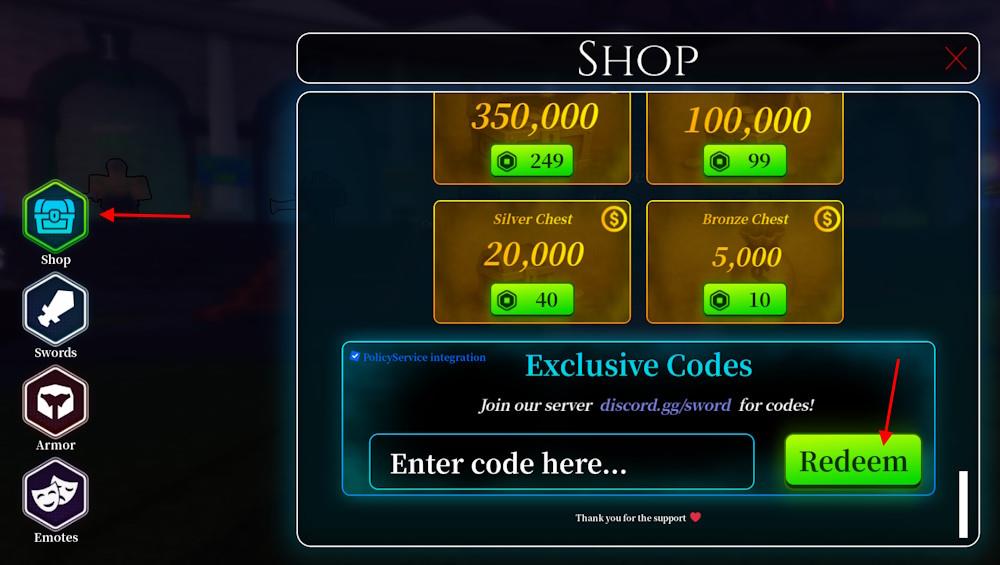
Open Sword League on Roblox and log into your account. Tap the gift box icon on the left side of the screen. Enter a working code exactly as shown, keeping it case-sensitive. Hit the Redeem button to claim your rewards right away. Codes expire quickly, so use them before they vanish.
Redeeming the codes for Sword League is easier than fighting high-tier enemies. Here is how to do it and claim rewards:
- Open the Sword League game on Roblox.
- Click the Shop button from the left menu.
- Type a working code in the ‘Enter code here…’ area.
- Click the Redeem button to claim rewards.
How to Get More Sword League Codes
Join our quick tips to snag more Sword League codes: check official social channels, follow the game’s Roblox group, participate in events and giveaways, and stay active on the community hubs where new codes are frequently shared.
Looking for the best way to find some new codes in the game? Bookmark this page right now. This way, you won’t miss out on any new rewards since we keep the list updated at all times.
You can also join the official Sword League Discord server. On the server, check the codes channel to get the list of active codes in the game. Moreover, you can check the game page to get updates on the next update. If you are a regular, keep visiting the rewards tab in-game to look for new codes or other freebies that you can easily claim.
How to redeem codes in Sword League step by step
Redeem codes in Sword League with these steps. The process is straightforward and accessible on all Roblox platforms. Follow the sequence exactly to avoid errors.
Step-by-Step Guide
-
Launch Sword League on Roblox and ensure you complete the initial tutorial if it’s your first time.
-
Locate and click the Shop button (or Chest icon in some guides) on the left side of the screen.
-
Scroll down to the bottom of the Shop window until you see the Exclusive Codes or Enter code here section.
-
Copy-paste a valid code into the text box-codes are case-sensitive, so match exactly (e.g., “brew”).
-
Click Redeem to claim rewards instantly; a confirmation pop-up shows what you received.
Troubleshooting Tips
Codes may fail due to typos, expiration, or server issues-try rejoining the game or switching servers. Each code works once per account.
Open step-by-step redeem instructions for Sword League on PC
Redeem codes in Sword League on PC using Roblox’s web client or app. The interface remains identical across platforms, ensuring smooth mouse and keyboard operation. Complete these steps precisely for success.
Step-by-Step on PC
-
Open Roblox in your browser (roblox.com) or the desktop app and launch Sword League-wait for the arena to load fully.
-
Click the Shop button (chest icon) on the left sidebar using your mouse.
-
Scroll down the Shop menu with your m
