Sharpen your edge in Roblox Blades with the latest August 2025 codes-grab free boosts, coins, and exclusive gear before they vanish from the servers.
All New Blades Codes
Unlock powerful blades with our latest August 2025 codes-finds, tips, and how to redeem quickly in Roblox Blades Codes.
- LUCKY5 (NEW)
- RELEASE! (NEW)
Expired Blades Codes
Right now, there are no expired codes in the game, so I would suggest that you get the rewards from the existing ones before they go away.
If you’re an avid fan of this genre, you must check out other similar fighting games like Demon Blade, Project Slayers, and Blox Fruits as well. However, if fighting isn’t your go-to genre, try checking out our Roblox game codes master list to find the list of games that suit your preferences.
How to Redeem Blades Codes
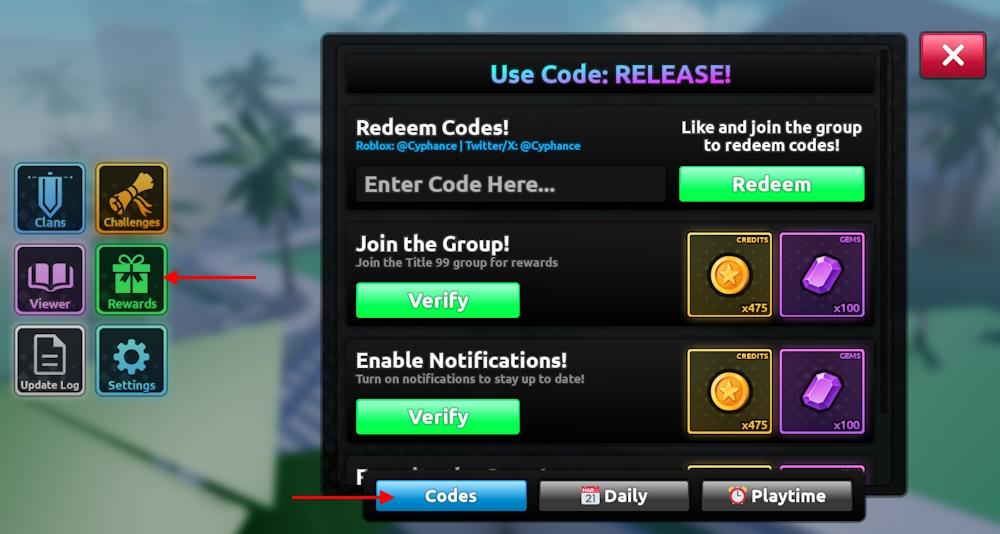
To redeem Blades codes, open Roblox Blades and tap the Codes button on the main screen. A text box will appear where you can enter a valid code exactly as shown. After typing it in, press the Redeem or Confirm button to claim your reward. New codes may expire quickly, so it’s best to use them as soon as they’re released.
Before you can redeem codes for Blades, you must join the TITLE 99 Roblox community, like the game, and favorite it. Then play the game to reach level 5, and verify in the rewards section. Once you have done that, here is how you can redeem the codes.
- Open the Blades game on Roblox.
- Click the Rewards button from the left menu.
- Go to the Codes tab and type a working code.
- Click the Redeem button to claim rewards.
How to Get More Blades Codes
New Blades codes are often released through the game’s official social media pages, Discord server, and developer announcements. Players should check these sources regularly, as codes may expire quickly or be tied to special events and updates. Joining the game’s community channels is a good way to spot new codes early and share them with other players.
Looking for the best way to find some new codes in the game? Bookmark this page right now. This way, you won’t miss out on any new rewards since we keep the list updated at all times.
You can also join the official BLADES Discord server. On the server, check the updates channel to get the list of active codes in the game. Moreover, you can check the game page to get updates on the next update. If you are a regular, keep visiting the rewards tab in-game to look for new codes or other freebies that you can easily claim.
How to redeem Blades codes step by step in-game
Redeeming Blades Codes
To redeem codes in Roblox Blades by TITLE 99, first complete prerequisites like liking the game, favoriting it, and joining the TITLE 99 Roblox group. Reach level 5 if required by recent updates.
Step-by-Step Process
-
Launch Blades on Roblox and load into a server.
-
Locate the green present “Rewards” button on the left side of the screen and tap it.
-
Switch to the “Codes” tab within the Rewards menu.
-
Enter the code exactly as shown (case-sensitive) into the “Enter Code Here” text box.
-
Press the green “Redeem” button to claim rewards instantly, such as gems or coins.
Tips for Success
Codes expire quickly, so test them promptly. Copy-paste to avoid typos, and check the in-game Discord link for new releases or errors. If a code fails, it may be expired or you’ve already claimed it.
Open the Rewards menu and join the required Roblox group
Accessing Rewards Menu
In Roblox Blades by TITLE 99, open the Rewards menu by launching the game and clicking the green present icon on the left side of the screen. This menu handles codes, daily rewards, and group verification checks.
Joining TITLE 99 Group
Blades requires membership in the TITLE 99 Roblox group to redeem codes.
-
Exit to the Roblox homepage (top-left menu).
-
Click the three lines (hamburger menu), then select “Communities” or “Groups.”
-
Search for “TITLE 99” and select the official group.
-
Click the blue “Join Group” button-most users join instantly if public.
-
Return to Blades; recheck Rewards menu to confirm group status (may require relog).
Verification Tips
Like and favorite Blades first, as prerequisites often include these. Group join verifies automatically in Rewards; reach level 5 if prompted. Test a code afterward to ensure eligibility.
