Players are rushing to crack the newest Liar’s Table codes for July 2025, hoping to gain an edge in Roblox’s fast-talking deception game. These fresh codes promise valuable boosts and in-game perks that can turn an ordinary match into a masterclass of bluffing and strategy.
However, if you can’t win a lot of games but still want the backs of your cards to have a cooler look, check out the active Liar’s Table codes to get some free cash or cosmetics. Use them to buy card stickers, voices, potions, and more.
All New Liar’s Table Codes
Stay updated with the latest Liar’s Table codes to earn free rewards like coins, bonus items, and exclusive customization options. These new codes for July 2025 can help you progress faster and gain extra advantages during matches. Make sure to redeem them quickly, as many expire after a short period or when new ones are added by the developers.
- PATRIOT: Redeem for 300 Cash (NEW)
- SUMMER2025: Redeem for 200 Beach Balls (NEW)
- RUSSO: Redeem for Russo Voice
- 20KLIKES: Redeem for 200 Cash
- 10KLIKES: Redeem for 100 Cash
Expired Liar’s Table Codes
- HOORAY
- EASTER2025
- NEWHEARTS
- XTRACASH
- HAPPY2025
- GIFTING
- CHRISTMAS2024
- WINTER2024
- WEEKEND
So, now that you’re here, you should try out other fun games like Volleyball Legends, Spongebob Tower Defense, and Arise Crossover. Furthermore, you can also have a look at our Roblox game codes master list to get an idea of what else you’re missing out on this platform.
How to Redeem Liar’s Table Codes
Learn how to redeem Liar’s Table codes by following the official redemption steps, confirming your Roblox account details, and inputting the codes exactly as shown. If a code doesn’t work, double-check for typos, ensure the code is still valid, and try again later.
Redeeming the codes for Liar’s Table is as easy as winning your first match in this game. Follow the steps given below:
- Launch Liar’s Table on the Roblox app.
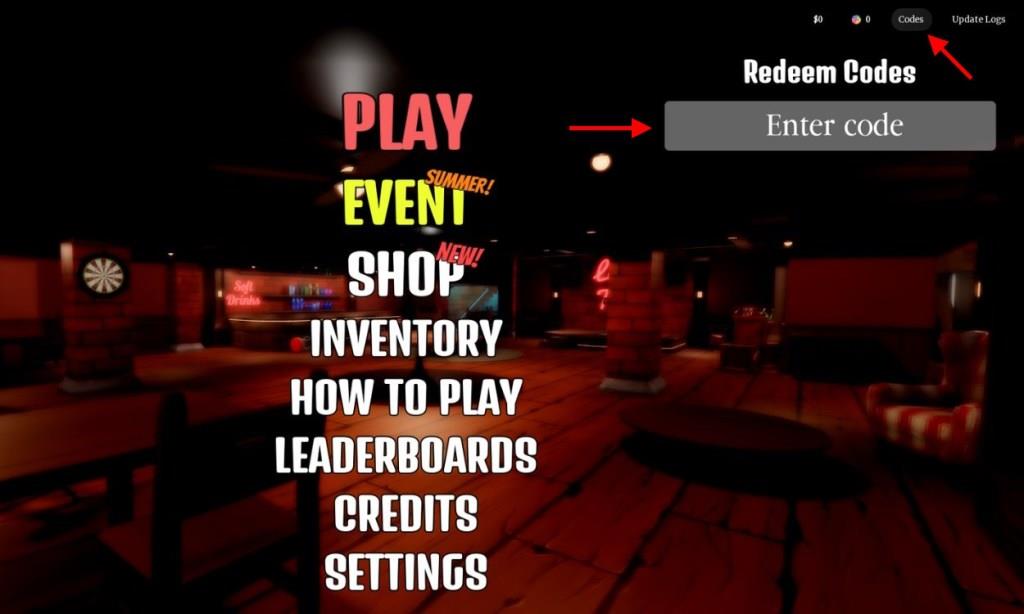
- Click the “Codes” button at the top right of the screen.
- Input a working code in the Enter code area.
- Press the Enter key to get your free rewards.
How to Get More Liar’s Table Codes
New Liar’s Table codes are usually released through the game’s official social media pages, developer posts, and community channels such as Discord or X. Players can also check the game’s description on Roblox, where active codes are often listed after major updates or events. Keeping track of developer announcements and joining community groups increases the chance of finding codes quickly before they expire.
If you want to grab new codes for Liar’s Table quickly, go ahead and bookmark this page. With just one click, you’ll be able to check all the latest active codes in the game. That way, you won’t miss out on any free rewards.
In case you want to check them by yourself, there are a few options you can try out. Join the official Let’s Make Games Discord server. Here you will find all the new codes in the ‘announcements‘ channel. Lastly, join the Let’s Make Games community on Roblox to stay updated on all sorts of news related to this game.
How to redeem codes in Liar’s Table step by step
Redeeming codes in Liar’s Table follows a straightforward process on Roblox. Players access the feature directly from the main menu for quick rewards like cash or items. Codes remain case-sensitive, so precision matters.
Step-by-Step Guide
Follow these exact steps to redeem codes successfully:
-
Launch Liar’s Table on Roblox through the app or website.
-
Locate the Codes button in the top-right corner of the screen or main menu.
-
Click Codes to open the input field labeled “Enter code.”
-
Copy and paste a valid code exactly as listed (avoid manual typing to prevent errors).
-
Press Enter on your keyboard to claim the rewards instantly.
Troubleshooting Tips
Codes fail if mistyped, expired, or already redeemed-double-check capitalization and spacing. Join the game’s Discord or Roblox group for the latest active codes and updates.
Show step-by-step screenshots for redeeming codes in Roblox games
Redeeming codes in Roblox games like Liar’s Table uses an in-game menu, distinct from Roblox’s site-wide promo or gift card redemption. Many games, including Liar’s Table, integrate a dedicated codes button for quick access to rewards. Screenshots typically illustrate the top-right menu icon and input field across guides.
General Roblox In-Game Process
Most games follow this flow, with Liar’s Table confirmed via prior sources:
-
Launch the game and stay in the lobby (not mid-match).
-
Click the Codes or Twitter icon (often top-right gear/pause menu).
-
Enter code in the text box that appears.
-
Hit Redeem or Enter for instant rewards.
Visual Guide Description
Guides show sequential screenshots:
-
Step 1: Full screen with red “Codes” button highlighted (top-right).
-
Step 2: Expanded menu with blank input field and “Enter code” prompt.
-
Step 3: Code typed (e.g., “SUMMER2025”), green success message below.
Mobile Adjustments
On phone/tablet, tap the three-lines menu, then Codes; interface scales smaller but identical. Copy-paste codes to avoid errors, as keyboards lack easy caps lock toggle.
