Claim free rewards and boost your progress in Effortless Tower with the latest working Roblox codes for August 2025-grab them before they expire and climb faster than your rivals.
So, if you’ve been stuck at a certain obstacle for the longest period of time, use the following Effortless Tower codes in the game to gain free skips that allow you to pass over that specific stage.
All New Effortless Tower Codes
Redeem the newest Effortless Tower codes to claim free rewards like coins, boosts, and exclusive items that help you progress faster in the game. These active codes are updated for August 2025, so make sure to use them soon before they expire. Enter each code exactly as shown in the game’s code menu to receive your prizes instantly and enhance your Roblox experience.
- THANKYOU: 1 Skip (NEW)
- SUMMER: 1 Skip
Expired Effortless Tower Codes
Fortunately, there aren’t any expired codes in the game, so seize this moment to get the free rewards from the available ones right now.
If you’re fond of such parkour games, try playing experiences like Troll IQ Tower, Slap Tower, and Build a Tower as well. However, if you’ve grown tired of these games, you should look up our Roblox game codes master list to find the best ones out there on this platform.
How to Redeem Effortless Tower Codes
Open the game in Roblox. Press the codes icon on the left side of the screen. Enter a valid code from the list exactly as shown. Hit redeem. Gems appear in your account if the code works.
Now follow the given steps to get all the rewards by redeeming the codes for Effortless Tower:
- Launch Effortless Tower on Roblox.
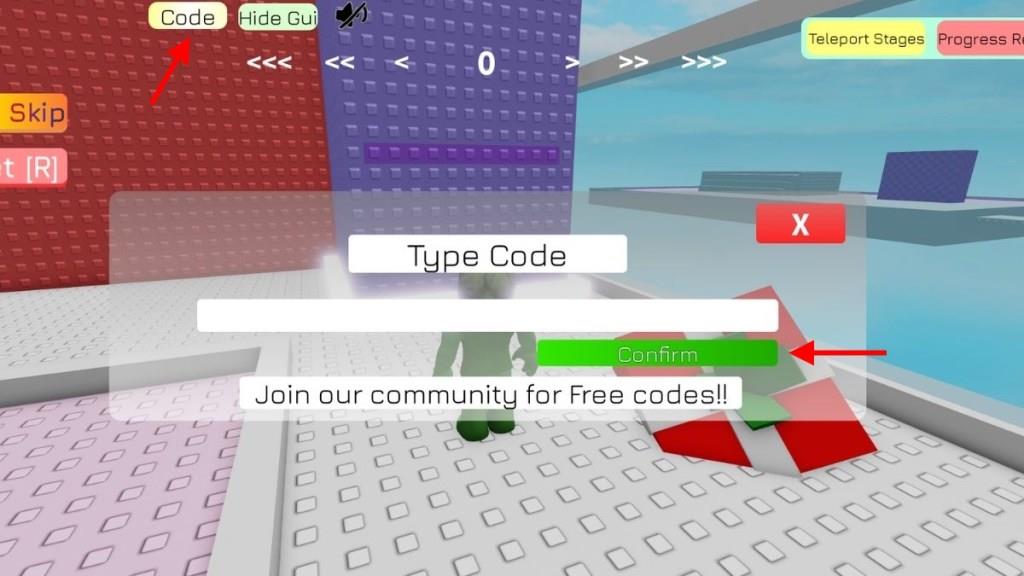
- Click on the Code button at the top of the screen.
- Input a working code in the text box.
- Click on the Confirm button to get all the rewards.
How to Get More Effortless Tower Codes
Check the game’s official Discord server and Roblox group page daily for new code drops. Follow the developers on X and join their community forums to catch announcements right away. Redeem codes quickly through the in-game menu, as they expire fast. Bookmark reliable code lists from trusted Roblox sites and set notifications for updates. Share active codes with friends to build community buzz that encourages more releases.
Hunting down codes for this game might seem to take a lot of time. So, if you get busy honing your parkour skills in this experience, simply bookmark this page to stay updated on the brand new codes.
You can also join the official Effortless Tower Discord server. This is where the new codes are listed in the ‘announcements‘ channel. Finally, I would recommend that you join the Twi_1st Games community on Roblox, as all types of news around the game are posted here.
How to redeem Effortless Tower codes
To redeem Effortless Tower codes in Roblox, you use the in-game Code button and then confirm the code to receive your reward.
Step-by-step redemption
-
Launch Effortless Tower from your Roblox account and wait until you load into the game lobby.
-
Look at the top of the screen and click the Code button to open the code redemption window.
-
Copy and paste (or carefully type) a working code into the white text box that appears.
-
Press the green Confirm button to redeem the code and claim your free skip or other rewards.
If a code does not work
-
Check for typos and make sure you entered the code exactly as shown (codes are case-sensitive).
-
Try rejoining or reopening the game to connect to a newer server, then redeem the code again.
-
Remember each code can usually be redeemed once per account and may expire after some time.
Show steps to redeem a code in Effortless Tower on Roblox
Here are the exact steps to redeem a code in Effortless Tower on Roblox.
Steps to redeem a code
-
Open the game
-
Launch Roblox and start Effortless Tower from your games list or the game page.
-
-
Find the Code button
-
Once you load into the lobby, look at the top of the screen and click the Code button.
-
-
Enter your code
-
A text box will appear; paste or type a valid code into this box exactly as shown (codes are case-sensitive).
-
-
Confirm and get rewards
-
Click the green Confirm button to redeem the code; if it is active, the reward (usually a free skip) is added to your account instantly.
-
-
If it doesn’t work
-
Check for typos or extra spaces, make sure you have not redeemed it before, and if needed, rejoin the game to a new server and try again.
-