Build Defense keeps players on edge with each wave of enemies-and March 2025 brings fresh codes that can give your Roblox base the boost it needs. From rare resources to speed upgrades, these limited-time rewards make a real difference in every defense strategy.
We have compiled the latest Build Defense codes to help you get free coins and buffs like the God Apple. Use these rewards to build your base and even become invincible temporarily.
All New Build Defense Codes
The latest Build Defense codes introduced in March 2025 offer players fresh rewards to enhance their defenses and advance faster through the game. These codes provide boosts such as bonus coins, resources, and exclusive items that help strengthen your base and towers. Redeeming them regularly ensures you stay ahead and make the most of limited-time opportunities before they expire.
- 4th: Redeem for 1x Grand Finale Firework
- swift: Redeem to get 7k Coins, God Apple, and Toxic Venom Firework
Expired Build Defense Codes
As of now, there are no expired build defense codes. However, remember that we add them in real time, so check back occasionally.
While there might only be a few codes, our Roblox codes master list houses many similar experiences. Games like SpongeBob Tower Defense and Special Anime Defense should satisfy your defense game urges too.
How to Redeem Build Defense Codes
To redeem Build Defense codes, open Roblox and launch the game. Look for the Twitter or Codes button, usually found on the side or bottom of the screen. Click it to open the redemption window, then type or paste a working code exactly as shown and press the “Redeem” button. If the code is valid, rewards such as coins, boosts, or items will be added to your account instantly.
While building your base might be difficult, redeeming codes for Build Defense is much easier. Follow the steps below to do so:
- Launch up Build Defense on Roblox.
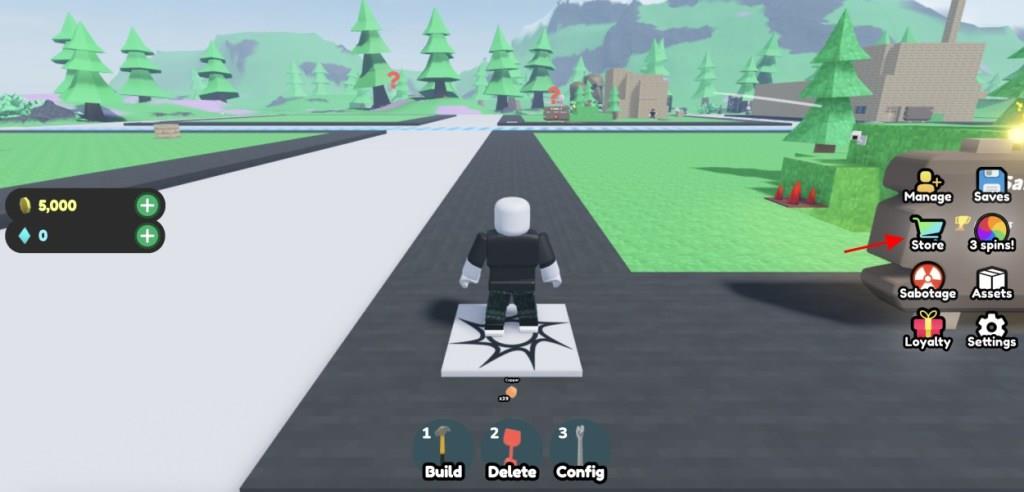
- Click on the Store icon on the right side of the screen.
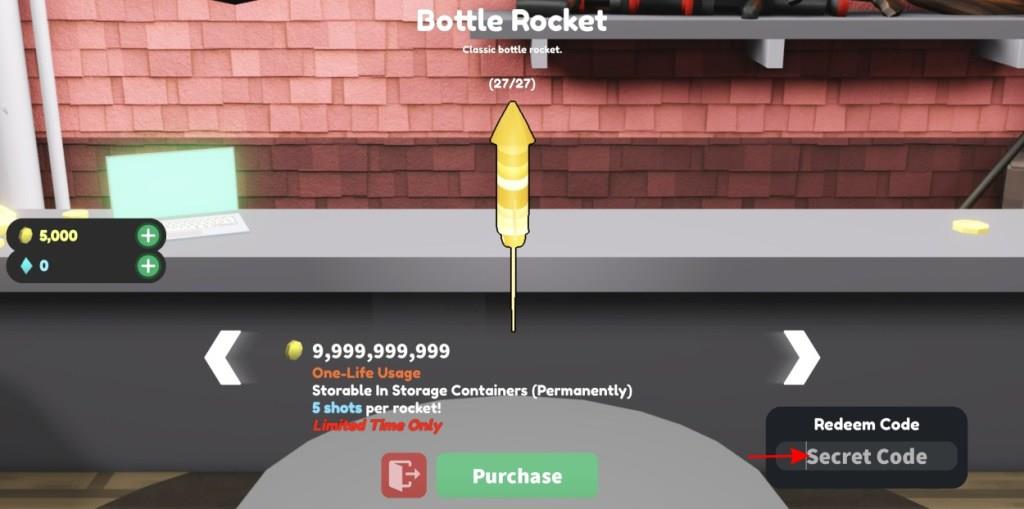
- Enter a working code in the text box on the right side.
- Simply hit enter and redeem your rewards.
How to Get More Build Defense Codes
Earn codes by completing daily tasks, events, and special campaigns, then redeem them in the game’s code menu to boost your defense stats.
As we mentioned above, the best way to get Build Defense codes is to check back here as we add the latest codes as we see them. Furthermore, we do recommend joining the game’s socials for all the latest news. For starters, follow the official Twitter and look for the latest posts for codes.
Once done, join the official Build Defense Discord server and chat away with fellow players about the game and its news. Lastly, you can even join the swiftplay! Roblox community for all the latest happenings on the game.
Which Build Defense codes are still active right now
Build Defense Active Codes (January 2026)
As of January 2026, only one code remains consistently active across recent sources for Build Defense on Roblox.
Active Codes
-
4th: Redeem for a free building block or Grand Finale Firework.
The code “swift” (7k Coins, God Apple, Toxic Venom Firework) appears expired in later updates.
Redemption Steps
Join the swiftplay Roblox group first. Launch the game, click the Store button on the right, enter the code in the “Secret Code” box, and hit Redeem.
Staying Updated
Follow @swiftplayRBLX on X or join the official Discord for new releases, as codes expire without notice.
How do I redeem codes in Build Defense step by step
Redeeming Codes in Build Defense
Redeem codes in Build Defense on Roblox through the in-game Store for free rewards like coins and fireworks.
Step-by-Step Guide
-
Join the swiftplay Roblox group, as many codes require group membership.
-
Launch Build Defense and wait for the game to fully load.
-
Click the Store button (shopping cart icon) on the right side of the screen.
-
Locate the “Secret Code” text box in the bottom-right corner of the Store menu.
-
Copy-paste an active code (like “4th”) exactly as shown, since codes are case-sensitive.
-
Press Enter or click Redeem to claim rewards instantly.
Troubleshooting Tips
-
Codes fail if expired, mistyped, or you’re not in the swiftplay group-double-check these first.
-
Each code works once per account; rejoin servers if issues persist.