Card Chaos Codes (August 2025) pulls you into a cash-backed maze where every shuffle updates your odds and every reward hides a riddle.
One round, you’re the weakest player alive; next round, you’re suddenly a walking nuke thanks to some busted card boost. Things get even spicier once you rip open a few packs, because the new cards can flip the whole game upside down. Packs do cost Robux, and grinding for cash is fun. However, you can just get the latest Card Chaos codes from our list below for free cash and keep your pulls rolling.
All New Card Chaos Codes
August 2025 brings a fresh batch of Card Chaos Codes, giving players new ways to collect MetricSys rewards and boost their progress. These limited-time codes offer various in-game bonuses, from rare cards to extra cash rewards, helping players strengthen their decks and climb the leaderboards faster. Make sure to redeem them before they expire, as new codes replace older ones each month to keep the competition dynamic and exciting.
- BIGTHREE: 1,600 Cash (NEW)
- TWENTYFIVEEE: 2,000 Cash (NEW)
- CRAZYEIGHT: 1,200 Cash
- thirteen: 1,500 Cash
- 1-800: 2,000 Cash
- WELCOMECONSOLE: 2,300 Cash
- FORGIVEME?: 3,300 Cash
- FIVEE: 1,200 Cash
- ONEFITTY: 1,500 Cash
- wowCCU: 2,500 Cash
- TWOTHOUSAND: 2,000 Cash
Expired Card Chaos Codes
- FINALLYRELEASE
- SORRYMIGRATE
- WELCOMECONSOLE
- NEWMEMBER
- HUNIDLIKES
- HUNIDLIKES
- SIXTYLIKES
While you are waiting for more codes, try out some of the other popular games using our Roblox games code list. Start with Blue Lock Rivals and Grow a Garden, both of which are extremely popular on Roblox. Next, check out Anime Last Stand and All Star Tower Defense X for some good old-fashioned TD action.
How to Redeem Card Chaos Codes
To redeem Card Chaos codes from August 2025, open the MetricSys app or website and log into your account. Find the codes section in the dashboard or rewards menu, then enter the active code exactly as shown, without spaces. Click submit or redeem, and confirm the cash reward credits to your balance if valid. Check your rewards history for the update, and try another code if it fails due to expiration. Codes work only once per account.
So, if you’re ready to try out some of the latest cards, redeem the codes for Card Chaos and get your free cash by following the given steps:
- Launch Card Chaos on Roblox.
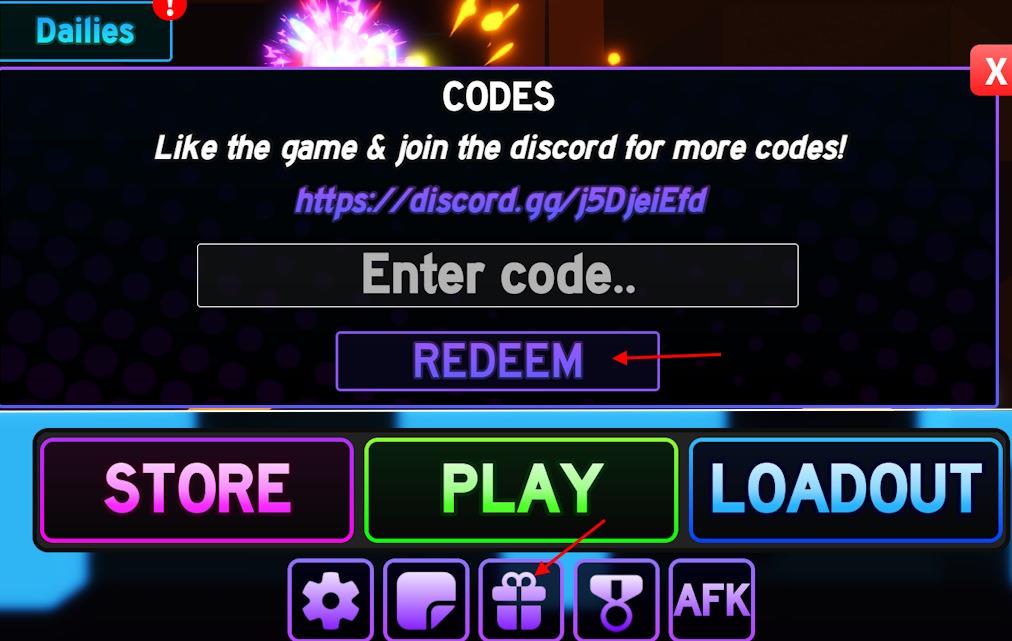
- Click on the Gift icon –> Codes button.
- Enter a working code in the pop-up window.
- Click the Redeem button to get all your free rewards.
How to Get More Card Chaos Codes
Check MetricSys announcements and social channels for new Card Chaos codes released during August 2025 events. Join their Discord server or follow X account updates to catch limited-time drops tied to tournaments. Redeem codes fast through the in-game menu under promotions, as they expire quickly after posting. Participate in community streams or leaderboards for exclusive rewards codes shared live. Track code lists on fan sites like CardChaosHub for verified August batches.
The developers of this game generally release new code when the game reaches a milestone or when they release an update. So, you can join the official MetricSys Discord server for all the active codes. There, you can check their announcement and codes channels to find the newly released codes. You can also check the MetricSys Roblox community regularly for the latest updates.
But why go through all that hassle, when you can we can do it for you. Simply bookmark this post and visit here when you want some freebies in the game. We make sure to always add the newly released codes before anyone else on the internet. So, trust us and you won’t be disappointed.
How do I redeem Card Chaos codes step by step
To redeem codes in Card Chaos on Roblox, follow this straightforward step-by-step process based on consistent guides from multiple sources.
Step-by-Step Redemption
-
Launch Card Chaos on Roblox and log into your account.
-
Once in the main menu or lobby, press M on your keyboard to open the menu (or look for the menu icon).
-
Click the Gift or present icon (typically at the bottom center of the menu).
-
Select the Codes tab or button in the pop-up window.
-
Enter the code exactly as shown (case-sensitive) into the text field.
-
Press Redeem or Enter to claim your cash or spins instantly-a green confirmation message will appear if successful.
Tips
Codes expire quickly, so test them promptly and avoid typos by copying directly. If a code fails, it may be expired or already used on your account. No mobile-specific differences noted, but ensure you’re in the menu, not mid-game.
Open the gift icon and codes menu in Card Chaos where is it located
In Card Chaos on Roblox, the gift icon and codes menu appear after opening the main menu, typically in the lobby or spawn area.
Menu Access
Press M on your keyboard (or tap the menu button, often a nine-dots icon in the upper left corner if the menu is closed). This opens the full menu screen.
Gift Icon Location
Look at the bottom center of the screen for the gift/present box icon (middle icon among three at the bottom). Click it to open a pop-up window.
Codes Tab
In the pop-up, select the Codes button (blue, usually upper left corner of the new window). Enter your code in the text field that appears and redeem.