Roblox’s Poop a Brainrot has players racing to outwit absurd chaos-and August 2025 brings fresh codes packed with surprises. From hidden boosts to wild transformations, these updates can turn a half-flushed run into pure victory.
You can hop into minigames, test your luck, and see what kind of brainrot rarity you manage to poop out. To make things easier, we’ve gathered all the latest Poop a Brainrot codes that hand out free cash and other handy rewards. Use them smartly and aim for the rarest poops possible.
All New Poop a Brainrot Codes
All new Poop a Brainrot codes bring fresh rewards and bonuses for players eager to boost their progress. These updated codes can grant extra coins, items, or special in-game perks that make gameplay more exciting. Be sure to redeem them quickly, as many codes expire fast and new ones replace them regularly. Keep an eye out for new updates and events to stay ahead in Poop a Brainrot.
- WELCOME!: 99,999 Cash (NEW)
Expired Poop a Brainrot Codes
There are no expired codes for this Roblox Experience. When developers eventually release code and it expires, we will move it to this section.
Till then, you can try out other collector games on Roblox. Many of these games also have codes, so you won’t need to wait to obtain free rewards. You can consider playing Grow Your Farm, Upgrade Your City, and My Pet Farm. Also, check out our Roblox game codes master list if you want to try out a few other genres.
How to Redeem Poop a Brainrot Codes
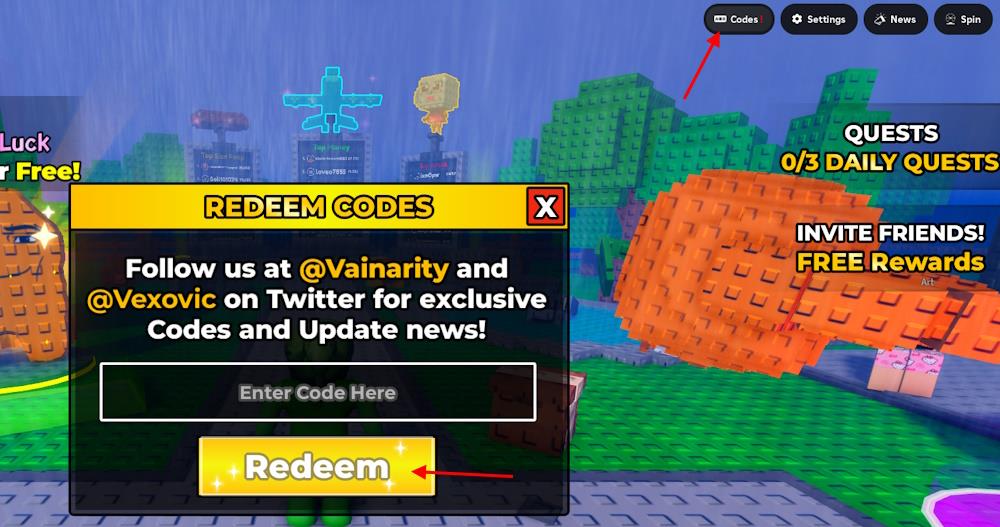
To redeem Poop a Brainrot codes, open Roblox and launch the game. Once you’re inside, find the codes or rewards button on the main menu screen. Click it, then copy and paste an active code into the text box. Press the redeem button to claim your rewards instantly. Make sure to double-check for typos or expired codes before submitting.
Redeeming the codes for Poop a Brainrot is really easy, and you just need to follow the given steps:
- Launch Poop a Brainrot on your Roblox app.
- Click on the Codes icon on the top right of the screen
- Enter a working code in the pop-up box.
- Click on the Redeem button to get your rewards.
How to Get More Poop a Brainrot Codes
Check the Poop a Brainrot Discord server and official Roblox group for new code drops. Follow the game’s Twitter or X account and turn on notifications to catch announcements right away. Join Roblox code-sharing communities on Reddit or Discord where players post updates fast. Bookmark sites like Pocket Gamer or Pro Game Guides that track codes regularly. Redeem them quickly since they expire without warning.
Finding new codes for Poop a Brainrot can be a massive hassle, as they only release codes during special events. So, instead of doing it yourself, simply trust us and bookmark this post. We always add the latest codes to our list without any delay. So, visit this page whenever you need some freebies in Poop a Brainrot.
Other than that, you can join the Poop a Brainrot Discord server. Here you will find all the upcoming updates about the game. Although there is no specific codes channel, look for the sub-announcements section for the latest codes. You can also interact with other players and participate in giveaways.
How to redeem Poop a Brainrot codes
To redeem Poop a Brainrot codes in Roblox:
Step-by-step redeem guide
-
Launch Roblox and open the Poop a Brainrot game from the game page or your favorites.
-
Once you are in the game and fully loaded into the lobby, look for the Codes or Codes icon at the top-right corner of the screen.
-
Click the Codes button to open the code popup/text box.
-
Click inside the text box labeled something like “Enter Code Here” and type or paste a working code (for example: POTIONS, WELCOME!, 100kMEMBERS).
-
Press the Redeem button to confirm and claim the rewards; your cash/dollars should be added to your balance immediately if the code is valid.
If your code is not working
-
Double-check spelling, capitalization, and extra spaces; copying and pasting directly from a trusted list helps avoid typos.
-
Some codes are one-time use per account or can expire, so a code that worked earlier or for someone else may no longer be valid for you.
Open the in-game Codes menu and show where to paste codes
In Poop a Brainrot, the spot to paste codes is inside the in-game Codes window: after you open that menu, there’s a single text box where you click and paste or type the code. Guides consistently show a small “Codes” button on the main in-game UI (often along the top or right side); pressing it opens a pop-up with a labeled input field such as “Enter Code Here,” and that text field is exactly where you paste your code before pressing the redeem button. Since visual UI layouts can change between updates, the exact position of the Codes button and the look of the box may be slightly different in your version, but it will always be the only editable text field in the Codes pop-up.
