Haikyuu Legends Codes (January 2025) unlocks a fresh volley of secrets, where every code lands like a perfect spike and legends rise from the crowd.
This game encapsulates the essence of the anime series, allowing players to embody characters ranging from the masterful setting skills of Oikawa to the relentless determination of Hinata. Here we have compiled all the active Haikyuu Legends codes that will give you free spins and Yen. Use these rewards to get playstyles and powers that suit you.
All New Haikyuu Legends Codes
Check out the latest Haikyuu Legends codes for January 2025 to claim free rewards like coins, spins, and boosts. These codes can help you upgrade your team, improve your stats, and climb the leaderboard faster. Make sure to redeem them soon, as they may expire or be replaced with new ones in future updates.
- UPDATE2: Free Lucky Spin (NEW)
- UPDATE1: Free Lucky Spin
- PROTORIONTWITTER: 1000 Yen
- LAUNCH: 100 Yen
Expired Haikyuu Legends Codes
The game does not have any expired codes yet. Utilize this period to claim all the rewards before the codes go inactive.
Tired of the volleyball action? Do not worry, Roblox also has all your favorite anime adventures in all forms. Get the Blue Lock Rivals codes and enter the virtual experience of being the ultimate egoist. You can also try to fill in the shoes of a One Piece pirate or marine in Blox Fruits. For more such experiences, you can check out our Roblox game codes master list.
How to Redeem Haikyuu Legends Codes
Open the Haikyuu Legends game in Roblox. Click the blue present icon on the left side of the screen. Enter a working code exactly as shown, keeping capitalization intact. Hit the green Redeem button. Check your in-game inventory for the rewards.
Scoring some points in Haikyuu Legends is easy but before you get faster, you must learn how to get the free rewards. Follow the step-by-step process below and redeem the codes for Haikyuu Legends:
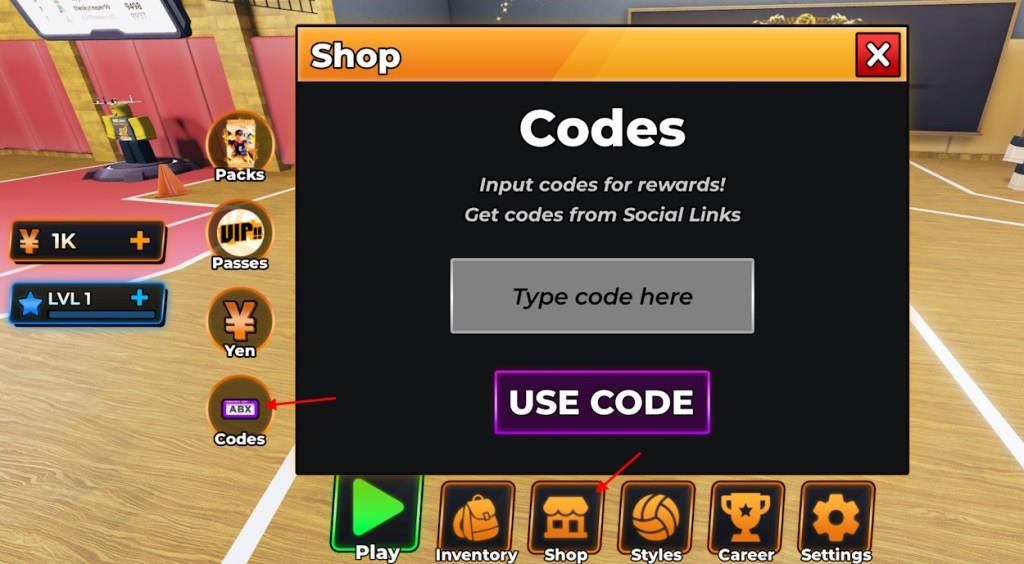
- Launch the Haikyuu Legends experience on Roblox.
- Open the Shop menu from the bottom of the screen.
- Select the Codes option from the right side.
- Input a working code in the Type code here area.
- Click the Use Code button to claim rewards.
How to Get More Haikyuu Legends Codes
New Haikyuu Legends codes are usually shared through the game’s official social media channels, including Twitter, Discord, and the Roblox group. Checking these sources regularly helps you stay updated on limited-time rewards. You can also enable notifications or join community discussions where players frequently share newly released codes. Participating in game events and following developer announcements often gives early access to fresh codes and exclusive bonuses.
When it comes to gathering the latest codes, we follow the title of the anime. Yes, if you are looking for the codes right as they arrive, our page is your best option. We frequently update the codes list with the new ones and move the expired ones. So, bookmark this page and stay on top of the codes always.
If you still want to hunt down all the Haikyuu Legends codes by yourself, you must follow the official socials for the game. The best place to find them is the Haikyuu Legends Discord server. The new codes are often shared in the announcements channel. However, the moderators compile the codes and post them in the codes channel as well.
How to redeem Haikyuu Legends codes step by step
Haikyuu Legends (also called Volleyball Legends) on Roblox lets players redeem codes for free spins and currency directly in-game via the Shop menu. You must reach at least Level 15 by playing matches before codes unlock.
Step-by-Step Redemption
Follow these exact steps to claim rewards without errors:
-
Launch Haikyuu Legends on Roblox and complete initial matches until you hit Level 15.
-
Open the Shop menu from the bottom of the screen.
-
Select the Codes tab (may appear on the left, right, or as “ABX” in some updates).
-
Enter a valid code exactly as shown (case-sensitive, no spaces).
-
Click Use Code or Redeem; rewards like Lucky Spins or Yen appear instantly.
Troubleshooting Tips
Codes fail if expired, already used, mistyped (e.g., “0” vs. “O”), or you’re below Level 15. Join the official Roblox group if prompted, and restart the game for glitches. Test recent codes like “2M_MEMBERS” from prior updates.
Active Haikyuu Legends codes January 2026
Haikyuu Legends (also known as Volleyball Legends) on Roblox offers active codes as of mid-January 2026 that reward Lucky Style Spins, Ability Spins, and other boosts. These codes tie to recent updates like UPDATE_53 and expire quickly, so redeem them soon after reaching Level 15 in-game.
Newest Codes
The most recent codes from January 17-19, 2026, updates include:
-
UPDATE_53 – 5 Lucky Style Spins
-
CHAT_BUBBLES – 5 Lucky Style Spins
-
YOGAN_REWORK – 5 Lucky Ability Spins
-
FREE_ABILITY_SLOT – 5 Lucky Ability Spins
Confirmed Active Codes
Additional verified codes still working per multiple sources:
-
UPDATE_52 – 5 Lucky Style Spins
-
SEASON_11 – 5 Lucky Style Spins
-
YEAR_2026 – 5 Lucky Ability Spins
-
UPDATE_51 – 5 Lucky Style Spins
-
SET_DUMP – 5 Lucky Style Spins
-
NEW_YEAR – 5 Lucky Ability Spins
-
FREE_CLAIM – 5 Lucky Style Spins
-
FREE_QUEST – 15 Lucky Style Spins
-
BAN_CHALLENGE – 5 Lucky Style Spins
Redemption Reminder
Open the Shop menu, go to Codes, enter exactly (case-sensitive), and hit Use Code. Check sites like Pro Game Guides or Pocket Tactics for updates, as older ones like UPDATE_50 may expire soon.
