Collect rare pets faster and expand your Grow a Collection empire with the newest August 2025 redeem codes-packed with fresh boosts, fun surprises, and exclusive rewards that keep you ahead in every challenge.
All New Grow a Collection Codes
Grow a Collection Codes (August 2025) provides Roblox players with fresh redemption options to expand their inventories and customize their collections efficiently.
- FIRSTFANART: Super Luck Boost (NEW)
- DISCORDFAN: Super Luck Boost (NEW)
- WOW2K: Earning Boost (NEW)
- THOUSANDLIKES: Earning Boost (NEW)
- LIKETHEGAME: Super Luck Boost (NEW)
- TIMETOPULL: Super Luck Boost (NEW)
- WELCOME: 10k Cash (NEW)
Expired Grow a Collection Codes
Currently, there are no expired codes in this Roblox Experience. Once a code is expired, it will be moved to this section.
If you like growing games, then there are so many other great games on Roblox that you can try out. Check out Grow a Garden, Grow Crystals, and Grow an Egg. You can find more similar games in our Roblox games codes list.
How to Redeem Grow a Collection Codes
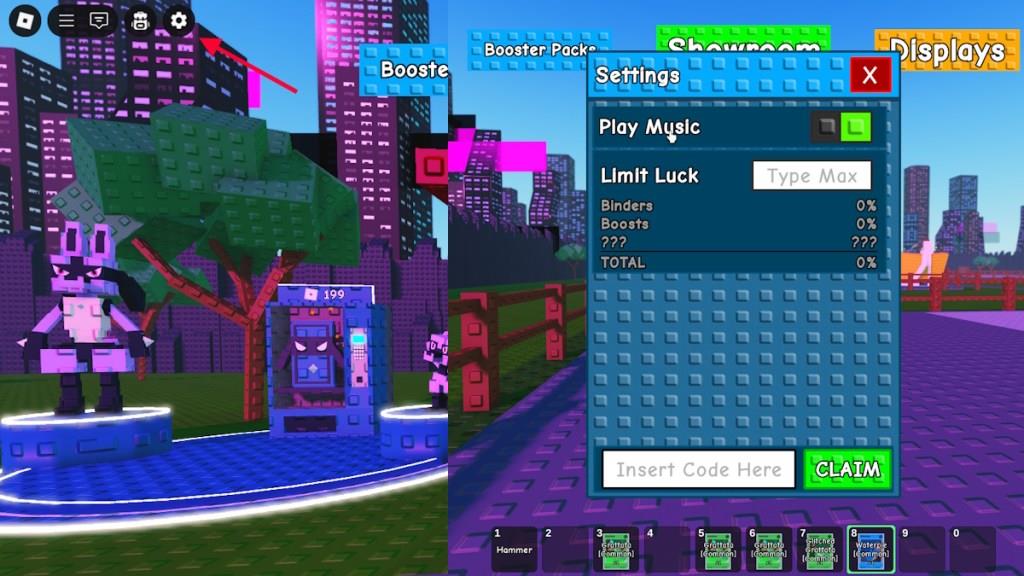
To redeem Grow a Collection codes, open the game on Roblox and locate the gift or Twitter icon on the main screen. Click it to bring up the code window, then type or paste your code exactly as shown. Press the confirm or redeem button, and your rewards will appear in your account right away. Make sure to check for typos and use active codes, as expired ones will not work.
Redeeming codes for Grow a Collection is fairly easy. You don’t have to follow any groups or take extra steps, all you have to do is perform the following steps:
- Launch Grow a Collection in the Roblox Launcher.
- Click on the Settings icon on the top left corner.
- Type the active code in the ‘Insert Code Here’ section.
- Click Claim to get your free rewards.
How to Get More Grow a Collection Codes
To grow a collection of codes, organize your codes by category, track expiration dates, and regularly check for new drops from Roblox creators or events; use a dedicated spreadsheet or note app to keep everything accessible and up to date.
Codes for Grow a Collection are released in their official Discord server and the game’s description. If you want to keep track of all newly released codes by yourself, then here is what you need to do. First, join Grow a Collection Discord server and keep your eyes on the ‘codes’ channel. However, most of the game’s code are revealed in the game’s description, also track it whenever you open the game.
Which Grow a Collection codes expire soon
None of the reliable code lists currently show individual Grow a Collection codes with confirmed future expiry dates, so it is not possible to say exactly which specific codes “expire soon.”
What is known about expiry
-
Major guides all state that there are no expired Grow a Collection codes yet, meaning every listed code is still active as of late 2025 / early 2026.
-
Those same guides warn that Grow a Collection codes can disappear without notice and encourage players to redeem them “as soon as you can” because they may expire quickly.
Practical advice
-
Treat every active code as if it might expire soon and redeem it immediately rather than saving it for later.
-
Check one or two up-to-date code pages (for example on gaming news or guide sites) before playing; if a code vanishes from the “active” section or moves into “expired,” that is the best signal it has just expired.
How to redeem Grow a Collection codes
To redeem Grow a Collection codes in Roblox, use the in-game settings menu and the “Insert Code Here” box to claim your rewards.
Step-by-step redemption
-
Launch Grow a Collection from the Roblox menu and wait for your game to load into your save.
-
Look at the top-left corner of the screen and click the small gear / cog / Settings icon to open the settings window.
-
At the bottom of this window, find the white “Insert Code Here” text field, then type or paste a valid code exactly as shown (codes are case-sensitive).
-
Press the green Claim button; if the code is active, your cash or boosts are added instantly to your account.
If a code doesn’t work
-
Double-check spelling, extra spaces, and capitalization, since a small typo will make the game say the code is invalid.
-
If it’s still not working, the code is likely expired or has been disabled for your region or server; trying a newer code list usually confirms whether it has been retired.