Turn your Roblox garden into a gourmet playground! The Grow a Garden cooking kit transforms simple harvests into interactive meals – from simmering stews to sizzling snacks – each recipe adding flavor, fun, and flair to your gameplay.
How to Get Cooking Kit in Grow a Garden
To get the Cooking Kit in Grow a Garden, players need to progress through gardening activities and collect specific materials that appear as they advance. Once enough resources are gathered, the kit becomes available through crafting or purchase using in-game currency. After obtaining it, players can use the Cooking Kit to prepare food items from harvested crops, turning their produce into interactive cosmetic dishes that add an extra layer of creativity to their garden setup.
The gluttonous pig has left the game, leaving behind his cauldron and cooking recipes. But you cannot just access them without any effort. Grow a Garden has converted the cauldron into the Cooking Kit, a new and interactive cosmetic that you need to unlock before you can use it.
The Cooking Kit can be earned as a reward by completing the following achievements in Grow a Garden:
- Complete all the Common achievements
- Complete all the Rare achievements
- Complete all the Mythical achievements
Among these, the Common achievements are the easiest to complete. They simply require you to plant, harvest, and shovel plants in your garden. It took me around 30-40 minutes of grinding to complete the Common achievements.
How to Use Cooking Kit in Grow a Garden
After you gain access to the Cooking Kit, place it in your garden and interact with it to open the cooking menu. Choose the ingredients from your harvested crops or collected items, then select a recipe to prepare. Each dish requires specific materials that you can grow or gather while exploring. Once cooked, the food can be used for various gameplay benefits or displayed as a cosmetic addition to your garden space.
Once you’ve completed all the quests, you need to click the “Claim Reward” button to unlock the Cooking Kit. It will be added to your cosmetics inventory automatically.
After it appears in your inventory, find an open space in your garden plot and click the cosmetics inventory icon (hammer and spanner icon) in the top left. Then, spot the Cooking Kit and click to place it in your garden.
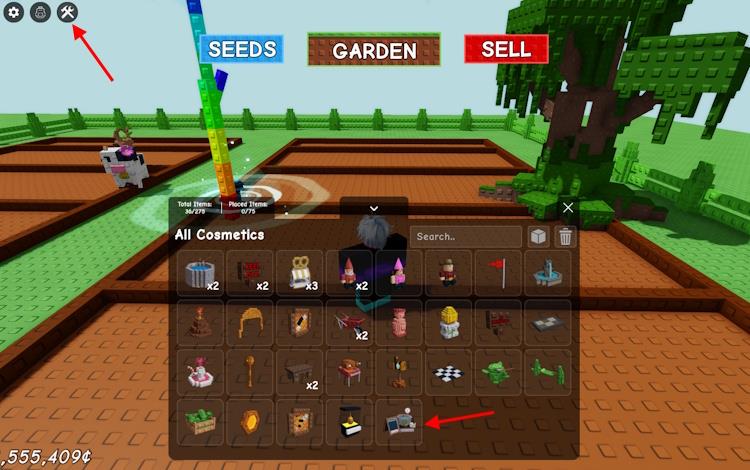
The Cooking Kit will now grace your plot in Grow a Garden. Though buggy at the time of testing, it is a functional cosmetic item that you can use to make food items.
Similar to the Cooking event, you can now hold fruits in your hand and walk up to the cauldron. It will allow you to submit the fruits that show up as ingredients on the left. You will see the cooking time on the right, along with the mutation percentage.
Once you’ve added the desired fruits, click the green Cook button to start cooking food. Like before, you can choose to skip the cooking process for a measly sum of 39 Robux. And sadly, you no longer spin while sitting inside the cauldron. Why, Jandel? Why?
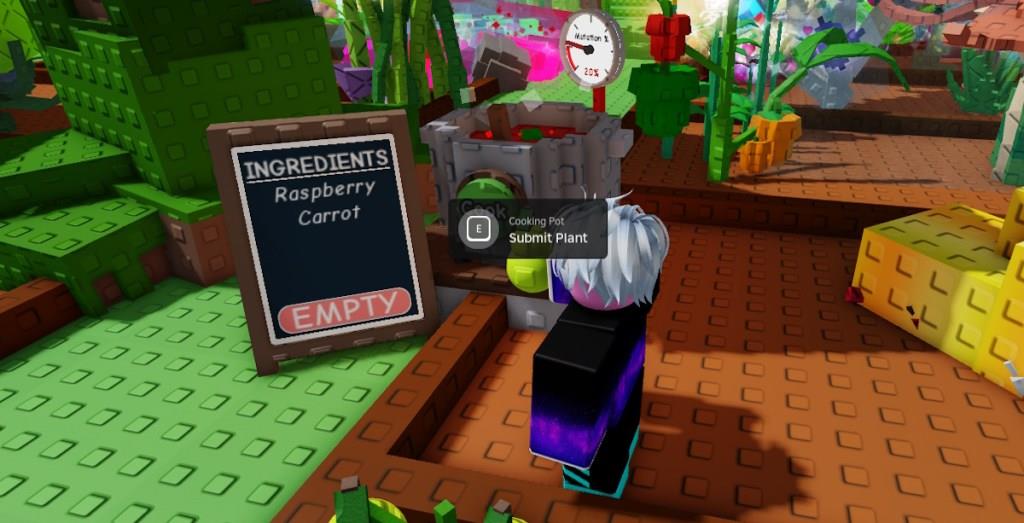
Moreover, it is an essential item you need to cook the new Corndog food item.
What are the full Common achievement requirements list
The full Common achievements list in Grow a Garden has not been fully documented in a reliable, text reference yet, so only partial Common requirements are currently known.
What is known so far
From community and guide coverage, the Common tier focuses on very early-game, low-threshold gardening actions. These include things like:
-
Shoveling a small number of plants (first basic shoveling milestone).
-
Harvesting starting crops such as carrots.
-
Selling small batches of common fruits/vegetables at the stall.
-
Gifting a few basic crops to another player.
These tasks belong to the “Core Plant achievements,” where Common is the lowest of several rarities (Common, Uncommon, Rare, Legendary, Mythical, Divine, Prismatic).
Why the full list is hard to give
-
The in-game achievement panel is the authoritative source, and not all entries have been transcribed one-to-one into wikis or guides yet.
-
Some video guides show the entire list only on screen, making it difficult to extract a precise, verified text list without direct game access.
How to see the complete list
To view the full Common requirements exactly as they appear in game:
-
Open the Garden Guide/achievement menu from your in-game UI.
-
Select the Achievements section, then filter or scroll to the “Common” rarity panel to see every task, progress bar, and reward.
This in-game menu currently remains the only complete and reliable listing of all Common achievement requirements.
Show complete Common Core standards by grade level
The full Common Core State Standards by grade level are too extensive to reproduce here, but they are all available in complete, official documents online.
Where to get the full standards
-
The official Common Core site provides the complete ELA/Literacy and Mathematics standards, organized by grade K-8 and grade bands 9-10 and 11-12.
-
Many state education departments (for example, California’s) host downloadable PDFs of the full ELA and math standards by grade span (K-2, 3-5, 6-8, 9-12).
ELA standards by grade
The Common Core ELA standards are grouped into strands: Reading, Writing, Speaking and Listening, and Language.
Each strand has grade-specific standards for K-8 and grade-band standards for 9-10 and 11-12 that build toward college and career readiness anchor standards.
Math standards by grade
The math standards are organized by grade (K-8) and by conceptual categories in high school (Number and Quantity, Algebra, Functions, Modeling, Geometry, Statistics and Probability).
For each grade, the standards outline both content expectations and Standards for Mathematical Practice, which apply across all grades.
Practical ways to view them
-
Use the “Standards in Your State” or “Standards” navigation on the Common Core site to select ELA or Math and then your desired grade level.
-
Download the official PDFs (often titled “Common Core State Standards for English Language Arts & Literacy in History/Social Studies, Science, and Technical Subjects” and “Common Core State Standards for Mathematics”) and use the table of contents to jump to each grade.
