Defend your tower against endless hordes in Nightshift Tower Defense-grab January 2026’s fresh Roblox codes before they expire.
All New Nightshift Tower Defense Codes
Here are the latest Nightshift Tower Defense codes for January 2026, fresh from developer updates. Redeem them now in Roblox to claim free coins, gems, and boosts that strengthen your defenses against waves of enemies. Check back often, as new codes drop with events and patches.
- newyears (NEW)
- riddleriddling2 (NEW)
- afk (NEW)
- riddleriddling1 (Requires 20 Wins)
- merryshiftmas (Requires 10 Wins)
- 300kvisits (Requires 10 Wins)
- bear5
- thx4playing
- beta
Expired Nightshift Tower Defense Codes
As of now, there are no such expired codes in the game, so I would suggest that you redeem the current ones right away.
If you’re a fan of these horror games on Roblox, try playing other similar titles like FNAF Eternal Nights, Five Nights TD 2, and Survive the Killer, too. Also, have a look at our Roblox game codes master list, because it has some of the best games that you can try once you’re done playing these.
How to Redeem Nightshift Tower Defense Codes
Launch Nightshift Tower Defense on Roblox and access the main menu. Tap the blue gift icon or codes button on the left side. Enter a valid code exactly as shown, keeping capitalization intact, then hit the green Redeem button. Check your in-game inventory for the rewards right away. Codes expire quickly, so use them soon.
Redeeming the codes for Nightshift Tower Defense is easy, and you just need to follow the given steps below:
- Launch Nightshift Tower Defense on your Roblox app.
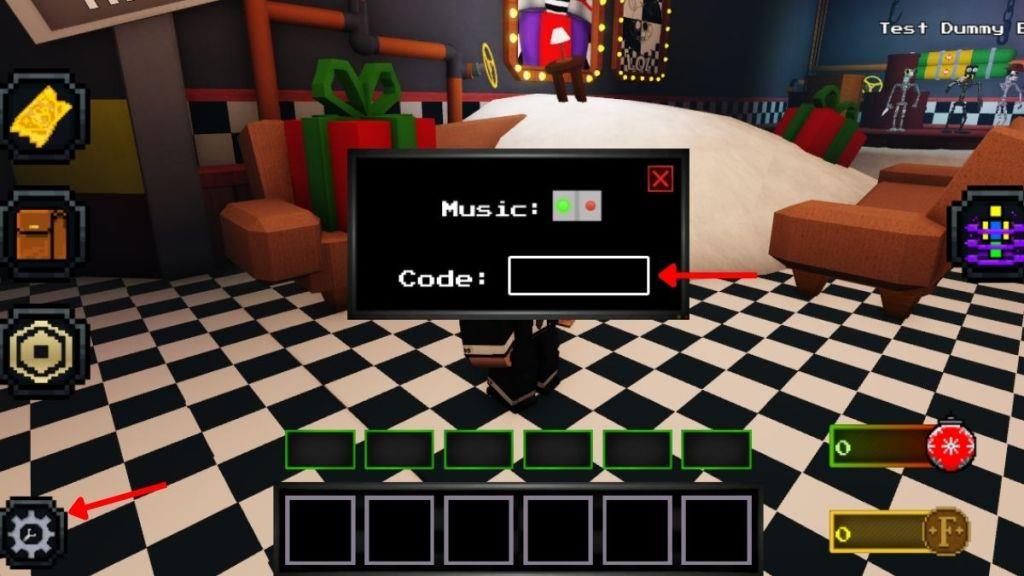
- Click on the Cog Wheel icon on the bottom left side of the screen.
- Enter any working Code in the text box.
- Press the Enter button to get all your rewards.
How to Get More Nightshift Tower Defense Codes
Players can find new Nightshift Tower Defense codes by following the game’s official Roblox page, joining the developer’s Discord server, and checking the game description after major updates. Many creators also share active codes on YouTube, Twitter, and community forums soon after they’re released. It’s a good idea to save the developer’s social links and visit them regularly, as most codes expire quickly once new events or patches arrive.
Now, if you want to be the first ones to get the codes in the game, consider joining the official Nightshift Tower Defense Discord server. All the new codes will be available in the ‘codes‘ channel of the server. Moving on, also join their official Phantom Code Collective group on Roblox to get the latest news updates.
Finally, you can bookmark this page because we keep the code list updated at all times. This way, you won’t miss out on any new rewards as the new codes can be found right here.
Why Are My Nightshift Tower Defense Codes Not Working?
Codes might fail to redeem if they have expired, as developers release new ones monthly and retire old ones quickly. Check for typos by copying directly from a reliable list, since small errors like missing letters or numbers block activation. Verify you’re in the correct game menu, with an active server connection and no ongoing events interfering. Clear your app cache or restart Roblox if glitches persist, and confirm the code hasn’t hit its usage limit per account.
It may happen that while entering the codes in the game, you’re not getting any rewards. So, make sure that you’re entering the correct spelling, or simply copy and paste it from our list. If it happens again, try checking your internet connection or restarting the game to see if that helps.
Still, if you can’t seem to get any rewards, try reaching out on the support channel of their official Discord server. You will always find someone facing the same problem and the solution to that as well.
How to redeem Nightshift Tower Defense codes step by step
Redeeming codes in Nightshift Tower Defense requires meeting win requirements first, such as 10 or 20 wins for most codes, earned through legitimate gameplay.
Step-by-Step Guide
Follow these exact steps in Roblox to redeem codes successfully.
-
Launch Nightshift Tower Defense on Roblox and ensure you meet the win threshold (e.g., play matches to reach 10+ wins).
-
Locate the settings cog/gear or cogwheel icon in the bottom-left corner of the screen.
-
Click the icon to open the code input text box.
-
Copy-paste a valid code exactly as listed (case-sensitive) into the text field.
-
Press Enter or the return key on your keyboard to submit and claim rewards instantly if eligible.
Troubleshooting Tips
Codes may fail if misspelled, expired, or if win requirements aren’t met-rejoin a server or double-check spelling. No level requirement beyond wins is consistently noted, though one source mentions level 10+.
Open the Settings cog in Nightshift Tower Defense where is it located
The Settings cog in Nightshift Tower Defense is located in the bottom-left corner of the screen.
How to Access It
Click the small gear/cogwheel icon positioned at the very bottom left once you’re in-game, after meeting any required win thresholds (like 10+ wins). This opens the code redemption text box directly.
Visual Confirmation
Video guides confirm the icon appears as a standard settings gear in that exact spot, often next to other UI elements like inventory or play buttons. If it’s not visible, ensure you’re in the main lobby or gameplay screen, not a menu, and rejoin the server if needed.
