Buzz through Build A Beehive with the newest Roblox codes for August 2025-grab free rewards, boost your hive, and grow your buzzing empire faster than ever before.
All New Build A Beehive Codes
Players can use the latest Build A Beehive codes to collect free rewards such as honey, boosts, and in-game items that speed up hive progress. These codes are updated regularly, so it’s worth checking back often to grab new bonuses before they expire. Redeeming them helps new and experienced players expand their beehives faster and enjoy smoother gameplay.
- SummerEvent: 1 Fire Blossom (NEW, limited to first 1,000 Redemptions)
Expired Build A Beehive Codes
Currently, there are no expired codes in this Roblox experience. Once the above codes expire, they will be moved to this section.
Roblox has no shortage of farm-building games. Try out Grow A Garden, Build an Island, and Grow Crystals for a similar experience. For more amazing games, check our Roblox game codes list.
How to Redeem Build A Beehive Codes
To redeem Build A Beehive codes, launch the game on Roblox and wait for it to load fully. Click on the Twitter or Codes icon, usually found on the side of the screen. Enter the code exactly as shown, paying attention to capital letters and numbers. Press the “Redeem” button to claim your rewards instantly. If a code doesn’t work, check for typos or see if it has expired, as some codes are time-limited.
Building a Beehive is no simple task. So, get yourself a head start by redeeming codes for Build A Beehive using the steps below.
- Launch Build A Beehive in the Roblox Launcher.
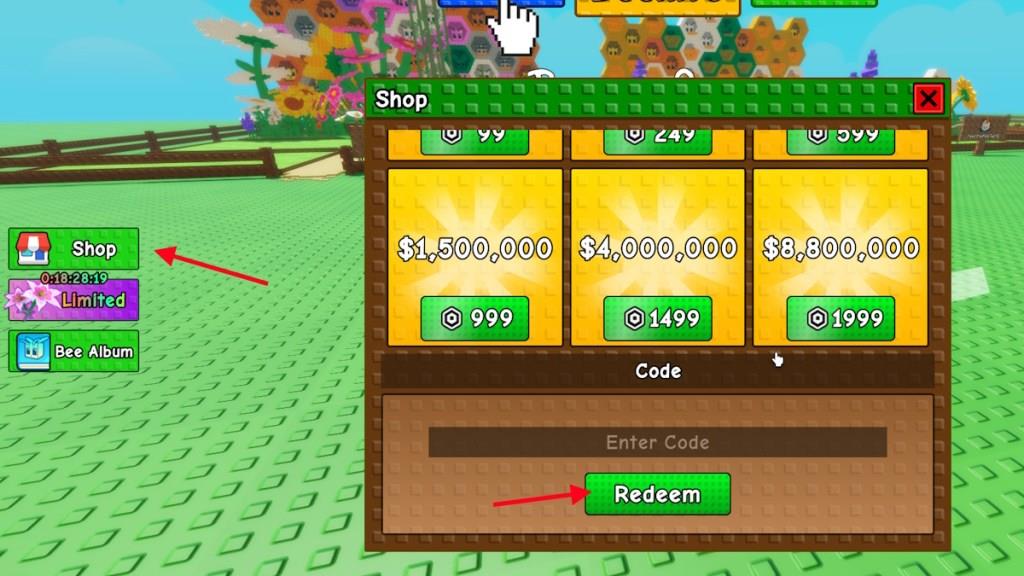
- Click on the Shop icon on the left side.
- Write the active code in the ‘Enter Code’ section.
- Click Redeem to get your free rewards.
How to Get More Build A Beehive Codes
Players can get more Build A Beehive codes by following the game’s official Roblox page and social media accounts, where new codes are often shared during updates or special events. Joining the developer’s Discord server is also a good idea, as the community usually posts the latest codes there first. Keeping an eye on seasonal promotions or collaborations can help you catch limited-time codes before they expire.
If you are looking for more codes for Build A Beehive, then you are already at the best possible place. All the codes added above are the only ones currently released by the developers. We take great pride in keeping our list updated with the latest codes, so you will always find the newly released codes here. Bookmark our post and visit from time to time whenever you need some freebies.
But, if you don’t trust us and would rather search for codes yourself, then here is how you can do it. Join the Build A Beehive Discord server and keep your eyes on the ‘game-news’ channel. Although they have a dedicated codes channel on the server, it is usually empty.
How to redeem codes in Build A Beehive
Redeeming codes in Build A Beehive is straightforward once you’re in the game. Follow these steps to claim free rewards like coins or flowers.
Redemption Steps
Launch Build A Beehive on Roblox and enter the main lobby. Click the Shop button (or icon) on the left side of the screen, then scroll down to the code input section at the bottom. Enter the code exactly as shown (case-sensitive) into the text box and press the Redeem or green Check button to receive rewards instantly.
Troubleshooting Tips
Codes may fail if mistyped, already redeemed on your account, or expired-copy-paste them to avoid errors. Some codes are server-specific or limited-use, like those from Discord bots. Test in a new server if issues persist, and check the game’s Discord for updates.
Where is the Shop button located in the game interface
In Build A Beehive on Roblox, the Shop button appears as an icon on the left side of the main game screen. It is typically positioned in the vertical toolbar or menu panel shortly after entering the lobby.
Exact Location
Look for the Shop icon (often a bag, cart, or store symbol) in the row of buttons along the left edge of the interface, near tools like the code redemption area. Clicking it opens the shop GUI where the code input box sits at the bottom.
Visual Guide
-
Enter the game lobby and scan the left-hand sidebar from top to bottom.
-
The button is usually 2-4 slots down, above or below inventory/bee management icons.
-
If hidden, check for a collapsed menu toggle or press the default UI key (like Tab) to expand it. Rewards and code redemption follow immediately after accessing this panel.