Copper chains bring a new spark to Minecraft’s crafting system, blending style and function in one sleek build. Learn how to forge these shimmering links, use them in creative designs, and add a touch of metallic charm to your world.
Items Required to Make Copper Chain in Minecraft
In Minecraft, to craft a copper chain, you’ll need 6 copper ingots and a string. Place the ingots in a U-shape in the crafting grid with the string occupying the middle slot on the bottom row, creating a chain that can be used for decoration or as a hanging item.
The materials required to make copper chains are easily obtainable in the game and are as follows:
- 1 Copper Ingot
- 2 Copper Nuggets
In order to get both the materials, you need to mine some copper ores first. These are found mostly around the levels, Y=43, and on exposed mountain peaks. Mine those ores to get raw copper which in turn you can smelt in furnaces to get copper ingots. Next, you can use one such ingot to get 9 copper nuggets in the game. Lastly, you would need a crafting table in Minecraft to make the chain.
How to Make Copper Chain in Minecraft
To craft a copper chain in Minecraft, gather copper ingots and a chain recipe from the crafting table; arrange five copper ingots in a U-shape with two on the bottom row, then collect your chain and connect it to blocks or items for decorative and functional builds.
Now that you can the required materials ready, you can craft a copper chain by following the steps below:
- Put the crafting table on the ground and right click on it to use its UI.
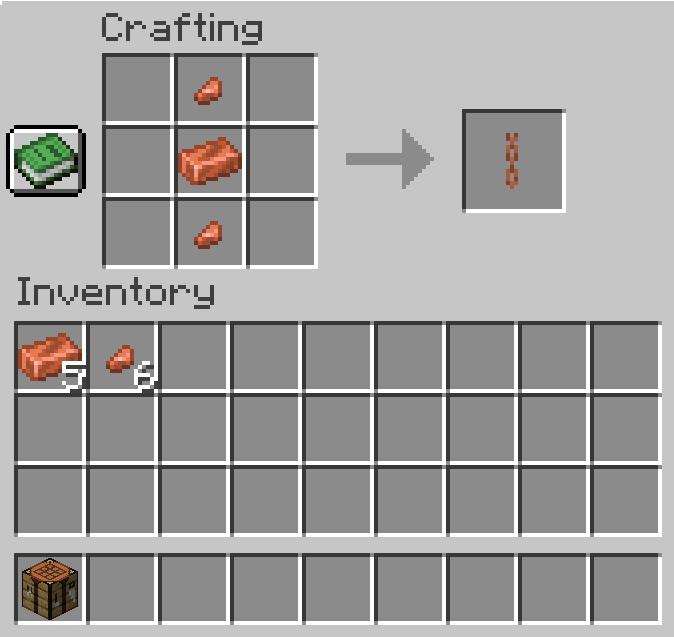
- Place the copper ingot at the center of the 3×3 grid and then, one nugget on top of it while the other right below.
- This way, you will get a single copper chain on the right cell.
- Now, you can drag the item to store it in your inventory.
Also Read: Minecraft’s Next 2025 Drop Will Bring Copper Golem, Copper Tools, and More
All Uses of Copper Chains in Minecraft
Copper chains can be used as decorative ties for armor stands, fences, and banners, connect levers and lamps for practical lighting setups, and serve as chain links in custom builds like chandeliers or hanging cages, all while maintaining a rustic, metallic accent that fits well with copper’s aging textures.
1. Making Hanging Signs
A set of 2 copper chains are used as a crafting ingredient in making the hanging signs in Minecraft. The second material required in making these are six stripped logs, that can be obtained by breaking logs of wood after stripping their texture using an axe.
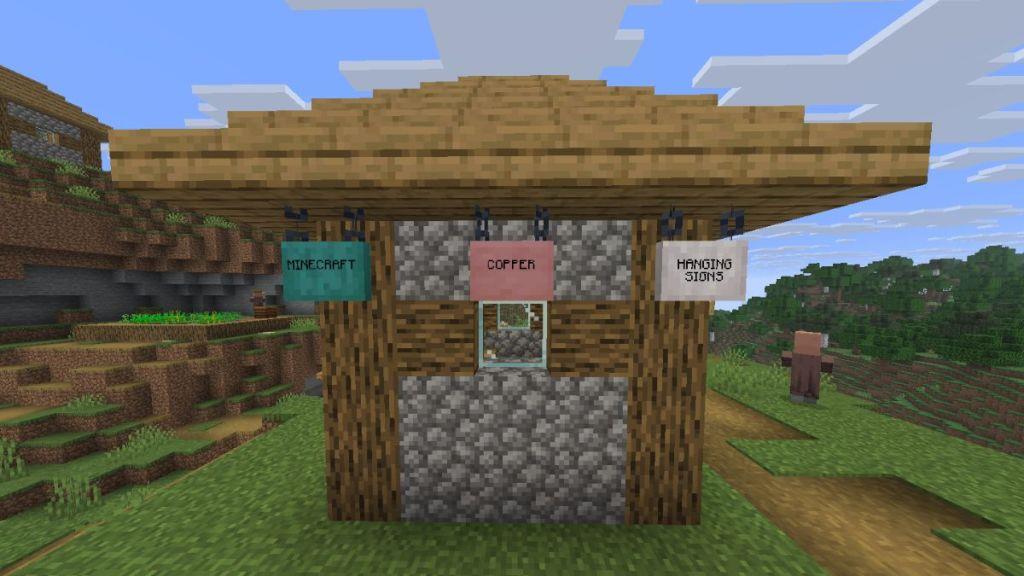
These signs can be hanged from the ceiling and thus doesn’t occupy a block by whole. Furthermore, like sign boards, you can write text on it and make the font glow using a glow ink sac for better visibility.
2. Hanging Items
Apart from using the chains in making hanging signs, you can use them as decorative item as well. Placing them vertically from the ceiling will allow you to hang all sorts of lanterns, bells, and sign boards as well.
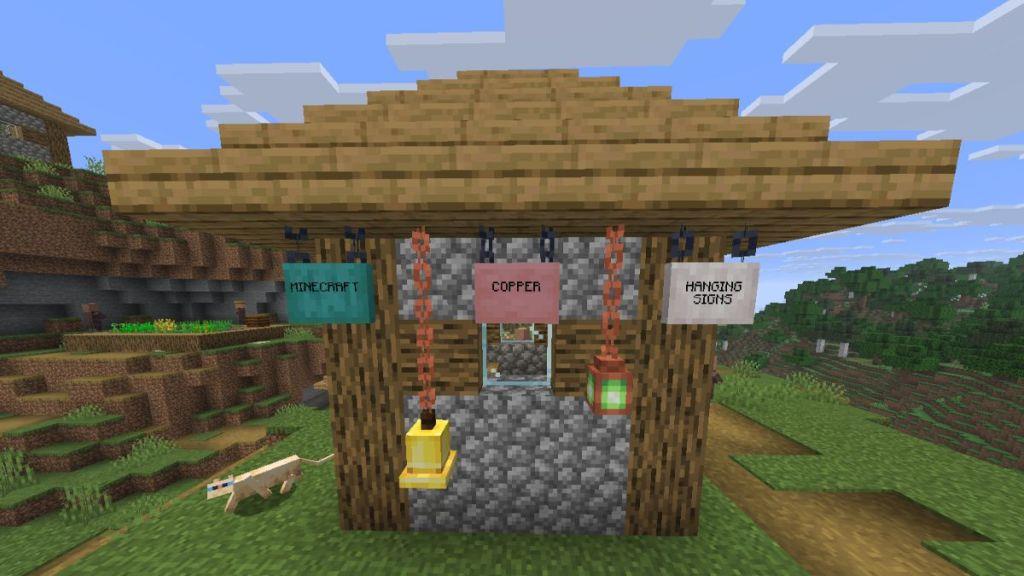
These can be placed horizontally too, but you can’t hang any lantern or bell to its end. Moreover, a horizontal and a vertical chain won’t connect with each other.
3. Oxidative States
Finally, the copper chains come in 8 different variants, based on their oxidative states and waxed nature. While the unoxidized chains comes in orange, oxidized ones in green, and the ones in between have a mix of both the colors.
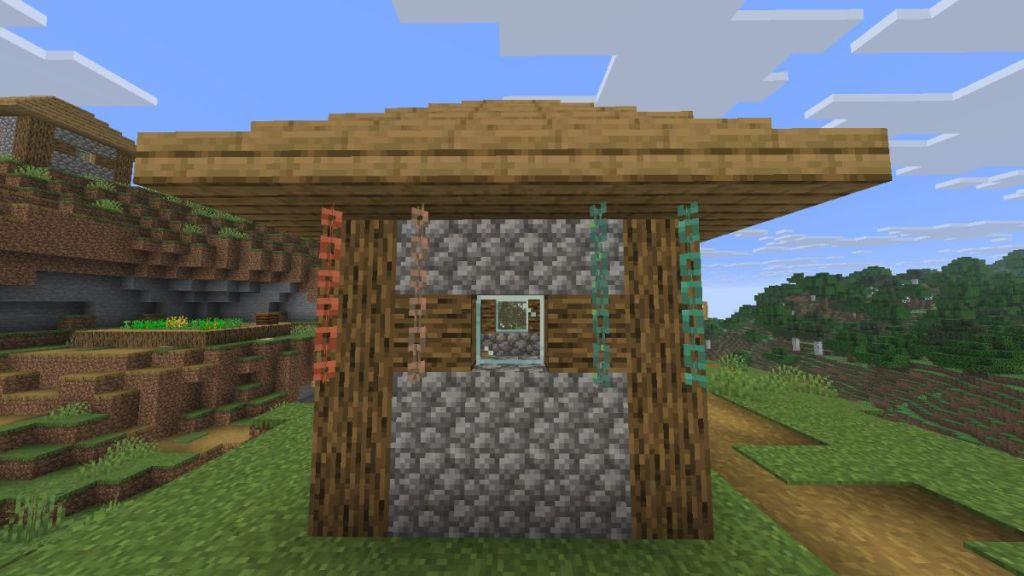
You can scrape off the patina from oxidized chains using an axe, and get back it’s original color. Otherwise, use a honeycomb to wax a copper chain and lock its state, hence it won’t change color in the future.
How to wax copper chains in Minecraft
Wax copper chains in Minecraft using honeycomb to prevent oxidation and lock their current appearance. This works on placed chains or items in both Java and Bedrock editions.
Right-Click Method
Right-click a placed copper chain with honeycomb in hand to wax it directly. The chain adopts a subtle shine and stops progressing through oxidation stages (unoxidized, exposed, weathered, oxidized).
Crafting Method
Place the copper chain and one honeycomb in any order within a crafting table’s grid. Retrieve the waxed copper chain, matching its exact oxidation state.
Removal and Notes
Unwax with an axe by right-clicking or scraping, or revert oxidation via axe or lightning strikes. Waxing supports creative builds by preserving desired patinas.
Can copper chains be unwaxed and how to remove wax
Yes, copper chains in Minecraft can be unwaxed to allow oxidation or aesthetic changes.
Unwaxing Method
Right-click a waxed copper chain with any axe to scrape off the wax, instantly reverting it to its matching unwaxed oxidation stage (unoxidized, exposed, weathered, or oxidized). This mirrors mechanics for other copper blocks like blocks or slabs.
Additional Notes
Axes prioritize wax removal before deoxidizing if layers remain; no honeycomb returns on unwaxing. Lightning strikes deoxidize nearby unwaxed copper but do not affect wax.
