Scale the fiery towers and ascend through divine trials in Hell to Heaven Climb. These fresh August 2025 Roblox codes grant you boosts and bonuses to make your ascent faster, smoother, and far more rewarding.
Well, the game can feel grindy or slow when you are unable to save enough coins for the next big upgrade. So, use Hell to Heaven Climb codes from our list to obtain free double coins and golden potions, which will help you get better upgrades faster.
All New Hell to Heaven Climb Codes
Prepare for a concise guide to the Hell to Heaven Climb, focusing on how to redeem codes efficiently, with tips on timing, code validation, and common pitfalls to avoid while navigating the August 2025 Roblox update.
- CLIMB: 1 Double Coin Potion (NEW)
- HEAVEN: 1 Golden Potion (NEW)
- Egypt: 1 Double Coin Potion (NEW)
- Weekend: 1 Double Coin Potion (NEW)
- Season: 1 Double Coin Potion (NEW)
- Trade: 1 Golden Potion (NEW)
Expired Hell to Heaven Climb Codes
Currently, there are no expired for this Roblox Experience. Once the above codes expire, they will be moved to this section.
While waiting for more content and places to climb, why not try something new? Check out Volleyball Legends for some sports action, Grow a Garden for a chill experience, and Anime Last Stand for some old-fashioned action. You will find more amazing games in our Roblox game codes list.
How to Redeem Hell to Heaven Climb Codes
To redeem Hell to Heaven Climb codes, launch the game on Roblox and wait for it to load fully. Look for the gift or code button on the main screen and tap it to open the redemption window. Enter a valid code exactly as shown, paying attention to capital letters and numbers, then confirm your entry. If the code is still active, the rewards will be added to your account instantly.
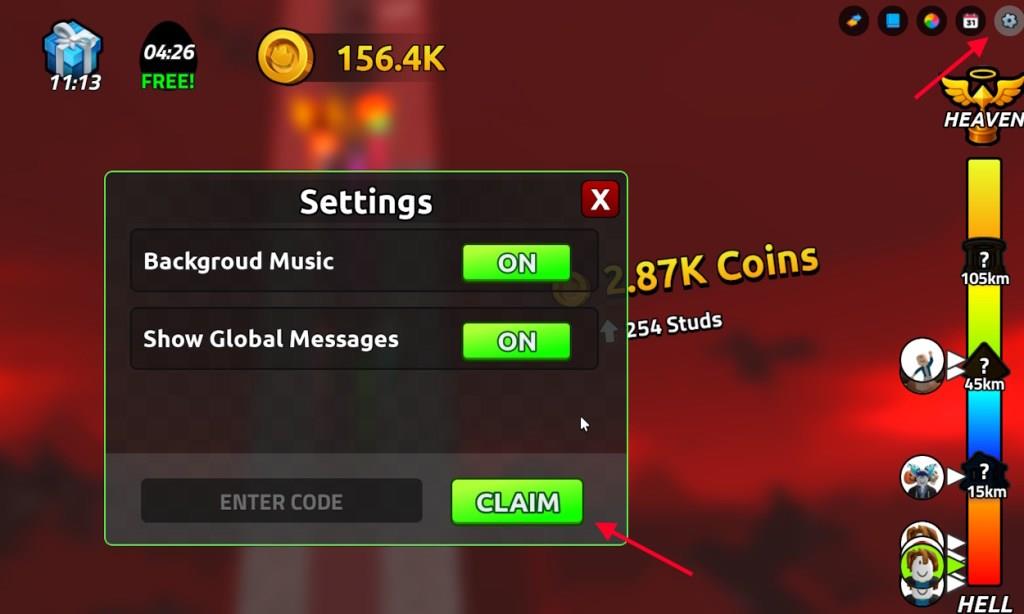
Redeeming codes for Hell to Heaven Climb is much less tiring than climbing to heaven. Here is how you can do it:
- Launch Hell to Heaven Climb in the Roblox Launcher.
- Click on the Gear iconin the top right corner.
- Type the active code in the ‘Enter Code’ section.
- Click Claim to redeem the rewards.
How to Get More Hell to Heaven Climb Codes
Players can often find new Hell to Heaven Climb codes through the game’s official social media pages, such as Twitter, Discord, and Roblox group announcements. Developers share these codes during updates, events, or milestone celebrations, so keeping notifications on helps you claim them early. You can also check community forums and fan pages where other players share working codes and updates daily.
If you are looking for more codes for Hell to Heaven Climb, then you are already at the right place. We have added all the currently active codes here, so you don’t need to look anywhere else. We can guarantee that you will find all the active codes here, so make sure to bookmark this list and visit regularly for freebies.
Other than that, you can join the Hell to Heaven Climb Discord server for the latest updates on the game. The developers share new codes on their Discord and through the game’s description, both of which can be hard to keep track of.
How to redeem codes step by step in Hell to Heaven Climb
Hell to Heaven Climb on Roblox lets players redeem codes easily through its settings menu for free potions and boosts.
Step-by-Step Redemption
Launch Hell to Heaven Climb on Roblox.
Click the gear or cog icon in the top-right corner to open Settings.
Scroll to the Codes section, enter a code exactly as shown in the text box, and press Claim.
Troubleshooting Tips
Copy-paste codes to avoid typos, as they are case-sensitive. Rewards appear instantly if valid; expired codes or input errors prevent redemption. Restart the game if issues persist.
Open the settings gear in Hell to Heaven Climb where codes go
Hell to Heaven Climb features a straightforward settings menu accessed via the gear icon for code redemption.
Accessing the Settings Gear
In the game lobby or during play, locate the gear/cog icon positioned in the top-right corner of the screen.
Click or tap it to open the Settings menu, which expands options like audio, graphics, and controls.
The Codes section appears within this menu, typically near the bottom-scroll if needed.
Code Input Location
Inside Settings, find the “Enter Code” text box (labeled clearly).
Type or paste your code exactly, then hit the green “Claim” button next to it for instant rewards.
This spot stays consistent across sessions; no login required beyond Roblox access.
