Sink a perfect shot every time with the newest Arcade Basketball codes for July 2025-grab fresh rewards, boost your score, and show off your skills across Roblox’s hottest hoops challenge.
To help you hit the ground running (or dunking), we’ve put together a list of Arcade Basketball codes that give free coins and useful resources. Use those coins to upgrade your baller and dominate the court like a glitch-free legend.
All New Arcade Basketball Codes
Stay updated with the latest Arcade Basketball codes available this July 2025 to claim free rewards like coins, skins, and exclusive bonuses. These active codes can help you progress faster and customize your game experience with new looks and upgrades. Make sure to redeem them before they expire, as new ones are added regularly with each game update.
- 4p0: 250 Coins (NEW, must follow 4p0)
- SkeletorAngel: 500 XP (NEW, must follow SkeletorAngel)
- SOLOSEBEE: 250 coins (NEW, must follow SOLOSEBEE)
- Release: 300 Coins (NEW)
- Group: 300 Coins (NEW, must be in group)
Expired Arcade Basketball Codes
Currently, there are no expired codes for now, so you might want to redeem the current ones before they expire.
While waiting for more free rewards, you can check out other great sports games on Roblox like Blue Lock Rivals and Goalbound. Want more unique experiences? Check out our Roblox codes master list and find your next adventure.
How to Redeem Arcade Basketball Codes
Open Arcade Basketball on Roblox and tap the gear icon in the top right for settings. Scroll to the code redemption area at the bottom. Enter a valid code exactly as listed, then hit the redeem button. Check your in-game inventory or notifications for rewards if successful. Codes expire quickly, so use them soon.
Unlike many other Roblox games, before you redeem some of the codes for Arcade Basketball, you must follow the group or developers. You can join the Arcade Basketball Roblox community and follow the Roblox profiles of the users we have mentioned to redeem them.
- Launch the Arcade Basketball experience on Roblox.
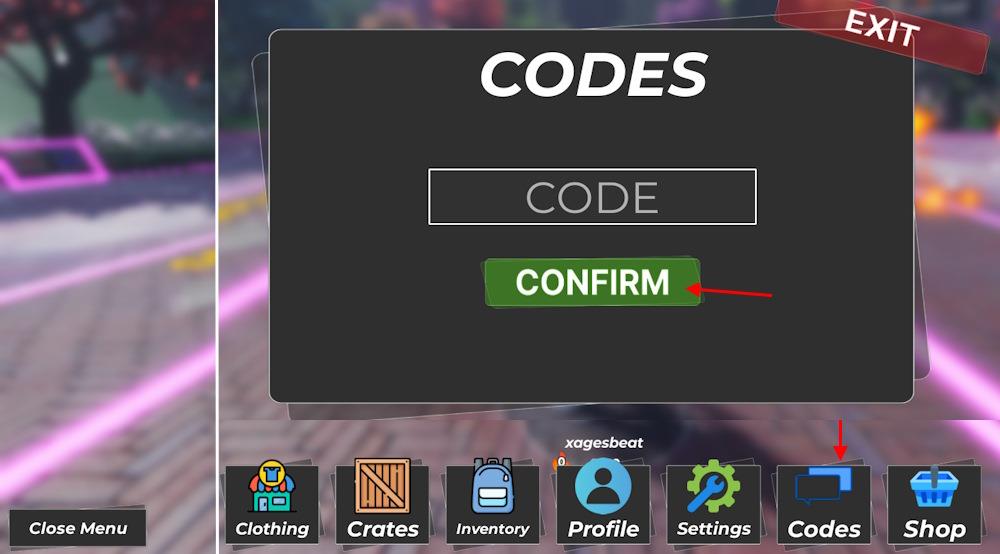
- Open the menu from the bottom left screen and select the Codes option.
- Type a working code in the ‘Code’ box and click the Confirm button.
How to Get More Arcade Basketball Codes
New Arcade Basketball codes are released through the game’s official social media accounts, Discord server, and Roblox group. Checking these sources regularly helps you spot fresh codes before they expire. Players can also set notifications for developer updates or join community forums where active members often share and confirm working codes. Keeping track of special events and collaborations is another reliable way to find exclusive rewards.
Keeping up with the codes for this experience is a breeze if you are on our page. We will update this list regularly, moving expired codes to the ‘expired’ section. That is why we suggest you bookmark this page for the codes for Arcade Basketball that have not expired yet.
However, you can scour through the game’s socials for codes by yourself. The Arcade Basketball Discord server is the ideal place to find the working ones. If you are in the Discord server, go to the codes channel and find all the codes.
The game is fairly new, so make sure you are not late on the redemption. Check for typos if you are getting an error while redeeming them. We suggest you copy the code from our list for no hassle. The codes are Caps Lock sensitive; you must check that before the redemption as well.
How do I redeem codes in Arcade Basketball step by step
To redeem codes in Arcade Basketball on Roblox, follow these simple steps in the game.
Prerequisites
Certain codes require specific actions first. Join the official Arcade Basketball Roblox group and follow developers like 4p0 and SkeletorAngel on Roblox if needed for rewards.
Step-by-Step Redemption
Launch Arcade Basketball and fully load into a match or lobby.
-
Click the Open Menu or Shop button in the bottom-left corner of the screen.
-
Select the Codes tab or option from the dropdown menu.
-
Enter the code exactly as listed (case-sensitive) into the text box.
-
Press Confirm or Redeem to claim your rewards instantly.
Troubleshooting Tips
Codes may fail if expired, misspelled, or prerequisites aren’t met-copy-paste them and try rejoining the server.
Open the Arcade Basketball codes menu step by step
To open the Arcade Basketball codes menu on Roblox, start by loading into the game fully.
Step-by-Step Guide
Click the Open Menu, Shop, or Menu button located in the bottom-left corner of the screen.
-
From the menu that appears, select the Codes tab or option (it may be labeled directly as “Codes”).
-
A text input box will pop up-enter your code here and hit Confirm or Redeem.
Quick Tips
Ensure the game is fully loaded in a lobby or match, as the menu won’t appear otherwise. Some codes require joining the group or following developers first.