Roblox’s Sky Squid Game drops fresh codes this July 2025-grab them now before they vanish.
Is this a test of trust and faith or the battle of the fittest? Jump in this game to know for yourself, but before you do check out the following active Sky Squid Game codes that gives you free money, using which you can buy various outfits.
All New Sky Squid Game Codes
Check out the latest Sky Squid Game codes for July 2025 to claim free rewards like coins, boosts, and other exclusive in-game bonuses. These codes can give you an extra advantage during matches and help you progress faster. Make sure to redeem them quickly, as many expire after a short period or are limited to a certain number of uses.
- FRONTMAN: Redeem for 25M Won (NEW)
- 1MVISITS: Redeem for 10M Won (NEW)
- TITLES: Redeem for 10M Won
- RELEASE: Redeem for 25M Won
Expired Sky Squid Game Codes
As of now, there are no expired codes in the game, so make sure you redeem the existing ones fast before they go away.
If experiences based on this popular show are your favorite genre, you should try out Ink Games, Squid Game, and Octopus Game. While you can also go ahead and check the Roblox game codes master list to find all sorts of cool experiences worth trying out on this platform.
How to Redeem Sky Squid Game Codes
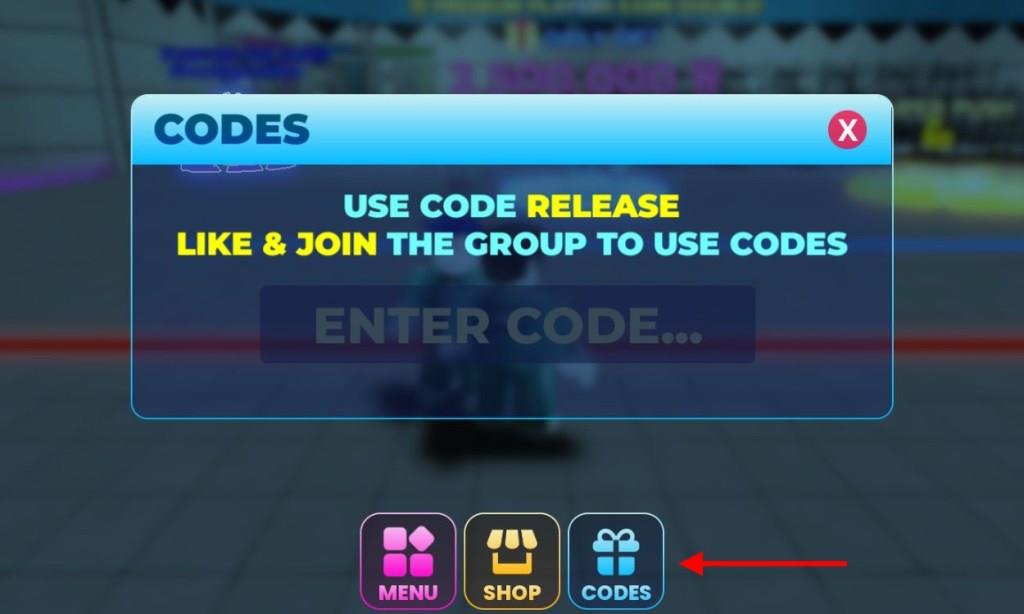
Open the Roblox app and launch Sky Squid Game. Tap the blue gift box icon on the left side of the screen. Enter a working code exactly as shown, keeping it case-sensitive, then hit the green Redeem button. Claim your rewards right away if the code works. Try another if it fails due to expiration.
In order to redeem the codes for Sky Squid Game, you must join their discord community first. Once done, follow these steps below:
- Launch Sky Squid Game on your Roblox app.
- Click on the Codes icon at the bottom of the screen.
- Enter a working code in the pop-up box.
- Press the Enter key to get your rewards.
How to Get More Sky Squid Game Codes
New Sky Squid Game codes can often be found through the game’s official social media pages, including Twitter, Discord, and the Roblox group. Developers usually post new codes during updates, collaborations, or seasonal events. Players can also check community pages, fan forums, or YouTube creators who regularly share verified codes. Staying active in the game’s Discord server and turning on notifications for announcements helps ensure you don’t miss limited-time rewards.
If you want the fastest to get all the latest codes in this game, consider bookmarking this page. Since we update the list as soon as new ones are released, you won’t be missing out on any rewards.
You can also join the official Sky Squid Game Discord server and check the ‘codes‘ channel to find the list of all active codes in the game. You can also join the Cublem community on this platform to get the news updates
How to redeem Sky Squid Game codes step by step
Redeeming Sky Squid Game codes requires joining the official Discord first, then following simple in-game steps. This process remains consistent based on guides from mid-2025 to early 2026.
Prerequisites
Join the Sky Squid Game Discord server, as most codes require verified membership. Membership links appear in Roblox game descriptions or developer socials. Codes work once per account after verification.
Step-by-Step Guide
-
Launch Sky Squid Game via the Roblox app or website.
-
Locate the Codes icon at the bottom of the screen and tap it.
-
Enter a valid code (e.g., FRONTMAN, 1MVISITS) into the pop-up text box.
-
Press Enter or the confirm arrow to claim rewards like Won currency.
Rewards appear instantly if the code is active and unexpired.
Troubleshooting
Codes may fail if expired, already redeemed, or without Discord verification. Copy-paste exactly, as they’re case-sensitive. Check Discord for updates if issues persist.
Join the Sky Squid Game Discord and Roblox group steps
Joining the Sky Squid Game Discord and Roblox group is a prerequisite for redeeming codes in this Roblox experience. Links are typically found in the game’s Roblox page description, Twitter, or code guides. Follow these steps carefully for verification.
Join Discord Server
-
Open Discord app or browser and click the + icon on the left sidebar.
-
Select “Join a Server” and paste the official invite link (often shared in game desc or sites like Beebom).
-
Click “Join” – verify your account if prompted for full access.
Membership enables code redemption, as confirmed in guides.
Join Roblox Group
-
Go to the Sky Squid Game Roblox page and scroll to the group link under the game thumbnail.
-
Click the group name, then hit “Join Group” button.
-
Complete any captcha puzzles; approval is usually instant unless manual review applies.
Verification Tips
Check game description or Discord for latest links, as they update. Once joined, relaunch the game to access the Codes menu. Issues? Ensure you’re logged into the correct Roblox account.
