Claim your edge in Force Battlegrounds this July 2025 with fresh redeem codes that bring you closer to victory-grab exclusive boosts before they vanish!
But let’s be real, fighting high-level players early on feels like trying to force push a mountain. That’s why we’ve listed all the active Force Battlegrounds codes that drop free Credits and Tokens. Use these rewards to gear up your build and slice through enemies like Darth Vader on a bad day.
All New Force Battlegrounds Codes
Stay ahead in Force Battlegrounds with the latest active codes that grant free rewards like boosts, spins, and special items. These codes update frequently, giving players new ways to strengthen fighters and progress faster. Be sure to redeem them quickly, as many expire soon after release, and keep an eye out for new drops from official Roblox events or developer announcements.
- NOTDMCA: 30K Credits (NEW)
- QUESTS: 20K Credits
- PIKEUPDATE: 10 Tokens
Expired Force Battlegrounds Codes
- FIRSTCODE
If you are looking for more thrilling action, check out Arise Crossover, Blox Fruits, and All Star Tower Defense X. Not your cup of tea? Check our Roblox game codes list to find the games that suit you best.
How to Redeem Force Battlegrounds Codes
To redeem Force Battlegrounds codes, open Roblox and launch the game. Click the menu or codes icon, usually located on the main screen. Enter a valid code into the text box exactly as shown, without extra spaces or characters, and press the confirm or redeem button. If the code is active, your in-game rewards will be added instantly.
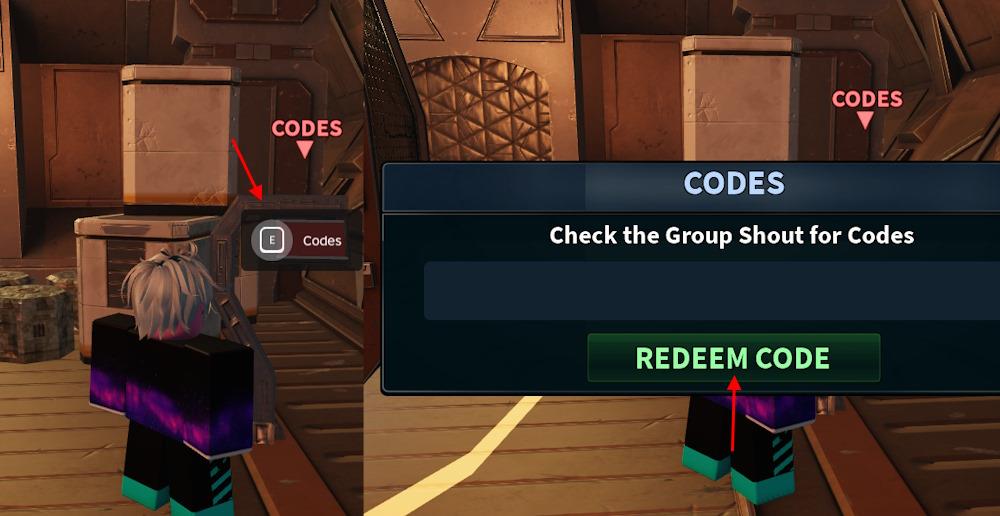
This is not a chill game, but redeeming codes for Force Battlegrounds is incredibly simple. Follow these steps to redeem the codes:
- Launch Force Battlegrounds on Roblox.
- Go to the Codes area on the left side of the lobby.
- Type a working code in the pop-up box.
- Click the Redeem Code button to claim rewards.
How to Get More Force Battlegrounds Codes
Check the Force Battlegrounds Discord server and official Roblox group for new code announcements from developers. Follow the game’s Twitter or X account and Roblox page, where updates often include active codes. Join community hubs like Reddit’s r/ForceBattlegrounds or fan Discord servers to catch player-shared releases. Bookmark code-tracking sites such as Rolimon’s or Beebom, which update lists frequently. Test codes soon after they drop, as they expire quickly.
Codes for Force Battlegrounds are released through in-game update logs and their Discord server. Join the Force Battlegrounds Discord server and turn on notifications for the ‘announcements’ channel. You will also find them in the codes channel. However, the devs don’t drop new code with every update, so you might end up getting spammed with random notifications instead. And if you’re just here for the codes, why waste time slashing the sword around? We’ve already done the hard work for you.
We take great pride in keeping our code list up to date with the latest codes. You won’t find a better place to find active codes than here on the internet. So, bookmark our post and visit whenever you want some freebies.
How to redeem Force Battlegrounds codes
Redeeming codes in Force Battlegrounds on Roblox is straightforward and done directly in the game’s lobby. Follow the steps below to claim rewards like Credits or Tokens without issues.
Redemption Steps
Launch Force Battlegrounds and enter the main lobby. Walk to the end of the hallway past the Tutorial and Factions areas to find the red-labeled Codes station or panel, then press E (or interact) to open the input box.
Enter a valid code exactly as shown (case-sensitive, no spaces) into the text field. Click the green Redeem Code button to instantly receive your rewards if the code is active.
Troubleshooting Tips
Copy-paste codes directly to avoid typos, and ensure no expired codes are used-many from July 2025 like QUESTS or PIKEUPDATE may still work, but check recent lists. If nothing happens, restart the game or verify your account meets any requirements.
Where is the Codes station located in the lobby exactly
In Force Battlegrounds on Roblox, the Codes station sits in the main lobby area. Locate it precisely at the end of the hallway beyond the Tutorial and Factions sections.
Exact Location Details
Head straight through the lobby hallway past the Tutorial door on your left and Factions area. The red-labeled Codes panel or console appears on the right wall or end zone, clearly marked for interaction.
Interaction Notes
Approach and press E (or tap on mobile) to activate the input field. No minimap marker exists, so rely on this fixed spawn point which stays consistent across sessions.