Hunt rare dinosaurs and survive prehistoric chaos with these active Dinosaur Simulator codes for July 2025-grab free DNA, bones, and boosts before they expire!
Your job is to hatch the rarest of them, and we are here to help you out. Use the latest Dinosaur Simulator codes from our list and get free DNA, eggs, and many useful rewards. Make the most out of the freebies and be the best dinosaur researcher on Roblox.
All New Dinosaur Simulator Codes
Stay ahead in Dinosaur Simulator with the newest codes released for July 2025. These codes give players a quick boost with rewards like DNA, bones, and other useful items to strengthen their dinosaurs and progress faster. Keep an eye on updates, as developers often introduce fresh codes during special events or seasonal changes.
- YT1KSUBS: 10,000 DNA (NEW)
- BETTERLATETHANSCRAMBLED: 250 Golden Eggs (NEW)
- SUPERDNA: 25 S-DNA
- CAMBRIANEXPLOSION: Anomalocaris
- JELLYDONUT200M: Jelly Joy Concavenator
- Pokemantrainer: Wyvern
- drinnk: Pizza Delivery Mapusaurus
- Burnt Burrito: Yutashu
- AMERICA: Freedom Eagle Balaur
- 092316: Freedom Eagle Balaur
- 115454: Chickenosaurus
- 060515: Twitter Ornithomimus
Expired Dinosaur Simulator Codes
- DS420kLIKES
While you are waiting for more codes, check out some of the other popular games from our Roblox game codes list. Try out Grow a Business and Pizzeria Tycoon 2 to continue developing your entrepreneurial skills. Want more variety? Check out Blue Lock Rivals and Volleyball Legends.
How to Redeem Dinosaur Simulator Codes
To redeem Dinosaur Simulator codes, open Roblox and launch Dinosaur Simulator, click the Twitter or gift box icon to access the codes input, enter a fresh code from the list, and press Redeem to claim your rewards.
Getting rewards from the codes in this Roblox experience is a cakewalk. Follow the step-by-step process below to redeem the codes for Dinosaur Simulator:
- Run Dinosaur Simulator on Roblox.
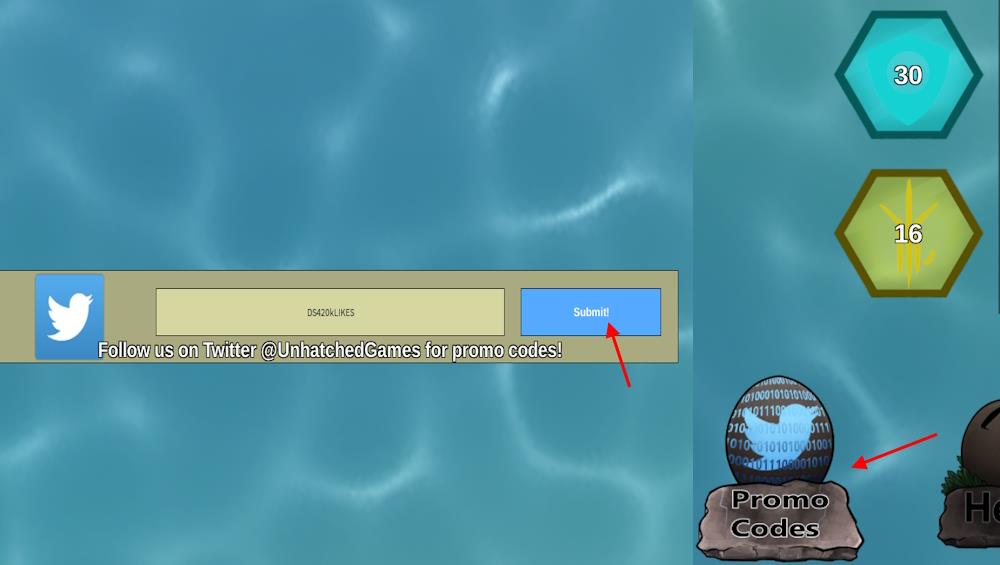
- Click the Promo Codes button from the main menu.
- Type a working code in the pop-up box.
- Click the Submit button to claim rewards.
How to Get More Dinosaur Simulator Codes
Check the game’s official Discord server and Roblox group page regularly for code announcements from developers. Follow Dinosaur Simulator on Twitter or X, where they post updates and new codes during events. Join community forums like Reddit’s r/DinosaurSimulator to see player-shared codes. Bookmark sites such as Pocket Tactics or Pro Game Guides that track active codes and test them monthly. Redeem codes quickly, as they expire fast after release.
Hatching dino eggs is much easier than scavenging the codes for Dinosaur Simulator. But don’t you worry. We are here to assist you with that. In our code list, you will find all the latest and working codes. As we go through the official sources regularly, you won’t miss out on the new rewards.
If you still want to hunt them down, check out the official Unhatched Games Discord server. On the server, look for the codes in announcements and update logs. For more news on the game’s latest updates, keep an eye on the @UnhatchedGames X account.
How to redeem Dinosaur Simulator codes in-game
Redeeming codes in Dinosaur Simulator is straightforward through the main menu interface. Follow these steps carefully, as codes are case-sensitive.
Redemption Steps
Launch Dinosaur Simulator on Roblox and ensure you’re at the main menu.
Click the Promo Codes button, typically located at the bottom of the screen.
Enter the code exactly into the text field that appears, then press Submit or Redeem.
Tips for Success
Rewards like DNA or skins appear instantly if the code is valid. Copy-paste codes to avoid errors, and check the official Discord or developer updates for new ones. If a code fails, it may have expired.
Where is the Promo Codes button located in the UI
The Promo Codes button in Dinosaur Simulator appears directly on the main menu screen. It sits at the bottom center or bottom right of the UI, often as a labeled icon or text button labeled “Promo Codes.”
Visual Location
From the spawn lobby or main menu (not in-game), look below the Play button and server list.
On mobile, it may require tapping a menu arrow or scrolling slightly if the screen is compact.
Desktop users see it prominently near the DNA counter or shop icons.
Troubleshooting Visibility
Join a server first, then exit to the main menu if hidden. Avoid redeeming mid-game, as the button only shows pre-game. Test with an active code like “SUPERDNA” to confirm access.