Collect free boosts, rare pets, and game passes with the latest Anime Anexus Simulator codes for July 2025-your quick route to leveling faster and dominating the Roblox arena.
Moreover, the fact that you can collect popular anime characters as your pet to boost your power is something worth trying. To help you out initially, we have listed all the latest Anime Anexus Simulator codes that give you free gems and other rewards. Make use of the freebies and become the strongest hero in the arena.
All New Anime Anexus Simulator Codes
Players can use the latest Anime Anexus Simulator codes to claim free boosts, yen, and other rewards that help them progress faster in the game. These codes often expire quickly, so redeem them as soon as possible to make the most of the limited-time benefits. Keep checking for new updates each month to stay ahead and upgrade your characters more easily.
- sorryforshut: 1x All Potions (NEW)
- release: 1x All Potions (NEW)
Expired Anime Anexus Simulator Codes
As of now, there are no expired codes in the game, so jump right in and redeem the rewards before they expire.
So, if you like anime games, then Blue Lock Rivals and Project Egoist might become your next favorite. You can also consider having a look at the Roblox game codes master list, since it consists of the top-tier games on the platform. Especially try Blox Fruits if you’re a fan of the One Piece anime.
How to Redeem Anime Anexus Simulator Codes
To redeem Anime Anexus Simulator codes, open Roblox and launch the game. Click on the Twitter or Codes button, usually shown on the main screen. A text box will appear where you can type or paste your active code. Press the Redeem or Confirm button to claim your rewards instantly. If the code is valid, the bonuses will be added to your account right away.
So, if you’re ready to make some easy rewards, follow the steps below to redeem the codes for Anime Anexus Simulator:
- Launch Anime Anexus Simulator on the Roblox app.
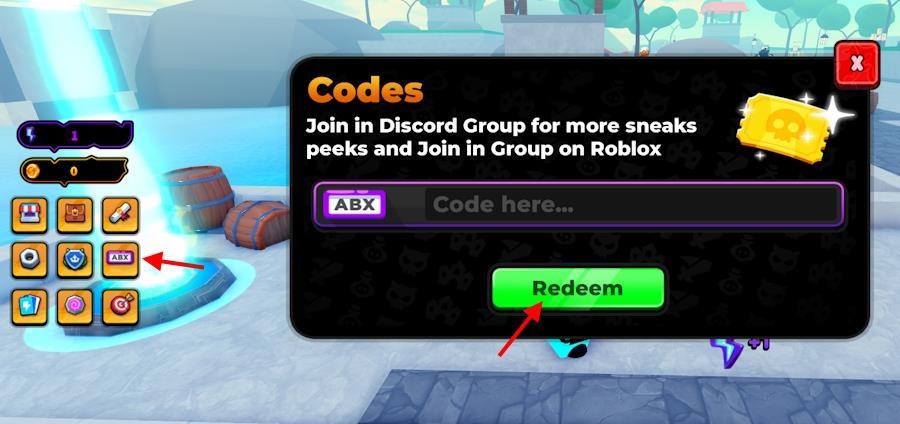
- Click on the Codes icon on the left side of the screen.
- Enter a working code in the text box in the pop-up window.
- Click the Redeem button to get all your rewards.
How to Get More Anime Anexus Simulator Codes
Check the game’s official Discord server and Roblox group page regularly, as developers post new codes there first. Follow Anime Anexus Simulator on Twitter or X for announcements during updates or milestones. Join Roblox code-sharing communities like Discord hubs or Reddit threads where players share active codes quickly. Test codes soon after release, since they expire fast. Bookmark reliable code lists and set notifications to stay ahead.
Hunting down every code on your own can feel like chasing Dragon Balls; time-consuming and easy to miss. That’s why it is smart to bookmark this page. We update the tier list regularly, so you won’t miss any drops or limited-time rewards.
If you see yourself as the main character, there are a few key paths to unlock all the codes. First, join the official Anime Anexus Simulator Discord server. Keep an eye on the ‘announcements’ and ‘codes’ channels, where the devs drop new codes like secret techniques. Also, don’t forget to follow the XYZ Roblox group for the latest news and updates straight from the source.
How to redeem codes in Anime Anexus Simulator
Redeeming codes in Anime Anexus Simulator is straightforward using Roblox’s standard code interface.
Redemption Steps
Launch Anime Anexus Simulator on Roblox. Click the Codes button (or icon resembling a Twitter bird or ABX menu) on the left side of the screen to open the input window. Enter the code exactly as shown (case-sensitive, no extra spaces), then hit Redeem to claim rewards like potions or gems.
Troubleshooting Tips
Codes may fail if expired, mistyped, or already claimed-double-check spelling from reliable sources. No group join or likes are typically required, unlike some other simulators. If the button doesn’t appear, ensure you’re in the main game area, not a sub-menu.
Show step-by-step on where the Codes button is located in-game
The Codes button in Anime Anexus Simulator appears on the left side of the screen once loaded into the main game area on Roblox.
Step-by-Step Location Guide
-
Launch the game and wait for the spawn area to load fully-avoid menus or loading screens.
-
Look at the left sidebar (vertical menu bar); the Codes button (often a scroll icon, Twitter bird, or labeled “Codes”/”ABX”) sits among buttons like Shop, Pets, or Leaderboard, typically 2nd-4th from the top.
-
Click it to expand the code input box at the bottom of the sidebar; paste your code and hit Redeem.
Visual Troubleshooting
If missing, respawn or rejoin the server, as it hides during events or private servers. Mobile users swipe right to reveal the sidebar. Ensure no overlapping UI from pets/leaderboards blocks it.
