Understanding how Dig Shovel Stats work can turn average gameplay into a power-run of speed and precision. From swing speed to treasure yield, every stat shapes how fast you dig, how deep you go, and how much value you pull from each scoop in Roblox’s Dig Shovel system.
Seeing four different things happening as you dig items might feel a bit overwhelming at first, but don’t worry. This guide breaks down the essential shovel stats in Dig so you can pick the right tool with confidence.
Shovel Stats in Roblox Dig
Each shovel in Roblox Dig has its own speed, power, and range that directly affect how fast players can remove blocks and gather materials. Higher-tier shovels often dig deeper layers and break tougher materials more quickly, but they usually cost more in-game currency. Players can compare stats like dig speed and block value to choose the best tool for their play style and progress faster through different ground levels.
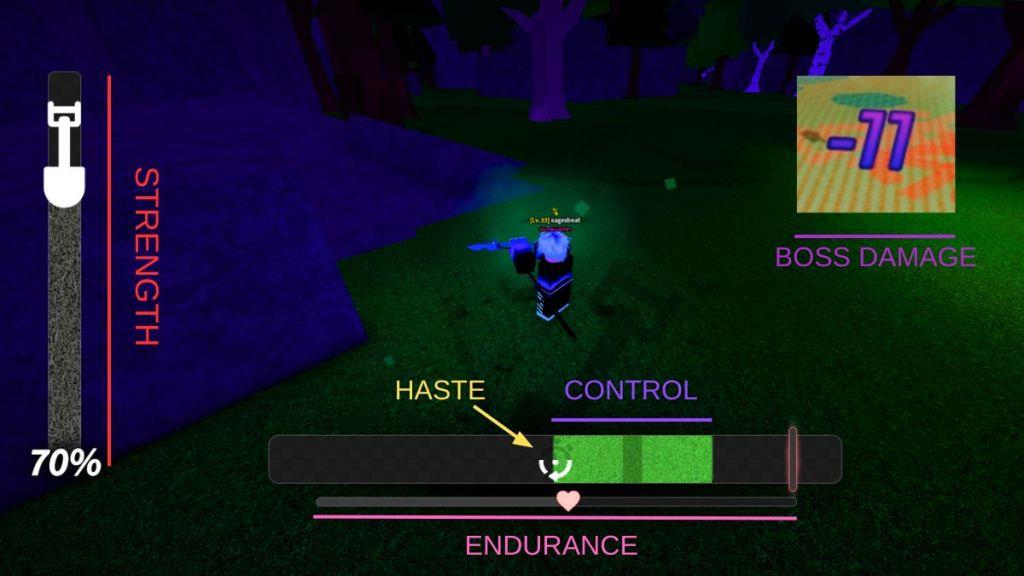
Not every Dig shovel is worth picking up, as we have already addressed in our shovel progression guide. If you are unsure which one to choose, you might end up wasting your money on the wrong option. To help you out, we have put together a Dig shovel stats table that breaks down how each shovel performs.
| Stat | Info |
|---|---|
| Strength | Strength controls how much progress you make with each successful dig. Higher Strength means you will reduce the vertical percentage bar on the left faster. It helps speed up digging overall. |
| Control | Control affects the size of your clickable bar in the digging minigame. A larger bar makes it easier to land strong or regular digs. It’s especially useful if you’re often missing your dig attempts. |
| Haste | Haste reduces the cooldown between digs, even after a miss. It becomes more valuable as the digging speed increases. Faster digs mean more chances to progress quickly. |
| Endurance | Endurance refers to the heart meter you see below the control bar. It isn’t boosted by shovels, but it plays a big role in digging. Higher Endurance slows down the heart meter in the minigame. |
| Luck | Luck increases your chances of digging up rare items. It doesn’t impact digging performance, but it’s key to finding rare items. A high luck stat is a must if you’re hunting rare loot. |
| Boss DMG | Check the Boss Damage stat by hovering over your shovel in the Equipment bag. Boss DMG shows how much damage you deal to bosses per successful dig. It doesn’t help with regular digging, so it’s best to keep a separate shovel, like the Slayer shovel or Prismatic shovel, for boss fights. |
How to Improve Shovel Stats in Dig
Upgrading your shovel in Dig requires gathering coins and materials through consistent digging and trading. Higher rarity shovels provide faster digging speed, greater depth power, and better rewards. You can boost stats by combining shovels, using enhancement items, or purchasing improved versions from the shop. Participating in events or reaching specific milestones often grants limited-edition shovels with unique bonuses, so stay active to strengthen your tools and improve your digging performance.
There are several ways to improve your shovel’s stats in Dig. In this guide, we will walk you through all the methods you can use to upgrade your shovel for better performance.
1. Use Charms Loadout
One of the easiest and most effective ways to improve shovel stats is by using charms in Dig. The game features more than 20 charms, each offering different stat bonuses. For example, if your shovel lacks luck, defeating the Fuzzball boss has a chance to reward players with the Fuzzy Foots charm to upgrade it.
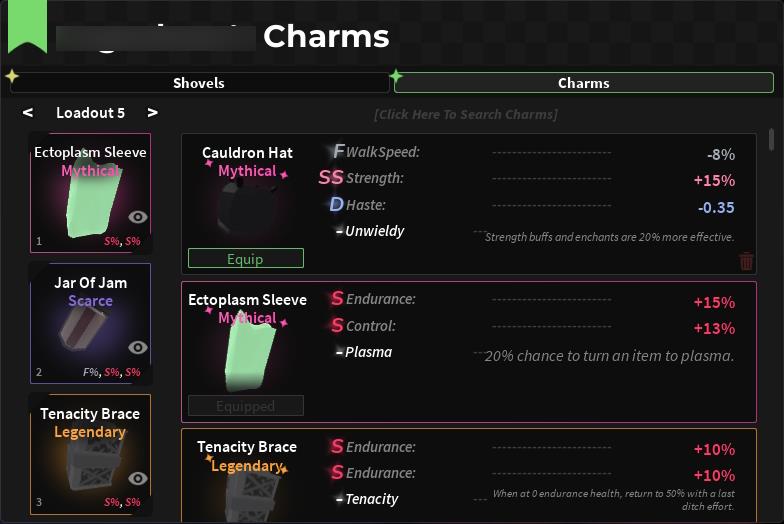
As you explore the game further, you will find plenty of charms that match your playstyle. Once you reach level 25, you will have unlocked all three charm slots and can freely experiment with loadouts.
You can also use a Charm Chisel to reroll charm stats, making them better suited to your shovel’s needs. Keep in mind that the endurance stat is only available through charms, so you might need to have one or two endurance boosting charms to improve the stat.
2. Enchant Shovel
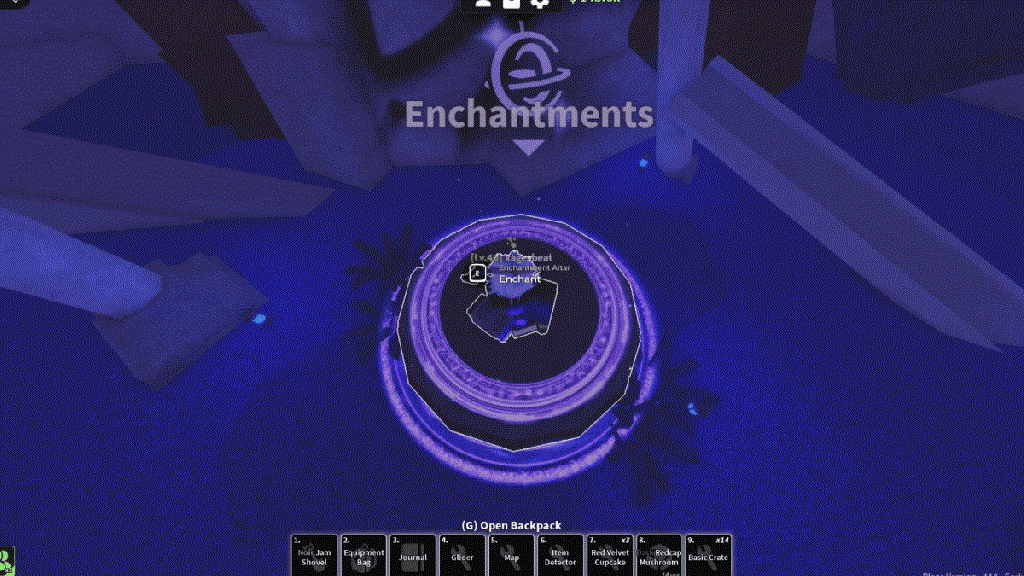
If you’re looking to fine-tune your Dig shovel stats even more, enchantments are a great option. You can find Enchantment Tomes while digging, with better chances if you use the Magnet Shovel or the Abundant enchantment. They can also be purchased from the Dark Wizard NPC.
Once you have an enchantment tome, head to Azure Hollow inside Cinder Cavern to enchant your shovel in Dig and gain valuable stat improvements.
3. Get a Better Shovel
When luck is not on your side, you might end up with the Noir enchantment and F-tier stats on your charms. I know, sounds horrible. If you still want to get better shovel stats, you can just get a better one from different Dig locations.
Best shovels to buy early game in Dig Roblox
In Roblox Dig, early game focuses on affordable shovels from Fox Town or Cinder Shores shops that offer balanced Strength, Control, and the ability to dig rock for faster progression.
Top Early Buys
-
Ruby Shovel (Cinder Shores shop, ~$2,500): Best first purchase with solid Strength/Control for rock digging, enabling quicker money-making without special abilities getting in the way.
-
Copper Shovel (Fox Town shop, $650): Quick upgrade from Wooden; balanced stats for dirt and easy farming to fund Ruby.
-
Rock Shovel (Fox Town shop, $800): Strong for rock terrain and collection bonuses on new items, great if you’re exploring early.
-
Toy Shovel (Fox Town shop, $350): Cheap rare-dig helper with decent stats; pair with quests for Pizza modifier value boost.
Free Early Options
-
Pizza Roller (Penguin Pizza quest reward): Excellent stats for zero cost, adds 1.45x value modifier-grind quests first.
-
Skip training shovels like Wooden or Training; upgrade ASAP for efficiency.
Progression Path
Start with Copper or Toy to farm cash, buy Ruby for rock access and speed, then save for mid-game like Shortcake ($45k) or boss drops. Avoid low-Luck or junk-only shovels early unless farming specifics.
Best starter shovels to buy first in Dig Roblox
In Roblox Dig, the best starter shovels prioritize balanced stats like Strength and Control for quick upgrades from the default Wooden Shovel, focusing on Fox Town shop buys under $1,000.
Top Starter Picks
-
Rock Shovel ($800, Fox Town): Strongest first buy for rock digging with high Boss DMG (25) and Luck (10); ideal for early exploration and combat despite low Haste.
-
Copper Shovel ($650, Fox Town): Reliable all-rounder (Strength 6, Control 4.5) for dirt; great cash farm to reach Ruby faster.
-
Toy Shovel ($350, Fox Town): Cheapest upgrade (Luck 7) for rare digs; solid for newbies practicing minigame timing.
Quick Path
Farm ~$800 with Wooden quests, buy Rock first for speed, then Ruby ($2,500 at Cinder Shores) as your rock powerhouse next.