Roblox players can outsmart rivals and fill their ponds faster with the newest Steal a Duck codes for July 2025-grab these rewards before they vanish from the coop!
While doing so, keep a lookout for the rare specimens, as those can earn you some quick and easy bucks in the game. However, if stealing from other players seems tougher than you imagined, go through our list of active Steal a Duck codes to get free ducks and other rewards. By utilizing these free resources, you can easily get rich in no time.
All New Steal a Duck Codes
Grab the latest Steal a Duck codes for July 2025. Redeem them now for free ducks, coins, and boosts to speed up your progress in this Roblox hit. Codes expire fast, so check back monthly for fresh ones and claim rewards before they vanish.
- Brains: Redeem for a Zombie Duck (NEW)
Expired Steal a Duck Codes
As of writing this, there are no expired codes in the game. You can therefore redeem the rewards for the above as soon as possible.
While you’re here, enjoy other fun games like Slap Tower, Horse Race, or Yeet a Friend. You may further check out our Roblox game codes master list to get an idea of all sorts of the best games available on this platform.
How to Redeem Steal a Duck Codes
Open the game in Roblox. Click the gear icon on the left side for the settings menu. Enter a working code exactly as shown into the text box. Hit the green Redeem button. Check your inventory for the rewards.
While stealing a duck might be a bit tough at the beginning, redeeming the codes for Steal a Duck is really easy, and you just need to follow the steps given below:
- Launch Steal a Duck on your Roblox app.
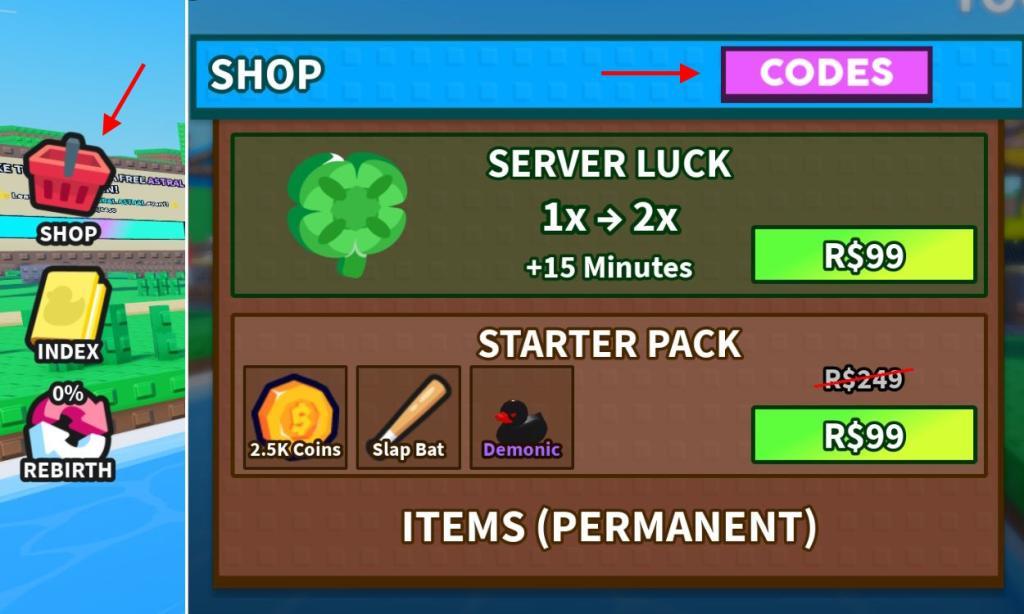
- Click on the Shop icon on the left and then click on the Codes button on top.
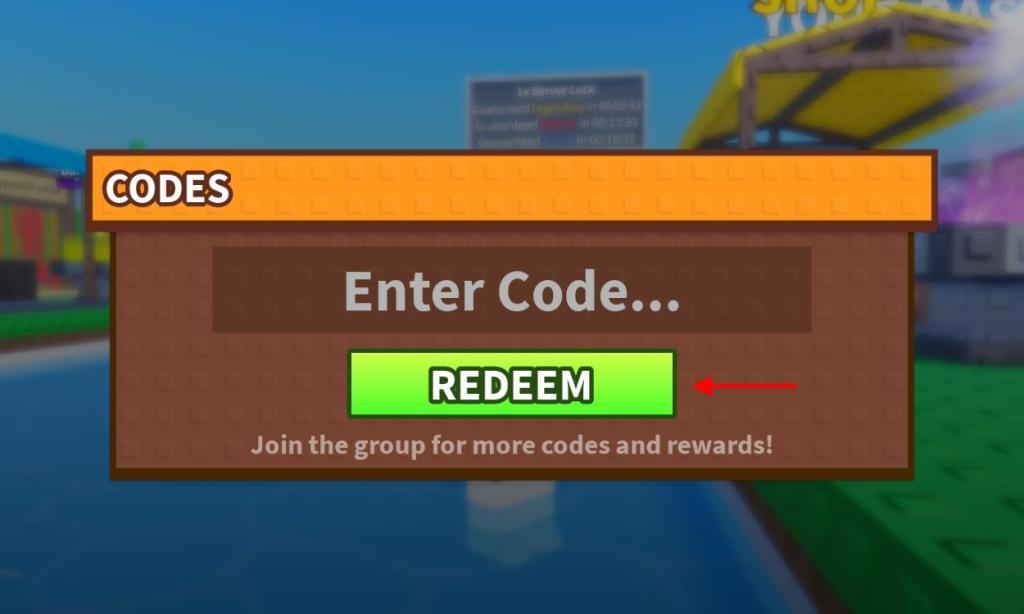
- Input a working code in the text box.
- Click on the Redeem button to get your rewards.
How to Get More Steal a Duck Codes
Boost your progress with smart strategies to maximize Steal a Duck Codes: prioritize completing daily tasks, check for new codes during maintenance windows, and participate in community events for exclusive releases. Keep an eye on official announcements and social channels for limited-time offers, and verify codes in-game promptly to apply them before they expire.
Now coming to another important aspect that where will you get more codes for the game? Since there is no official Discord server yet, all new codes will be released on the official game page on Roblox. You can further consider joining the Aetherscape Studios Roblox community to stay updated on all sorts of in-game news.
Finally, if you don’t feel like hunting down the codes yourself, feel free to bookmark this page right now. Since we update the list frequently, you won’t miss out on any cool rewards released in the game.
Redeem Steal a Duck codes step by step guide
Here is a simple step-by-step guide to redeem Steal a Duck codes in Roblox.
Open the game
-
Launch the Roblox app or website and log into your account.
-
Search for Steal a Duck and press the play button to join the game.
Find the codes menu
-
Once you load in, look at the left side of your screen.
-
Click the Shop button/icon on the left.
-
In the Shop window, click the Codes button at the top (usually purple).
Enter and redeem a code
-
Click in the Enter Code… text box that appears.
-
Type or paste a working Steal a Duck code (for example, WEATHER or BRAINS).
-
Press the green Redeem button to claim your rewards.
-
If the code is valid and active, you receive the reward instantly in-game.
If a code doesn’t work
-
Check for spelling, extra spaces, and capitalization before trying again.
-
If it still says invalid or expired, assume the code has been disabled and try another one from an updated list.
Show screenshots of the Shop and Codes buttons in-game
Steal a Duck does not have publicly available screenshots of the Shop and Codes buttons directly embedded in standard guides or search results.
Visual Guide Description
The Shop button appears as a shopping bag or cart icon on the far left side of the main game screen, typically near other menu icons like settings or inventory.
Clicking it opens a vertical shop panel where the Codes button sits at the top, often as a purple or ticket-shaped icon labeled “Codes.”
A text input box labeled “Enter Code…” and a green “Redeem” button appear below it once selected.
How to View In-Game
Take your own screenshots by loading into Steal a Duck on Roblox and using these steps, since no direct images were found:
-
Join the game and press Shift + Print Screen (or Windows + G for Game Bar on PC) to capture the left-side menu with the Shop icon.
-
Open Shop, then capture again to show the Codes tab at the top of the panel.
Check YouTube code videos for Steal a Duck, as they often demonstrate the exact UI during redemption (search “Steal a Duck codes Roblox gameplay”).
