Chase rare spins and rewards before they vanish-our July 2025 Project Blue Lock codes guide breaks down every working code, how to redeem them, and the fastest ways to boost your Roblox game.
To give yourself a head start, redeem the active Project Blue Lock codes below and get plenty of normal or lucky spins. By using these spins, you can unlock the best characters in the game!
All New Project Blue Lock Codes
All new Project Blue Lock codes give players fresh ways to earn free spins, cash, and other rewards in the Roblox game. These updates keep the gameplay exciting, helping both new and experienced players enhance their team and test new strategies without spending extra resources. Make sure to redeem the latest codes quickly, as some may expire after a short period.
- AIKUUPDATE: Redeem for 5 Lucky Spins (NEW)
- COBRATERRITORY: Redeem for 30 Lucky Spins (NEW)
- SNAKECOIL: Redeem for 20 Lucky Spins (NEW)
- NARUHAYAUPDATE: Redeem for 5 Lucky Spins
- RUNINBEHIND: Redeem for 30 Lucky Spins
- BETTERTHANISAGI: Redeem for 20 Lucky Spins
- SHIDOUUPDATE: Redeem for 5 Lucky Spins
- ZLATAN: Redeem for 30 Spins
- BICYCLEKICK: Redeem for 20 Spins
- 1KFOLLOWERS: Redeem for 3 Lucky Spins
- DEFENSEKING2: Redeem for 20 Spins
- CHAMELEON: Redeem for 30 Spins
- REOUPDATE: Redeem for 5 Lucky Spins
- COPYCAT: Redeem for 3 Lucky Spins
Expired Project Blue Lock Codes
- FREECODE??
- FEELINGLUCKY?
- MCDONALDSCONTROL
- NELNAGI
- 3MVISITS
- 3MHURRAY
- THANKSFOR15K
- ACE-EATER
- DONLORENZO
- PABLOUPDATE
- KAZOOM
- THANKSMATE
- LOKIUPDATE
- NEWRARITY
- THANKSFOR1M
- WOW5K
- KAISERFIX
- HOPEFULLYKAISER
- KAISERUPDATE
- 500KVISITS
- ITOSHISAE
- 400KVISITS
- 2500MEMBERS
- RINUPDATE
- 1500MEMBERS
- 200KVISITS
If you would like to try out a few other football games, go ahead and try out Blue Lock Rivals. Azure Latch, and LOCKED. You may further check our Roblox game codes master list, where you’ll find a list of all the best games to kill time on this platform. If you want our recommendations, Blox Fruits and Grow a Garden are two of the coolest games on the platform.
How to Redeem Project Blue Lock Codes
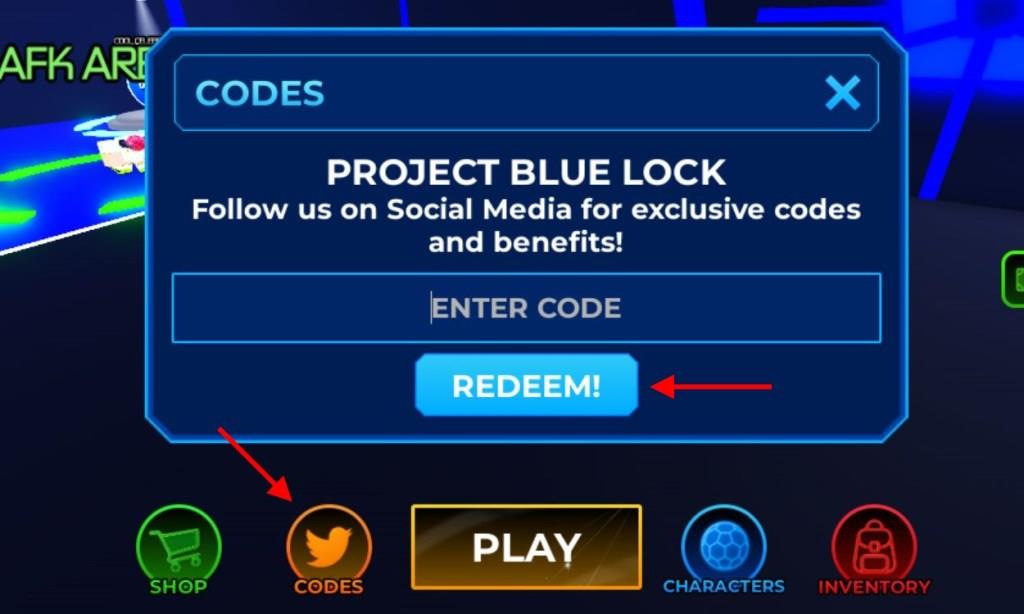
To redeem Project Blue Lock codes, open Roblox and launch the game. Once inside, click on the “Codes” or “Gift” icon, usually found on the main screen. A text box will appear where you can enter your active code. Type the code exactly as shown, press “Redeem,” and your rewards such as spins, coins, or boosts will be added to your account instantly. Make sure the code is valid and not expired before submitting it.
In order to redeem the codes for Project Blue Lock, you need to join the Sub Studios community on Roblox first. Now you may follow the steps below:
- Launch Project Blue Lock on your Roblox app.
- Click on the Codes icon at the bottom of the screen.
- Enter a working code in the pop-up box.
- Click on the Redeem button to claim your rewards.
How to Get More Project Blue Lock Codes
Players can find new Project Blue Lock codes by checking the game’s official Roblox page, Discord server, or social media accounts, where developers often post updates and rewards. Joining the community helps you hear about special giveaways and limited-time codes before they expire. It’s also smart to follow Roblox fan forums and YouTube channels that share code updates regularly, so you never miss a chance to earn extra spins or in-game bonuses.
Tracking down active codes in any Roblox game can be a hassle, especially with frequent updates and codes being released across different platforms. That’s why we recommend bookmarking this page. We update it regularly with the latest codes as soon as they go live, so you never miss out on any freebies.
Furthermore, you can consider joining the Project Blue Lock Discord server. On the server, you will find all the new codes in the ‘codes‘ channel. Lastly, you can join the Sub Studios community on Roblox as mentioned earlier for redeeming the codes and getting news updates on the game.
How to redeem codes in Project Blue Lock
To redeem codes in Project Blue Lock on Roblox, first join the official Sub Studios group, as it’s often required. Launch the game, then tap the Codes button (usually a Twitter bird icon or labeled “Codes”) at the bottom of the screen.
Step-by-Step Guide
Follow these exact steps for success:
-
Open Project Blue Lock via the Roblox app or website.
-
Click the Codes icon at the screen’s bottom to open the input box.
-
Enter a valid code exactly as shown (case-sensitive; copy-paste to avoid typos).
-
Press the Redeem button to claim rewards like spins instantly.
Troubleshooting
Codes may fail if expired, mistyped, or post-update-wait for servers to stabilize. No group membership or prior likes sometimes block redemption, so verify those first. Check Discord’s codes channel for freshest lists.
What are the current active Project Blue Lock codes
Current active codes for Project Blue Lock on Roblox, as of January 2026, include recent ones offering lucky spins for abilities and characters. These expire quickly, so redeem promptly after joining the official Sub Studios group.
Active Codes
-
SHARKY: 20 Lucky Spins
-
PINKYSHARKY: 20 Lucky Spins
-
IAMSHARK: 5 Lucky Spins
-
KURONA: 20 Lucky Spins
-
PINK: 20 Lucky Spins
Recently Expired
Codes like NJR, BARCATRAITOR, 222M, BRAZILTOPSCORER, and BRAZILIANMAESTRO no longer work. Older July 2025 codes have fully expired.
Redemption Reminder
Launch the game, tap Codes at the bottom, enter exactly (case-sensitive), and redeem. Verify group membership first.
