April 2025 brings fresh Mosquitoes VS Humans codes packed with rewards that can shift the balance between swarms and survivors. Whether you’re commanding the bloodthirsty or defending against the bite, these new codes might just give you the edge you need in Roblox’s wildest showdown.
While you can’t buy your way out of this one, getting some skins in the game helps. Use our list of new Mosquitoes VS Humans Codes to get free coins. You can then use this currency to buy mosquito and human skins and style up your blood sucking game.
All New Mosquitoes VS Humans Codes
All new Mosquitoes VS Humans codes let players claim fresh rewards to boost gameplay, from in-game currency to power-ups that help in battles between mosquitoes and humans. These codes often expire quickly, so make sure to redeem them as soon as possible to get the latest bonuses and stay ahead of opponents.
As of writing this, there are no working Mosquitoes VS Humans codes. However, we do suggest you keep checking back, as a new code will pop up very soon.
Expired Mosquitoes VS Humans Codes
- firstcode
While working codes for this experience are rare right now, our Roblox game codes master list has a lot of other adventures you can embark on. Want a more serious experience? In that case, check out games like Blue Lock Rivals and Ninja Time.
How to Redeem Mosquitoes VS Humans Codes
To redeem Mosquitoes VS Humans codes, open Roblox and launch the game. Once inside, tap the Twitter or Codes button, usually found on the main screen. A text box will appear-enter an active code exactly as shown and confirm it to claim your free rewards. If the code is valid, the items or bonuses will be added to your account instantly. Be sure to check that you type the code correctly, as expired or misspelled codes won’t work.
Ready to get those coins? Follow the steps below to redeem the codes for Mosquitoes vs Humans:
- Launch Mosquitoes VS Humans on the Roblox app.
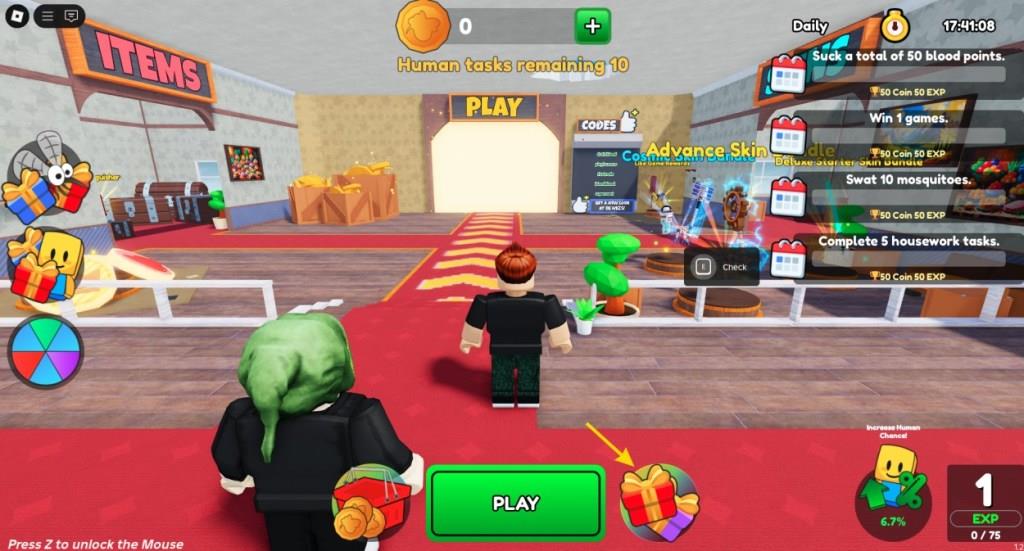
- Click the Gift icon on the bottom bar
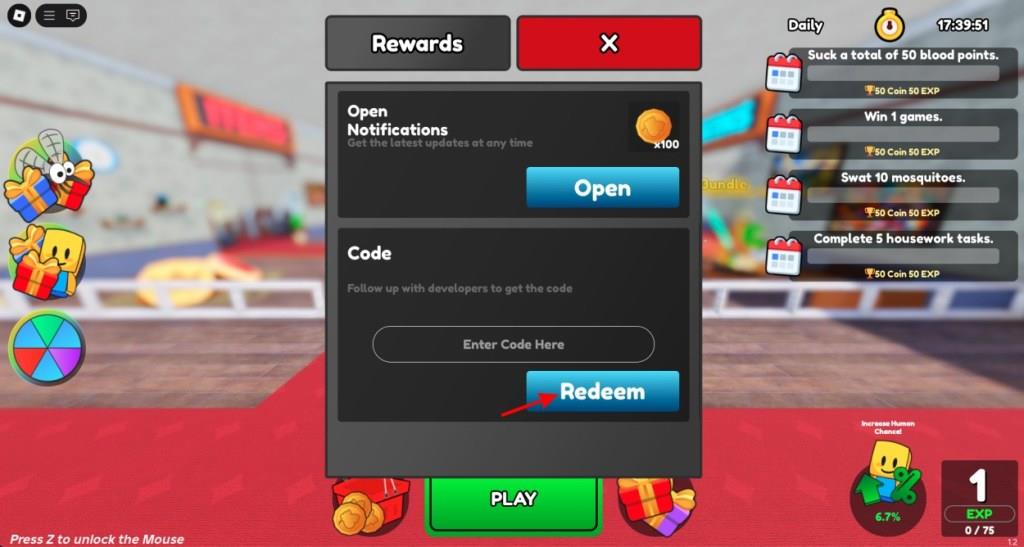
- Scroll down till you see the Code window.
- Enter a working code in the textbox.
- Click the Redeem button and claim your coins.
How to Get More Mosquitoes VS Humans Codes
To get more Mosquitoes VS Humans codes, keep an eye on the game’s official Roblox page, social media accounts, and developer announcements. Join the Discord server or follow the game’s community groups, where new codes are often shared first. Codes may also appear during special events or updates, so checking frequently ensures you don’t miss limited rewards.
The best place to find the latest codes for Mosquitoes VS Humans is this article itself, as we add them immediately upon release. However, we do suggest you join the official Mosquitoes vs Humans Discord server. Once there, keep an eye on the ‘codes‘ channel.
Furthermore, if you want even more codes, then do follow the developer Twitter on X. Lastly, join the game’s official Roblox community for all the news on the game.
How to redeem codes step by step in Mosquitoes VS Humans
Redemption Steps
Launch Mosquitoes VS Humans on Roblox. Click the red gift icon next to or at the bottom of the Play button.
Scroll down to the Codes section or text box labeled “Enter Code Here.” Enter the code exactly as shown and press the Redeem button.
Rewards appear immediately if valid; some codes require Level 3 or higher.
Troubleshooting Tips
Copy-paste codes to avoid typos or case-sensitivity issues. Restart the game if errors persist.
Codes expire quickly, so verify activity through official sources like the developer’s X or Discord.
Show where the gift icon is located in the UI
Gift Icon Location
The gift icon appears as a red present box on the game’s main menu screen in Mosquitoes VS Humans.
It sits directly next to the large green Play button, typically at the bottom center of the lobby UI.
Visual Identification
Look for the prominent red gift/present symbol-often outlined or glowing slightly for visibility.
Clicking it opens the code redemption menu with a text input field labeled “Enter Code Here.”
