Sail through chaos and treasure in Dead Sails this March 2025 with the newest Roblox codes that can boost your gold, gear, and glory. Keep your ship afloat and crew loyal before the next storm hits-these codes won’t last forever.
So, we have brought you some active Dead Sails codes that will reward you with free Dabloons. These freebies will help you buy some items required for your survival, like Coal, Dynamite, or Bandage.
All New Dead Sails Codes
All new Dead Sails codes bring players fresh rewards such as extra coins, boosts, and exclusive gear to enhance gameplay. These codes are updated regularly, helping players gain a quick advantage and progress faster through battles and ship upgrades. Make sure to redeem them soon, as many expire quickly after release.
- patchverify: Redeem to get 20 Dabloons (NEW)
- Release: Redeem to get 10 Dabloons (NEW)
Expired Dead Sails Codes
Currently, there are no expired codes as the game is pretty new. So, redeem these codes ASAP and grab all the freebies before the developers take them down.
If you want to look for other games on this platform that suit your taste, do check out our Roblox game codes master list where you will have lots of options to choose from. Furthermore, you can try out other fun survival games like Survive the Killer and Squid Game in the meantime.
How to Redeem Dead Sails Codes
Enter your Dead Sails codes in the in-game code menu and tap Redeem to receive your rewards instantly.
Getting rewards from the codes for Dead Sails is as easy as it gets. Simply follow the steps below to redeem the codes:
- Launch Dead Sails in the Roblox app.
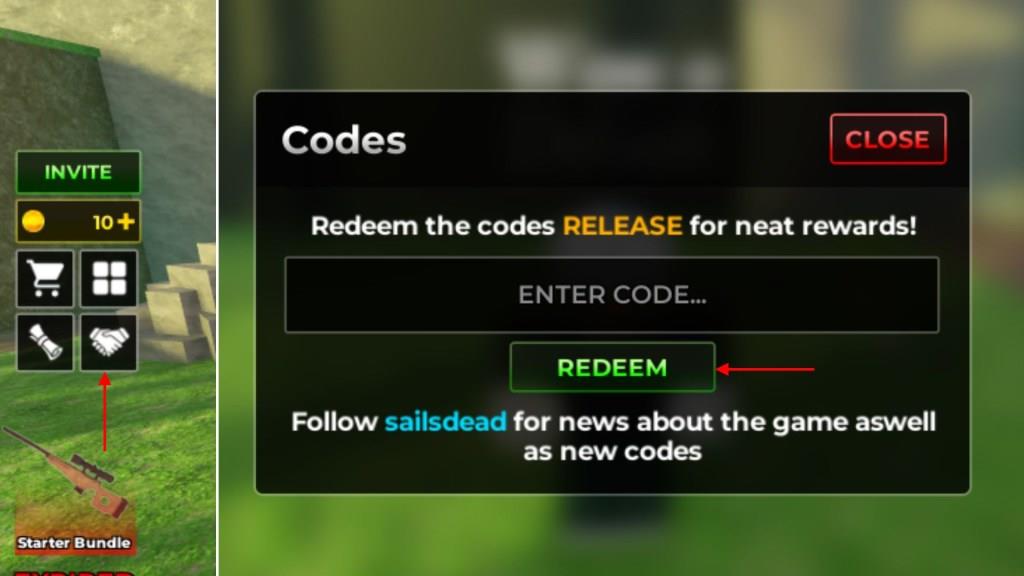
- Click on the Codes icon (Handshake) on the left side of the screen.
- Type in a working code in the Enter Code text box.
- Click on the Redeem button to claim your rewards.
How to Get More Dead Sails Codes
New Dead Sails codes are usually shared through the game’s official social media accounts, such as Twitter, Discord, or the Roblox group. Checking these channels regularly ensures you don’t miss recent updates or limited-time rewards. You can also follow Roblox content creators who feature Dead Sails, as developers sometimes collaborate with them to release special codes. Bookmarking reliable fan sites or community pages can also help you stay ahead of new releases.
It can be a tiresome process to be on the lookout for new codes every time the game updates. Hence, I would recommend you bookmark this page as we always keep our code list updated whenever new ones are released. We also get rid of the inactive codes once they stop working so that you do not waste your time redeeming them.
However, if you want to hunt the codes for Dead Sails by yourself, you can follow the game’s socials. You can go ahead and join the official Dead Sails Discord server and look for new codes on the ‘announcements‘ channel. There is also a codes channel on the server that may contain new codes in the future. So, keep an eye on that as well. Furthermore, consider following the Twitter X Account or the Awesome Melon Games community on Roblox to stay updated about any game news all the time.
How to redeem codes in Dead Sails step by step
Redeeming codes in Dead Sails is straightforward using the in-game menu. Follow these steps exactly to claim free Dabloons or Lucky Spins, as outlined across multiple guides.
Step-by-Step Guide
-
Launch Dead Sails through the Roblox app or website.
-
Locate the Codes icon, shown as a handshake symbol, on the left side or top of the screen.
-
Click the icon to open the redemption window.
-
Enter a valid code into the “Enter Code” text box-copy and paste to avoid typos, as codes are case-sensitive.
-
Press the green “Redeem” button to claim rewards instantly.
Rewards like Dabloons appear directly in your inventory without a confirmation popup. Each code works once per account, and expired ones trigger a “Code not found” error.
Open the Codes (handshake) menu in Dead Sails where is it located
The Codes menu (handshake icon) in Dead Sails appears on the left side of the screen. Guides consistently place it among the main menu buttons for quick access.
Exact Location
Look below the currency counter on the left side, where four buttons arrange in two rows. The handshake icon sits in the second button of the second row-hover over it to confirm the “Codes” label.
Opening the Menu
Click the handshake directly to open the redemption window with the code input field. Some sources note it near the top-left or chat area, but left-side consensus holds across updates.
