Unlock the hidden codes that power up Roblox anime adventures in March 2025.
Use our list of the latest Anime Power codes from below and redeem them to get free potions, crystals, diamonds, fragments, and other resources. Once you use these free rewards, you can easily level up in the game and slay your competition way faster.
All New Anime Power Codes
Get ready to explore fresh power codes and quick boosts for your Roblox anime adventures, featuring the latest inclusions and practical tips to maximize your in-game progress.
- 7.5KLIKES: Get 1x Power Potion (NEW)
- MINIUPDATE: Get 10x Lineage Crystals (NEW)
- 5KLIKES: Get 50 Diamonds (NEW)
- sorry4shutdown: Get 1x Drops Potion (NEW)
- RELEASE: Get 100 Diamonds
- NOEXPLOITERS: Get 1x Power Potion
- PLIQUE: Get 1x Damage, Coin, and Power Potion
- 1KLIKES: Get 50 Sword Fragments
Expired Anime Power Codes
The game just released and there are no expired codes yet. So, make sure you redeem the codes before the developers remove them.
While you wait for new codes, you can check out more anime games like Jujutsu Infinite or Blue Lock Rivals. However, if you want to enjoy idle gaming while having the best anime characters, you must try Anime Last Stand or Anime Vanguards. Bored with the anime theme? Check out our Roblox game codes master list and decide on a fresh adventure.
How to Redeem Anime Power Codes
To redeem Anime Power codes, open Roblox and launch the Anime Power game. Click the Codes button on the main menu or in the settings section. Enter a working code into the text box exactly as shown, then press Redeem to claim your rewards. If the code is valid, bonuses such as coins, boosts, or power-ups will be added to your account immediately. Expired codes will display an error message, so always check the latest active list before trying them.
Ready to redeem the codes for Anime Power? Follow the step-by-step process below and claim your rewards effortlessly:
- Launch Anime Power on the Roblox app.
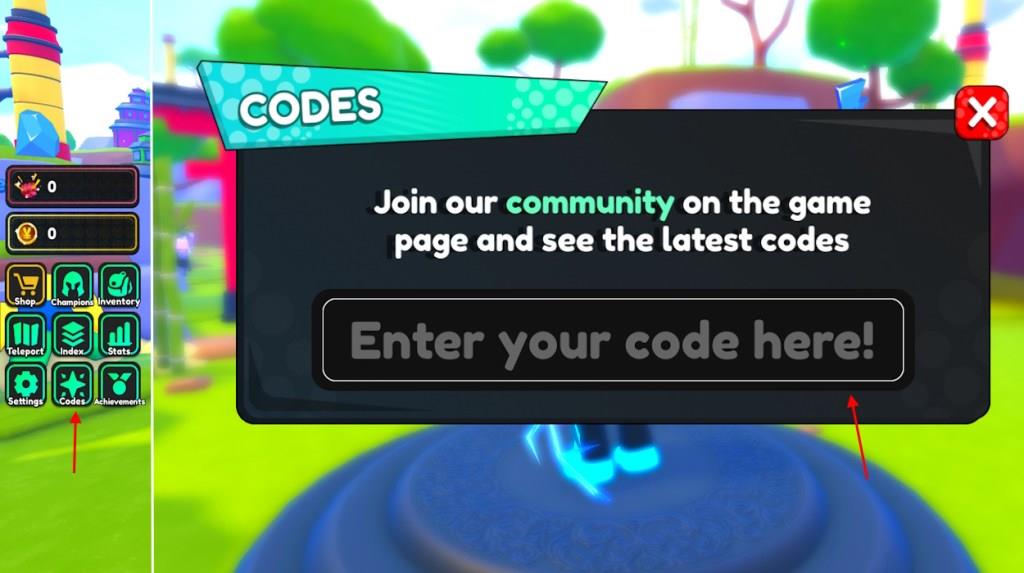
- Click the Codes button from the left menu.
- Type in a working code in the Enter your code here! area.
- Click the enter button on your device to get the reward.
How to Get More Anime Power Codes
Players can find more Anime Power codes by checking the game’s official Roblox page, joining the developer’s Discord server, and following their social media accounts for updates. New codes are often released during milestones, special events, or game updates. It’s also a good idea to check community forums and fan sites, where active players usually share the latest working codes.
The best place to find codes for this experience is the official socials. Although the game’s developers haven’t shared social media links, there are community servers. Join the Anime Power Discord server and check the codes channel to stay updated with the new ones. The game receives frequent updates so ensure you keep an eye on the announcements and updates channel. Moreover, you can join the AlphaXGames Roblox community to learn more news about the game.
However, finding codes in these official channels might take away a lot of time. That is where we come in. We go through the channels regularly to look for the latest codes for Anime Power. So, if you don’t want to miss the free rewards, bookmark this page and visit us frequently.
Redeem codes in Anime Power step-by-step guide
To redeem codes in Anime Power on Roblox, follow this straightforward process directly in the game interface.
Step-by-Step Guide
-
Launch Anime Power through the Roblox platform and join a server.
-
Locate the “Codes” button or tab on the left side of the screen, typically in the menu between Settings and Achievements.
-
Click it to open the code redemption window, which includes a text input field labeled “Enter your code here!” or similar.
-
Copy and paste a valid code (case-sensitive) into the text box to avoid typos-examples include older ones like RELEASE or 7.5KLIKES from March 2025 context.
-
Press Enter on your keyboard or tap the confirmation button to submit; rewards like potions or diamonds appear instantly if active.
Troubleshooting Tips
Codes are one-time use per account and expire quickly, so test promptly. If “Already claimed” shows, it’s redeemed; invalid ones trigger no message. Check in-game notifications for success.
Show exact steps to find the Codes button in-game
In Anime Power on Roblox, the Codes button appears directly in the main game menu for easy access.
Exact Steps to Locate
-
Launch the game and fully load into a server until the spawn area appears.
-
Look at the left side of your screen for the vertical menu bar, positioned between the main gameplay area and any chat window.
-
Scroll or identify icons in this bar: Codes is typically the second or third option from the top, shown as a “Codes” label or scroll icon right below Settings (gear) and above Achievements or Leaderboard.
-
Click it to expand the redemption textbox-no main menu or shop navigation required.
Visual Confirmation
If the menu is collapsed, hover or tap the left edge to expand it. Mobile users pinch-zoom out for clarity. Rewards confirm success immediately.
