March 2025 brings fresh Hollow Era codes packed with new rewards for Roblox players eager to boost their progress and style. Here’s how to claim every code before they expire and make the most of the latest bonuses.
Use our latest Hollow Era codes and get free cash or skill point reset. Once you utilize these freebies, no one can stop you from devouring the souls.
All New Hollow Era Codes
New Hollow Era codes are a quick way to earn free rewards like coins, boosts, and exclusive items that can improve your gameplay. These codes are released by the developers to celebrate updates, events, or milestones, and they change from time to time. Make sure to redeem them as soon as possible since many expire quickly. Regularly checking for new codes helps you stay ahead and get the most out of Hollow Era each month.
- SORRYFORSHUTDOWNSFIXEDFR: Redeem for 1 Skill Tree Reset Orb (NEW)
- 1MVISITS: Redeem for 10k Cash (NEW)
- 20KMEMBERS: Redeem for 10k Cash (NEW)
Expired Hollow Era Codes
- 10KLIKES
- SORRYFORSHUTDOWNS
- 5KLIKES
- SORRYFORSHUTDOWN2
- 2500LIKES
- 100KVISITS
- SORRYM1EXPLOITINGBUG
- 4KMEMBERS
- 500LIKES
- RELEASE
Although the above codes have expired, you can still try your luck with them. However, if that doesn’t take your fancy, I suggest checking out our Roblox game codes master list. More specifically, we suggest playing titles like Anime Adventures and Anime Vanguards.
How to Redeem Hollow Era Codes
To redeem Hollow Era codes, open Roblox and launch the Hollow Era game. Once you’re in the main menu, find the “Codes” or “Gift” button-usually represented by an icon on the screen. Click it to open the redemption window, then type or paste your active code into the text box. Press “Redeem” to claim your rewards instantly. Make sure to enter each code exactly as shown, since they’re case-sensitive and may expire after a limited time.
Note: You must join the official Roblox Hollow Era Roblox community to be able to redeem the codes in-game.
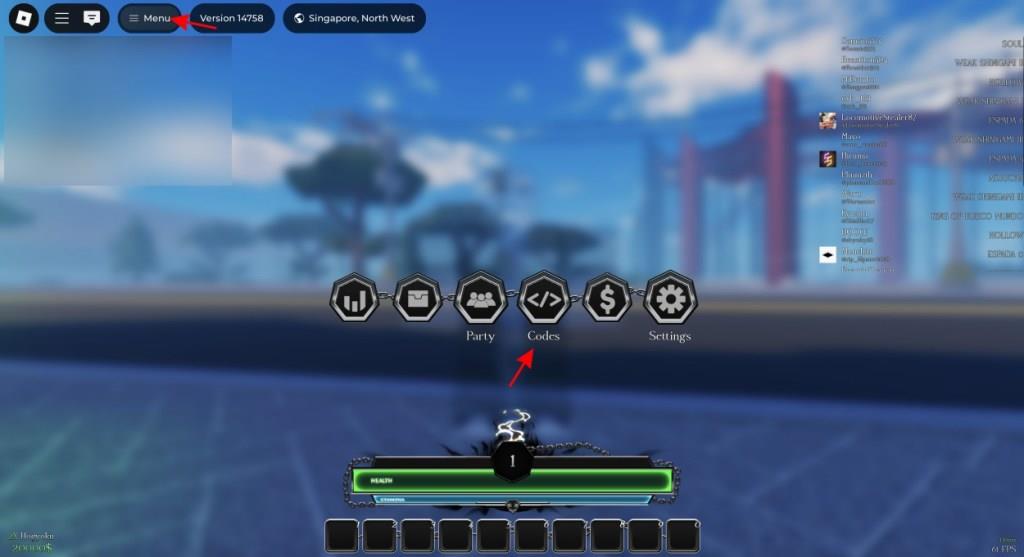
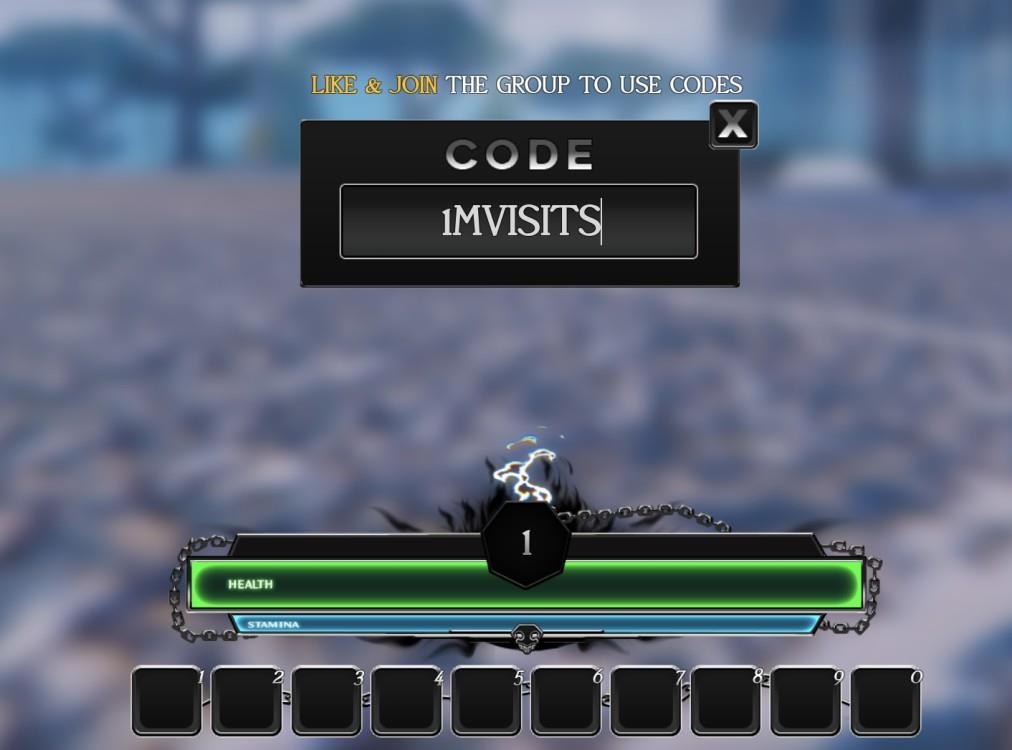
Thankfully, it’s quite easy and quick to redeem codes for Hollow Era. Follow the steps below to do so:
- Launch Hollow Era on Roblox.
- Click on the Menu icon on the top left.
- Click on the Codes button from the menu.
- Input a working code in the text box.
- Simply press Enter and get your rewards.
How to Get More Hollow Era Codes
Players can find new Hollow Era codes through the game’s official social media pages, such as Twitter, Discord, and YouTube, where the developers share new rewards during updates and special events. Joining the community channels and turning on notifications helps ensure you never miss new releases. Checking the game’s description on its Roblox page can also provide active codes, as developers often update them directly after patches or milestones.
As always, we recommend checking back right for the latest Hollow Era codes as we add them immediately. However, we also suggest you join the official Hollow Era Discord server. Once there, make your way to the ‘game-news‘ channel and go through the announcements to find new codes.
Besides redeeming the latest codes, we suggest you also join the official Hollow Era Roblox community for the latest news on the game.
How to redeem codes in Hollow Era step by step
Redeeming codes in Hollow Era on Roblox follows a straightforward process that requires joining the official group first.
Prerequisites
Join the Hollow Era Roblox group via the game’s page, as codes won’t work without membership. Like the game if prompted. This step ensures eligibility for rewards like cash and rerolls.
Step-by-Step Guide
-
Launch Hollow Era on Roblox and create a character slot if needed, then join a server.
-
Press the M key (or tap the menu icon-three lines-at the top-left on mobile).
-
Click the Codes button (often shown as or a link icon).
-
Enter the code exactly as listed (case-sensitive; copy-paste to avoid errors).
-
Press Enter to claim rewards instantly.
Troubleshooting Tips
Codes fail due to typos, expiration, or unmet requirements like group membership-double-check these. Mobile users can long-press to copy codes for pasting.
Open the Hollow Era codes menu in-game step by step
Opening the codes menu in Hollow Era requires accessing the main in-game menu first.
Prerequisites
Join the official Hollow Era Roblox group and launch the game. Create a character slot on the start screen by pressing the “+” icon, then hit Play to enter a server.
PC Steps
-
Once in-game, press the M key on your keyboard to open the main menu.
-
Click the icon (codes button) or Codes option in the menu.
Mobile Steps
-
Tap the three horizontal lines (menu icon) at the top-left of the screen.
-
Select the or Codes button from the menu.
This opens the code redemption box for entering active codes like HALLOWEEN2025.
