Grab rare plushies and claim free rewards with these fresh Claw Machine Simulator codes for March 2025-perfect for players aiming to boost their crane skills and expand their collection fast.
We have compiled the latest Claw Machine Simulator codes that will give you those free tokens and tickets. Spend these freebies at the claw machine and catch the rare plushies.
All New Claw Machine Simulator Codes
Grab the latest active Claw Machine Simulator codes to earn free rewards like coins, gems, and exclusive in-game items. These codes can help you upgrade your claw, collect rare prizes faster, and progress more easily through each level. Check back often, as new updates usually bring additional codes and limited-time bonuses.
- RELEASE: Get 1k Tokens
- BRITE: Get 50 Tickets
- RUSSO: Get 50 Tickets
Expired Claw Machine Simulator Codes
The game just released and there are no expired codes yet. So, make sure you redeem the codes before the developers remove them.
There are plenty of simulator games on Roblox similar to Claw Machine Simulator. We suggest you check out Fisch and Car Training if you want to keep your simulator rush going. Otherwise, dive deep into our Roblox game codes master list and select your next adventure.
How to Redeem Claw Machine Simulator Codes
To redeem Claw Machine Simulator codes, open Roblox and launch the game. Tap the Twitter or Codes icon on the main screen to open the redemption window. Enter an active code exactly as shown, including any capitalization or symbols, then press the Redeem button to claim your reward. If the code is valid, your in-game currency or prizes will appear in your account right away.
Before you start the redemption process, you must complete the tutorial in the game. Once you are done with it, follow the steps below to redeem the codes for Claw Machine Simulator:
- Launch Claw Machine Simulator on Roblox.
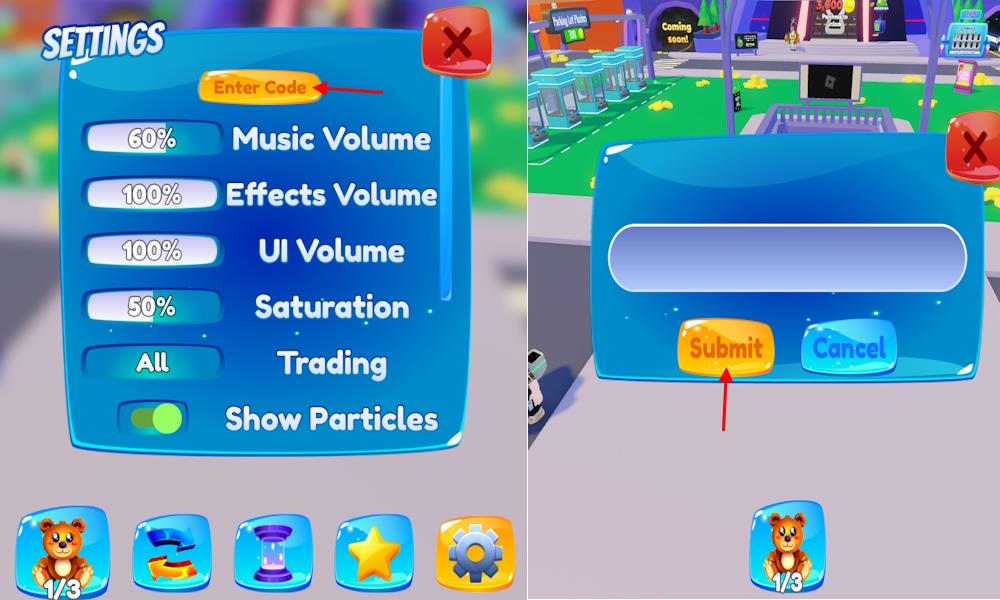
- Click the plushie bear icon –> gear icon from the bottom menu.
- Select the Enter Code tab and type a working code.
- Click the Submit button to claim rewards.
How to Get More Claw Machine Simulator Codes
New Claw Machine Simulator codes are often released through the game’s official social media channels such as Twitter, Discord, and Roblox group posts. Players should follow the developers and join the community servers to catch new announcements quickly. Checking fan sites, YouTube creators, and update logs can also help find active codes before they expire. Staying active during special events or updates usually gives the best chance to grab fresh rewards.
The best place to find the codes for this experience is from the official social pages. Ideally, the developers share new codes in the RB Battles Discord server. On the server, look for the announcement channel and keep an eye out for the new codes. However, there can be other codes in separate channels which can make your scavenger hunting hard. Make sure you go through all the channels to stay updated. You can also follow the Twitter for more codes and other updates.
While the freebies from the codes make your simulation fun, clawing for the codes can get time-consuming. That is why, we suggest you bookmark this page to stay up-to-date with the codes for Claw Machine Simulator. You can also find more free rewards if you join the RB Battles Games Roblox community. If the codes aren’t working, ensure you restart the game and Roblox. Moreover, the Claw Machine Simulator codes are case-sensitive, so copy them directly from our list to avoid any typo issues.
How to redeem codes step by step in Claw Machine Simulator
To redeem codes in Claw Machine Simulator on Roblox, first complete the in-game tutorial if you haven’t already. Follow these exact steps for success.
Step-by-Step Guide
-
Launch Claw Machine Simulator on Roblox and ensure you’ve finished the tutorial (it ends after defeating the first boss, Todd).
-
Click the plushie bear or teddy bear icon at the bottom of the screen to open your inventory.
-
Tap the gear or cogwheel icon (bottom-right in inventory or bottom menu) to access settings.
-
Select the yellow or golden “Enter Code” button or tab at the top of the settings menu.
-
Paste a valid code (like BRITE or RUSSO) into the text box-codes are case-sensitive.
-
Hit “Submit” to claim rewards; a pop-up confirms success.
Common Fixes
Copy-paste codes to avoid typos, restart the game if errors occur, or check Roblox servers. Codes come from sources like RB Battles Discord.
Show where the plushie bear icon is located on screen
The plushie bear icon in Claw Machine Simulator appears at the bottom center of the screen after completing the tutorial. Tap it to access your inventory and proceed to code redemption.
Visual Location
This teddy bear-shaped button sits prominently in the lower UI bar, often next to claw controls and currency displays. It resembles a cute stuffed animal to match the game’s theme.
Quick Access Tips
-
Zoom out if mobile view hides bottom icons.
-
Ensure tutorial completion (post-Todd boss); icon unlocks then.
-
From there, gear icon → “Enter Code.”
