New crossover, fresh rewards – Arise fans can grab exclusive Roblox codes this March 2025. Whether you’re after rare gear or bonus currency, these limited-time codes bring extra power to your next in-game adventure.
Here is a list of all the latest Arise Crossover codes that will give you free cash and other in-game rewards. Use these in-game resources to become the ultimate dungeon hunter.
All New Arise Crossover Codes
The latest Arise Crossover codes bring fresh rewards for players eager to enhance their Roblox experience. By redeeming these updated codes, you can claim exclusive in-game items, currency, and boosts that give your character a quick advantage. The list is refreshed regularly, so checking back for new codes can help you stay ahead and make the most of special crossover events featured in Arise.
- BETA: Get 250 Cash (NEW)
Exclusive Codes
Apart from the public codes, there are some exclusive codes that only a few select users can utilize to get free rewards. If you played the game in the alpha or testing phase, you will be eligible to redeem these codes:
- AlphaTester (alpha test participants only)
- TESTERQA (QA testers only)
- TESTER (testers only)
- CCTESTER (content creators only)
Expired Arise Crossover Codes
- ALPHA
While you wait for more codes, did you know there are such similar anime dungeon-hunters on Roblox? From that massive list, we suggest you try Jujutsu Infinite and Blox Fruits. But if you are looking to expand your horizons with new experiences, check out our Roblox game codes master list.
How to Redeem Arise Crossover Codes
To redeem Arise Crossover codes, open the game on Roblox and select the “Codes” option from the main menu or settings. Enter an active code exactly as shown, including capitalization and punctuation, then press “Redeem” to claim your rewards. If the code is valid, your in-game items or bonuses will appear in your inventory right away; if it shows an error, double-check for typos or expired codes before trying again.
Clearing dungeons in the game is difficult but if you follow the steps below, you can easily redeem the codes for Arise Crossover:
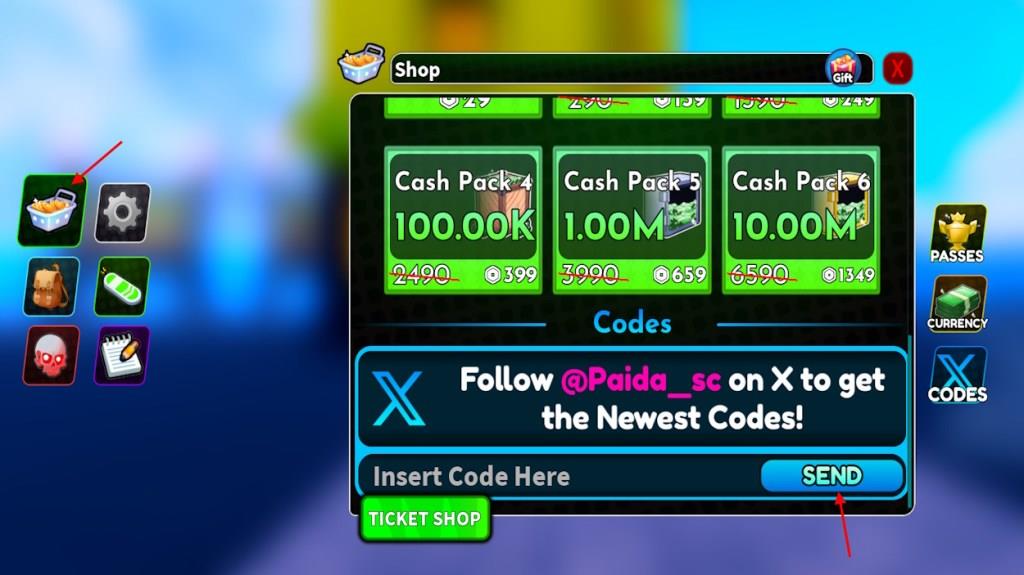
- Open Arise Crossover on the Roblox app.
- Click the Shopping cart on the left menu.
- Select the Codes option (X) from the right tab.
- Insert a working code in the text box.
- Click the Send button to claim rewards.
How to Get More Arise Crossover Codes
Boost your Arise Crossover codes by following reliable official channels, checking daily social posts, and joining sanctioned events, then quickly redeeming any codes you find through the in-game redeem feature.
If you are looking for more codes, don’t worry; we got you covered. We go through the internet every day to find the latest freebies so that you never miss out on any of them. That is why we suggest you bookmark this page and wait until more active codes for Arise Crossover are here. But as a dungeon hunter yourself, you might want to taste the victory of hunting the codes by yourself.
To do so, the best place is the Arise Crossover Discord server. On the server, look through the ‘game-codes!’ channel. Here, the developers regularly add the latest codes. You can also follow the developer Twitter and wait for more exclusive rewards. Moreover, keep an eye on the codes while typing them to stay clear of any redemption errors. If there is an issue, we suggest you copy the codes directly from our list.
How to redeem codes in Arise Crossover step by step
To redeem codes in Arise Crossover on Roblox, follow these straightforward in-game steps.
Step-by-Step Guide
-
Launch Arise Crossover via the Roblox app or website and join a server.
-
Locate the shopping cart (or shop) icon on the left side of the screen.
-
Click it to open the shop menu, then select “Codes” (often marked with an X or at the bottom-right of the pop-up).
-
Enter the code exactly as shown (case-sensitive; copy-paste to avoid errors) into the text box.
-
Click “Send” or “Redeem” to claim rewards, which appear in your inventory or mailbox instantly.
Troubleshooting Tips
Codes may fail if expired, already used, mistyped, or if you’re in tutorial mode-complete any intro missions first. No account linking or prerequisites are typically needed beyond logging in.
Open the in-game shop and locate the Codes entry step guide
Open the in-game shop and locate the Codes entry by following these precise steps in Arise Crossover on Roblox.
Step 1: Launch Game
Start Arise Crossover and join any server to load into the main gameplay area.
Step 2: Find Shop Icon
Look on the left side of your screen for the shopping cart icon (shop button), typically near the bottom or middle of the UI panel.
Step 3: Open Shop Menu
Click the shopping cart to expand the shop interface; a pop-up or full menu appears with purchase options and tabs.
Step 4: Locate Codes Tab
In the shop pop-up, scroll or look at the bottom-right corner for the “Codes” button (may appear as an X icon or labeled tab); select it to open the code entry field.
