Soar past your rivals with the latest Flying Wings Race Simulator codes for March 2025-grab free rewards, boost your speed, and claim the skies before anyone else does.
To enhance your flight, here are the latest Flying Wing Race Simulator codes, which provide speed, magnet, and cheater potions. Utilize these free rewards to gain various flying boosts and reach new heights.
All New Flying Wings Race Simulator Codes
Stay ahead in Flying Wings Race Simulator with the newest March 2025 codes that offer rewards such as extra speed boosts, in-game currency, and exclusive upgrades for your gliders. These codes give both beginners and skilled players an easier way to progress through races and customize their aircraft. Make sure to redeem them quickly, as some may expire or be replaced with future updates.
- MERRY_GO_ROUND: 3 Speed Potions
- SPOOKY: 3 Cheater Potions
- launch: 3 Magnet Potions
- chicken_wings: 3 Cheater Potions
Expired Flying Wings Race Simulator Codes
- GOD_BLESS_AMERICA
- RIO_DE_JANEIRO
- glory_to_the_motherland
- bo’oh’o’wa’er
- hola_amigo!
- christmas24
Even though the game has plenty of codes for it, we understand if you want more. For all those cases and more, our Roblox codes master list will come to our rescue. If you’re tired of the skies, games like Monster Race and Race Clicker are the ones you should try.
How to Redeem Flying Wings Race Simulator Codes
To redeem Flying Wings Race Simulator codes, launch Roblox and open Flying Wings Race Simulator, then tap the Settings or Codes button, enter your code exactly as shown, and press Redeem to receive your in-game rewards. If a code doesn’t work, double-check for typos or expiration and try again with a fresh code.
Thankfully redeeming codes for Flying Wings Race Simulator is faster than taking to the skies. Follow the steps below to learn how:
- Start Flying Wings Race Simulator on Roblox.
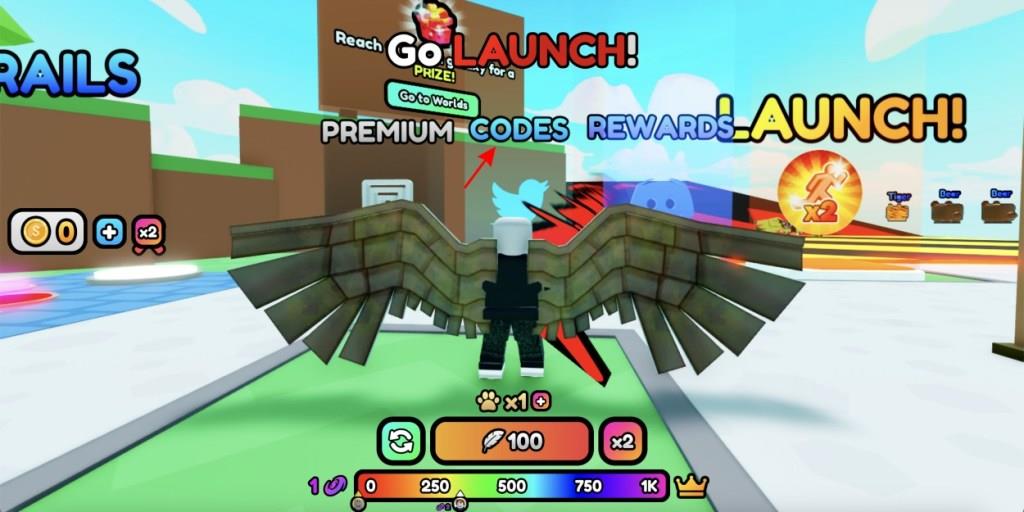
- Walk to and step inside the Code box.
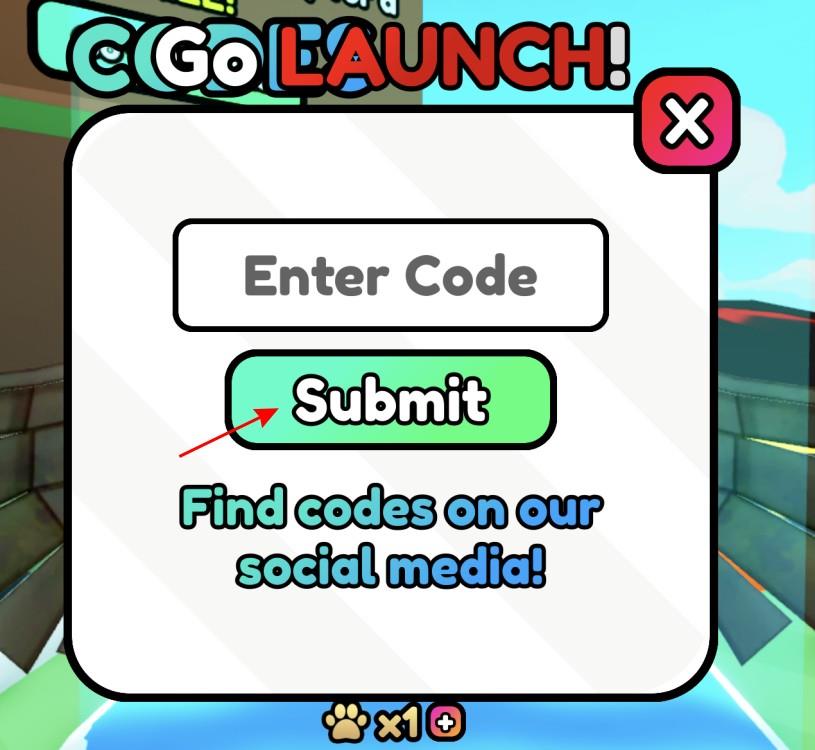
- Input a working code in the text box.
- Click on Submit and redeem your rewards.
How to Get More Flying Wings Race Simulator Codes
Players can find more Flying Wings Race Simulator codes by following the game’s official Roblox page and joining the developer’s group or Discord server, where new codes are often posted first. Checking social media accounts, such as X (Twitter) or YouTube channels related to the game, can also help. Many Roblox fan communities share fresh codes soon after they appear, so staying active in those spaces increases the chance of spotting new rewards quickly.
As we keep telling you, the best way to get the newest Flying Wings Race Simulator codes is to keep an eye here. This is because we add codes as we see them. Want even more? Drop into the official Simple Bricks Discord server. Here, keep an eye on the ‘announcements’ channel which posts the latest codes.
Furthermore, I do recommend following the official Twitter for even more news. You should also join the Simple Bricks Wings Roblox community for the latest news on the game.
How to redeem codes step-by-step in Flying Wings Race Simulator
Redeeming codes in Flying Wings Race Simulator follows a straightforward process in the Roblox lobby area. Codes unlock free potions like Speed, Magnet, or Cheater boosts to aid racing progress. Players must interact with a specific in-game sign or zone rather than a menu button.
Step-by-Step Guide
Follow these exact steps for successful redemption:
-
Launch Flying Wings Race Simulator on Roblox.
-
Locate the Codes area in the lobby-typically a sign, blue button, or box next to the launch ramp or racing track (left side near Premium and Rewards icons).
-
Approach or step on/inside the Codes sign or zone to open the text input box.
-
Enter the code exactly as listed (case-sensitive; copy-paste to avoid errors).
-
Click the green Submit button to claim rewards instantly.
Troubleshooting Tips
Invalid entries show “Code doesn’t exist,” often from typos or expired codes-double-check spelling. Rewards appear in your inventory under Exclusive Shop or Store tabs after unlocking basic progress like buying an Egg. Test in any world, as the Codes zone persists.
Where is the Codes area located in the lobby exactly
In Flying Wings Race Simulator on Roblox, the Codes area sits prominently in the lobby for easy access during races. Players approach it directly without menus to input rewards like potions. Exact positioning draws from consistent guides across updates.
Precise Location
The Codes zone appears as a large sign, blue button, or glowing box/object in the main lobby spawn area. Position it to the left side near the launch ramp, racing track entrance, Premium icon, and Rewards area-often right beside the initial flight path or ramp start.
Visual Identification
-
Look for “CODES” text on a tall signpost or interactive platform/stepping zone.
-
It’s visible immediately upon spawning, not hidden; walk or fly close to trigger the input box.
-
In some updates, it glows or matches the blue submit button style for quick spotting.
Step onto or touch it to open the redemption field, as confirmed in multiple walkthroughs up to late 2025.
