Minecraft’s latest Bedrock beta, version 1.21.60, opens testing for the first wave of 2025 features – from fresh Pig variants to new Lodestone crafting mechanics – giving players a glimpse at what Mojang has in store for the year ahead.
So, with that being said, here are all the changes introduced in the Minecraft 1.20.61 update.
Minecraft 1.21.60 Adds New Pigs
The 1.21.60 update introduces new pig variants to Bedrock Edition, giving players more variety in their farms and worlds. Each pig type features distinct appearances inspired by different biomes, from grassy plains to snow-covered regions. These new variants breed and behave like regular pigs but bring more personality and charm to animal pens. Mojang continues to expand mob diversity, making exploration and breeding mechanics more rewarding.
In addition to the regular pink pigs that have been in Minecraft for quite a long time, Mojang has now introduced two new variants. These new Pig variants are known as Warm and Cold pigs, and they have very unique textures and appearances. From their names, it’s clear enough about the biomes they get spawned in.
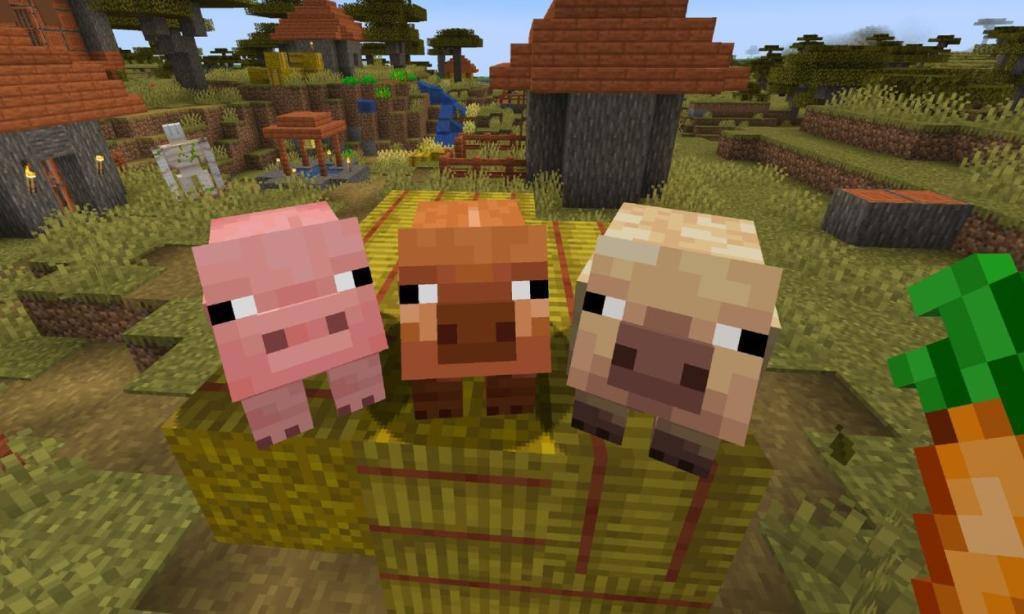
While you can find the Warm pigs in the Savanna, Jungles, and Badlands region, the Cold pigs can be found in Taiga, Windswept Hills, and Forest biomes. Finally, the regular ones, whose name has been changed to Temperate pigs, spawn in milder zones such as Forests, Swamps, and Plains. Also Read: All Minecraft Chicken Variants and Where to Find Them
With the addition of new pig species following the existing Wolf Variants, we can expect more such animal variations in Minecraft’s future updates.
New Leaf Particles and Lodestone Crafting Changes
New leaf particles now appear around trees with certain biome types, adding more detail to forest and jungle environments. The update also tweaks Lodestone crafting by adjusting how players combine chiseled stone bricks and Netherite ingots, making the process clearer and aligning recipe behavior across platforms. These refinements bring small but noticeable consistency improvements for both exploration and building.
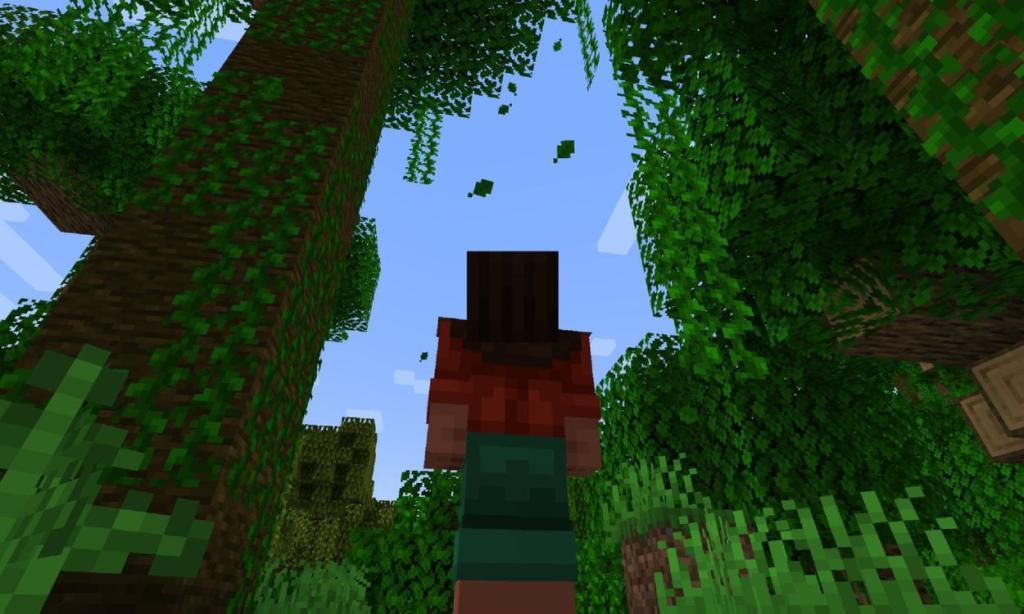
With Minecraft 1.21.60 update, all the leaf blocks in Minecraft’s Overworld will now emit leaf particles falling to the ground. In addition to Cherry and Pale Oak leaves, this feature is now available for all of the following blocks:
- Oak Leaves
- Jungle Leaves
- Acacia Leaves
- Dark Oak Leaves
- Spruce Leaves
- Mangrove Leaves
- Birch Leaves
- Azalea Leaves
- Flowering Azalea Leaves
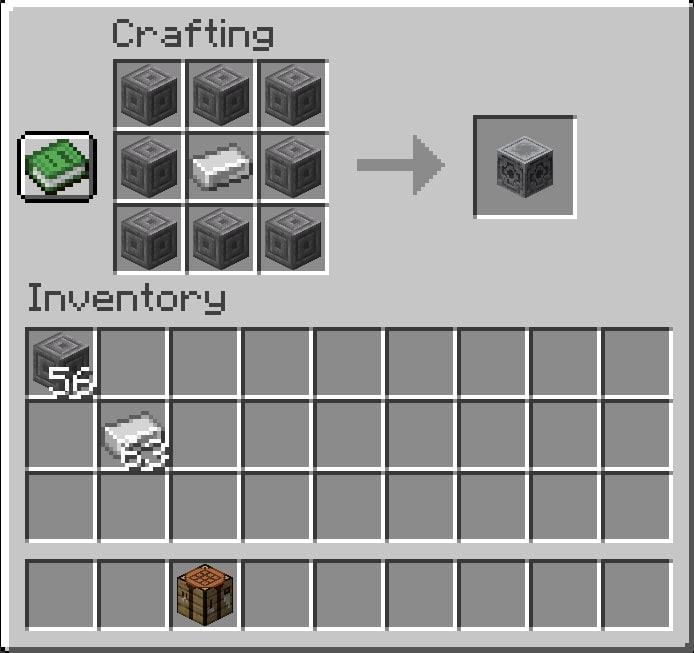
Coming to the Lodestones, this ignored block has received a brand new crafting recipe. Rather than going into the Nether and fighting for your life to get some Netherite, the Lodestone can now be crafted using 8 Chiseled Stone Bricks and 1 Iron Ingot. Simply open up the crafting table and place the ingot at the center, 8 chiseled stones on the rest of the squares to get the Lodestone.
Finally, the Pale Garden biome now takes up a larger area upon its spawn and can even surround a Woodland Mansion as well. Furthermore, the flower patches, and pumpkins now spawn with a much larger area in their respective locations.
In addition to all the major changes, Minecraft 1.21.60 has also brought about minor changes including narration in the realms plan picker, audio adjustments and better collision detection between moving blocks.
How do I enable the Drop 1 2025 experimental toggle in Bedrock
To enable the “Drop 1 2025” experimental toggle in Minecraft Bedrock Edition (version 1.21.60 or later), access it through world settings before loading or generating a world.
New World Steps
Navigate to the “Play” menu, select “Create New,” then go to “Game” settings and scroll to “Experiments.” Toggle “Drop 1 2025” on, confirm the warning popup by selecting “Turn on Experiments anyway,” and create the world.
Existing World Steps
From the “Play” menu, select your world, choose “Edit,” go to “Game” settings, and scroll to “Experiments.” Enable the “Drop 1 2025” toggle and confirm; a backup copy (“Copy of…”) generates automatically.
Verification Tips
Enabled worlds show an “Experimental” tag in the Worlds list; recheck Experiments in settings to confirm activation. Note potential bugs with toggles, as reported by some users, and back up worlds manually.
Create a backup copy before enabling experimental features
Minecraft Bedrock Edition automatically creates a backup copy named “Copy of [Your World Name]” when you enable experimental features like “Drop 1 2025” on an existing world. This protects your original world from irreversible changes caused by experiments.
Manual Backup Steps
From the “Play” menu, select your world and choose “Edit.” Tap the export icon (or “Export World”) to save a .mcworld file to your device or cloud storage, then create the experimental version separately. For added safety, duplicate the world folder in your device’s Minecraft worlds directory using a file manager app before editing settings.
Why Backup First
Experimental toggles modify world data irreversibly, risking corruption or lost progress; always verify the “Experimental” label appears post-activation.