Claim your free boosts this month with the latest Astral RNG codes for January 2025 and stack up rewards faster than ever in Roblox’s chaotic luck simulator.
Here is our list of all the latest Astral RNG codes that will help you get the starstruck potion, luck potion, essence, and tokens. Utilize these free rewards to increase your chances at the cosmic gamble.
All New Astral RNG Codes
New Astral RNG codes offer players free rewards such as spins, boosts, and other valuable in-game items to enhance their progress. These codes are released periodically by the developers and can help players advance faster or test new features without extra effort. Make sure to redeem them as soon as possible, since many expire after a limited time.
- Release – 1 Starstruck Potion, 5 Luck Potion, 25 Astral Token (NEW)
- RollingInTheStars – 1 Astral Essence, 1 Starstruck Potion, 25 Astral Token (NEW)
- PushRelease – 1 Astral Essence, 25 Astral Token, 1 Flame Essence (NEW)
- FixesYippie! – 2 Astral Essence, 50 Astral Token, 2 Flame Essence
Expired Astral RNG Codes
There are no expired codes yet in this Roblox RNG experience. While the developers consistently add new codes with each update, they haven’t invalidated any previous ones. Don’t miss out on free rewards – claim them all!
While you wait for more codes, you can always try the gacha experience in Anime Vanguards and Blue Lock Rivals. If you are tired of RNG, you can always find more fresh experiences in our Roblox game codes master list.
How to Redeem Astral RNG Codes
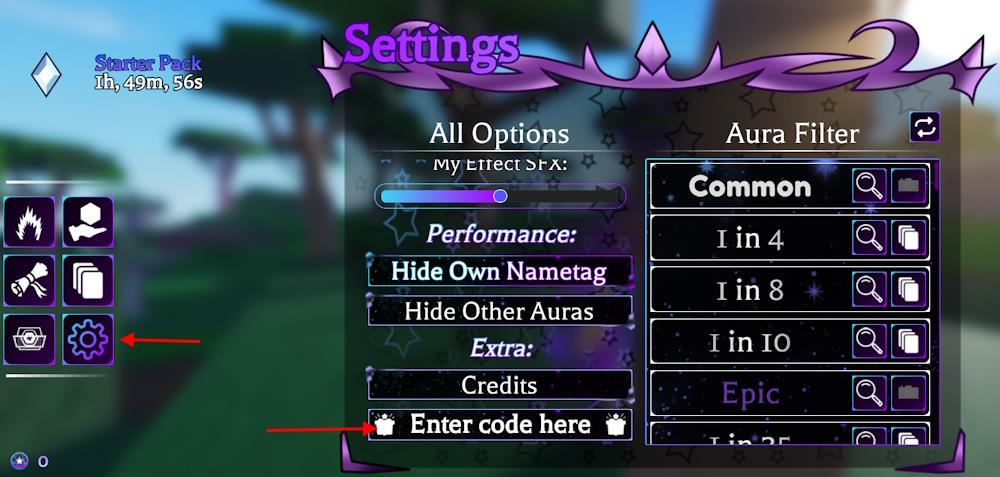
To redeem codes in Astral RNG, launch the game on Roblox. Tap the gear icon at the bottom of the screen to open settings. Enter a valid code from our list into the text box, then hit the green Redeem button. Rewards appear right away if the code works. Check the list above for active ones this month.
Rolling for the best aura can be hard but redeeming the codes for Astral RNG is a cakewalk when done right. Here is how to do so:
- Launch the Astral RNG experience on Roblox.
- Select the Settings button on the left menu.
- Type a working code in the Enter code here area.
- Click the enter button on your keyboard.
How to Get More Astral RNG Codes
To maximize your Astral RNG Codes, check the official Roblox group and social channels for daily drops, participate in in-game events, and stay tuned to patch notes that sometimes gift bonus codes; always verify codes on trusted sources and redeem promptly before they expire.
There aren’t many places where you can find the official codes for this game. You can join the Astral Realms Discord server to find all the latest announcements and updates. Find the codes channel on the server to learn about all the active codes. However, developers share the codes in the announcements channel first, so make sure you check all of them to be sure.
Want to stay away from such hassle? Bookmark this page to never miss the new Astral RNG codes. We frequently update the list with the latest codes and remove the expired ones. So, if you want to save time and want all the active codes, visit our page regularly.
How do I redeem codes in Astral RNG step by step
To redeem codes in Astral RNG on Roblox, follow these straightforward steps derived from reliable guides.
Step-by-Step Guide
-
Launch Astral RNG through the Roblox platform on your device.
-
Locate the Settings button (gear icon) on the left side of the screen, typically in the second column of buttons or left menu.
-
Open Settings, then scroll to the bottom where you’ll find the “Enter code here” text box below the Credits section.
-
Copy and paste a valid code exactly as listed (codes are case-sensitive) into the text box.
-
Press Enter on your keyboard to submit; a confirmation notification will appear if successful, listing your rewards.
Troubleshooting Tips
Codes can only be used once per account, so invalid or expired ones will show an error. Double-check spelling and avoid extra spaces, and verify new codes via the official Discord or Roblox group for updates.
Show where the Settings button is located in-game
In Astral RNG on Roblox, the Settings button appears as a gear icon on the left side of the screen. It sits in the second column of the vertical button menu, typically among other icons like roll or inventory options.
Visual Location
-
From the main game lobby or rolling area, look leftward to the narrow UI panel running vertically.
-
The gear icon is often positioned 2-3 slots down from the top, below primary action buttons and above lower utility ones like shop or leaderboard.
-
Clicking it expands a menu with sliders, credits display, and the code redemption box at the bottom.
Quick Access Tips
Hover or tap the gear to confirm; mobile users may need to pinch-zoom out for full visibility. Updates rarely shift its spot, but check the official Discord for screenshots if the layout changes.