Buzz into Bee Masters Simulator with fresh January 2025 codes that can boost your honey production, speed up your progress, and help you rise through Scorpion Games’ buzzing Roblox ranks.
To get you started, we have listed active Bee Masters Simulator codes that give you free Robux tokens.
All New Bee Masters Simulator Codes
Players can use the latest Bee Masters Simulator codes to earn free items, boosts, and in-game currency that make progress faster and more enjoyable. These codes often include special rewards from Scorpion Games, helping players upgrade their bees, gather honey quickly, and strengthen their hives. Check back often, as new codes are added regularly while older ones expire.
- ITWASMYDYSLEXIA: Redeem to get 30 Robux tokens (NEW)
- GAMEPASSESFIXED: Redeem to get 100 Robux tokens (NEW)
Expired Bee Masters Simulator Codes
- SORRY50TIMES
- PLUHHH
While the above codes should suffice your early-game needs, there’s even more Roblox experiences for you to enjoy. Fans of similar RNG games should check out games like Sol’s RNG and Aura RNG. Still not enough? Visit our Roblox codes master list for a wide variety of experience and their codes.
How to Redeem Bee Masters Simulator Codes
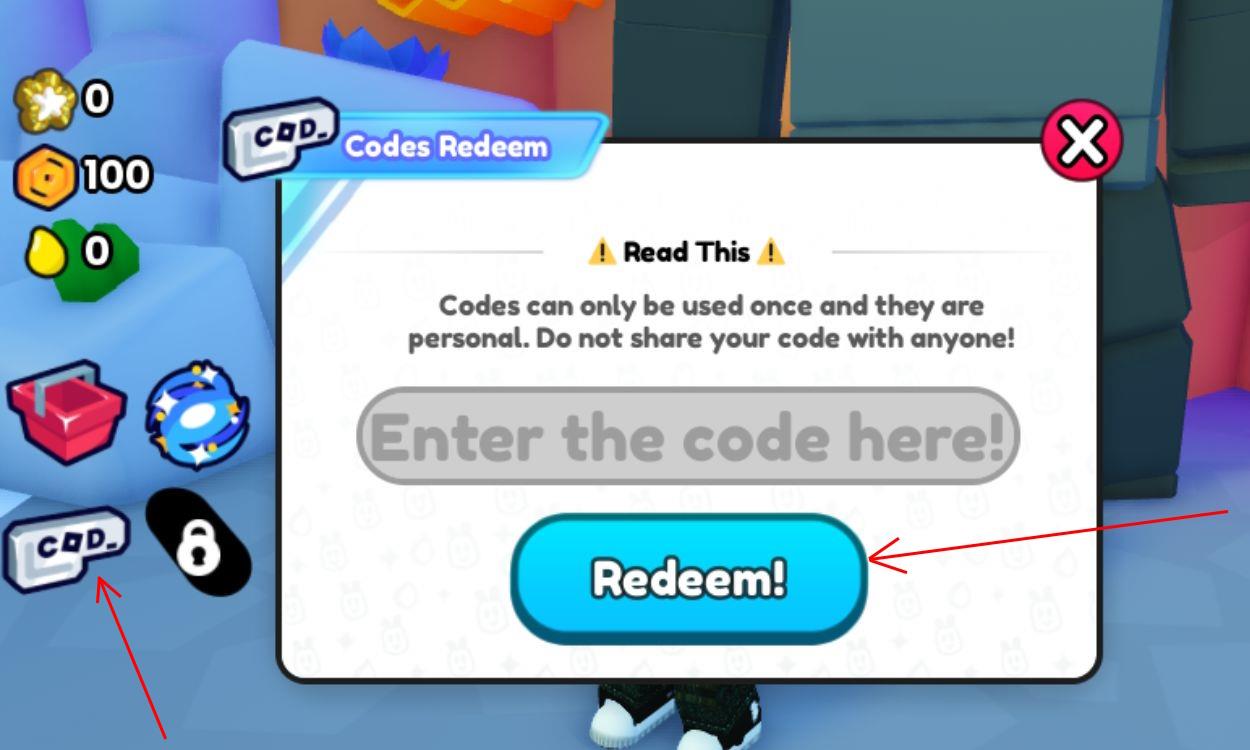
To redeem Bee Masters Simulator codes, open the game, tap the Codes button on the main screen, enter the provided code exactly as shown, and press Redeem. If a code is valid, rewards appear in your inventory or are sent to your character immediately. Codes expire, so use them before the stated expiration date.
Redeeming codes for Bee Masters Simulator is as easy as cracking eggs in the game. Simply follow the steps below:
- Launch Bee Masters Simulator in the Roblox app.
- Click the Cod_ icon on the left side of the screen.
- Input a working code in the text box in the pop-up.
- Click Redeem followed by Yes to claim rewards.
How to Get More Bee Masters Simulator Codes
Players can find new Bee Masters Simulator codes by following the official Scorpion Games social media pages on platforms like X (Twitter), Discord, and Roblox groups, where developers often share updates and rewards. Checking community forums, fan sites, and update notes in the game menu can also help spot new codes quickly. Staying active during special events or game milestones increases the chances of receiving limited-time bonuses.
The quickest way to get the latest codes for Bee Masters Simulator is to bookmark this post as we add new ones in real time. However, there are even more ways for the keener ones among you.
You can consider joining the official Scorpion Games Discord server to get the latest updates about the game. Once there, check out the ‘announcements’ and ‘codes’ channels for all new game codes. You can also join the game’s Roblox community or YouTube channel for more information.
How do I redeem codes in Bee Masters Simulator step by step
Here is the simple step-by-step way to redeem codes in Bee Masters Simulator:
-
Open the game
-
Launch Bee Masters Simulator from the Roblox app and wait until your character loads into the map.
-
-
Find the “COD/Codes” button
-
Look at the left side of your screen for a button labeled COD or Codes (often a white “cod” icon in a small menu).
-
-
Open the code window
-
Click that COD/Codes button to bring up a small popup with a text box and a blue Redeem button.
-
-
Enter a working code
-
Click inside the text box and type a valid code exactly as written (codes are case-sensitive), or copy-paste it to avoid mistakes.
-
-
Confirm and redeem
-
Press the Redeem button (sometimes followed by Yes/OK on a confirmation prompt) to submit the code.
-
-
Check your rewards
-
If the code is active, you’ll instantly see a notification and the rewards (like Robux Tokens, eggs, or treats) will be added to your account; if nothing happens, the code is likely expired or mistyped.
-
Open the Codes menu in Bee Masters Simulator where is it located
The Codes menu in Bee Masters Simulator is on the left side of your in-game screen. Look for a small button labeled “COD” or “Codes” in the left vertical button stack, usually the first button on the second row of that menu.