Dark energy stirs again in Spts: Return of the Reaper, and players are racing to grab fresh November 2024 codes before they disappear. DVG Studios has dropped new rewards that boost your grind and sharpen your edge-if you know where to find them.
To push you in your training, we have compiled working Spts Return of the Reaper codes that get you free in-game rewards. You can use all these rewards to boost your training and get your punch, speed, and psychic power stronger before going against more enemies.
All New Spts Return of the Reaper Codes
All New SPTS Return of the Reaper Codes bring fresh rewards for players eager to strengthen their abilities and progress faster. These new codes, released by DVG Studios, provide valuable boosts that help players train stats and gain resources more quickly. Fans of SPTS: Return of the Reaper can redeem these codes through the in-game menu to make the most of the latest update and stay ahead in their training.
- NEWMAP: 250 Universal (NEW)
- FINALLYUPDATE: 300 Universal (NEW)
- SorryForTheLongAwait: 500 Universal (NEW)
Expired Spts Return of the Reaper Codes
- 2XTPM
- TYFORSUPPORT
- 3kFav!
- 2.5kLIKES
- Lucky
- SORRY!!
- SORRYFORBEINGSTUPID
- 2000 LIKES
- 1?
- 750KVISITS
- 800KVISITS
- 650K VISITS!!!
- Spts:Delay
- okaylastwhoops
- whoops
- 2KFAVOURITES
- SORRYFORSHUTDOWNS
- CRASH
- 300KVISITS
- 200KVISITS
- 750 Active!
- 1.5KFAV
How to Redeem Spts Return of the Reaper Codes
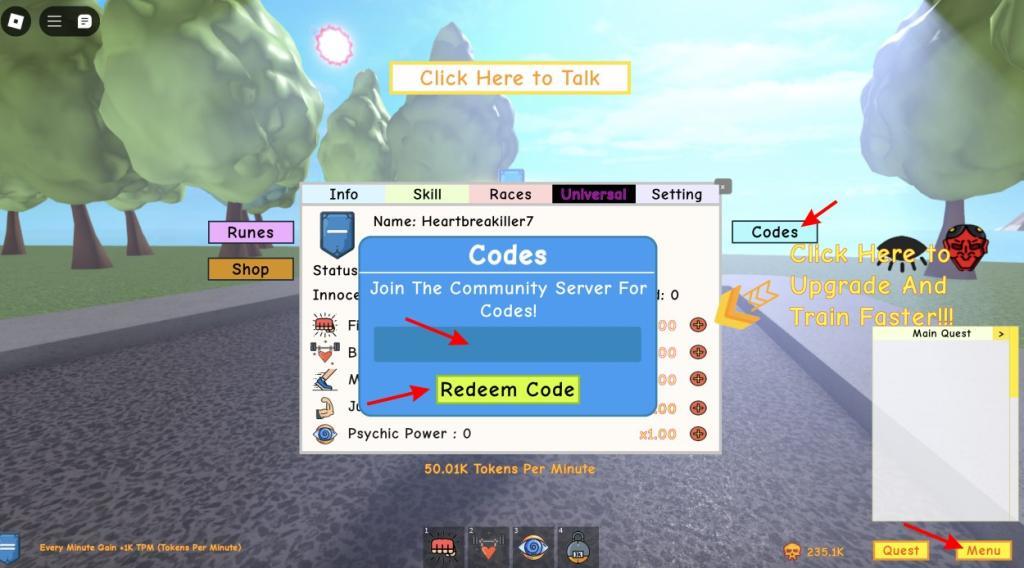
To redeem Spts: Return of the Reaper codes, open the game and tap the Twitter or Codes icon on the main screen. Enter a valid code exactly as shown, including any capital letters or symbols, then press the Redeem button to claim your rewards. If the code is valid, the bonus will be added to your account immediately; if not, double-check for typos or confirm that the code hasn’t expired.
Ready to level up and become the best superhero ever? Follow the steps below to learn how to redeem your Spts Return of the Reaper rewards:
- Start up the Spts Return of the Reaper experience on Roblox.
- Once in the game, click on the Menu button on the bottom right.
- Click on the Codes button to open the redemption window.
- Input a working code in the text box.
- Finally, click on Redeem Code and you’re done.
Where to Get More Spts Return of the Reaper Codes?
Players can find new Spts: Return of the Reaper codes through the game’s official channels such as the DVG Studios Discord server, X (formerly Twitter) page, or community groups where updates are posted regularly. It’s a good idea to check these sources after new events, patches, or seasonal updates, as developers often release codes to celebrate milestones or thank players for their support. Fan communities and Roblox forums are also reliable places to spot shared codes that may not appear in the game immediately.
As it is with titles in our Roblox master codes list, there are plenty of codes available for Spts. The best place to get the newest codes for this Roblox experience is this article itself as we add them as soon as we see them. However, you can also join the official DVG Studios Discord server for more news and to find like-minded gamers. Once there, look for the codes channel and make your life easier.
How do I redeem codes in Spts Return Of The Reaper
To redeem codes in Spts: Return of the Reaper on Roblox, follow these straightforward steps. The process is consistent across guides from DVG Studios’ game.
Redemption Steps
-
Launch Spts: Return of the Reaper and join a server.
-
Click the yellow or blue Menu button in the bottom-right corner of the screen.
-
Select the Codes button (often on the right side of the menu) to open the input field.
-
Enter a valid code exactly as shown (case-sensitive), then press Redeem Code.
-
Confirmation appears as “Successfully Redeemed!” with rewards like Universal instantly added.
Troubleshooting Tips
Codes may fail if expired, mistyped, or on an outdated server-try rejoining or copying/pasting directly. No private servers are needed for redemption.
Open the in-game menu and navigate to Codes section
To open the in-game menu and navigate to the Codes section in Spts: Return of the Reaper, follow these precise steps based on standard Roblox mechanics for this DVG Studios game.
Opening the Menu
Click the yellow or blue Menu button located in the bottom-right corner of your screen after loading into a server. This opens the main menu interface with various tabs.
Navigating to Codes
In the open menu, select the Codes tab or button, typically positioned on the right side among options like Shop or Stats. A text input field will appear for entering codes.
Quick Tips
Enter codes exactly (case-sensitive) and tap Redeem Code; rewards grant instantly if valid. If the menu doesn’t appear, ensure you’re fully loaded in-game and try refreshing the server.
