Roblox Massacre’s January 2026 codes drop free in-game credits-grab them before they vanish.
All New Massacre Codes
Massacre Codes for Roblox unlocking in-game credits and exclusive perks, with January 2026 updates and fresh options to amplify your gameplay.
- happynewyear: 3333 Credits (NEW)
- 4kmembers: Perk Crates (NEW)
- 3million: 5000 Credits, Perk Crates, and More (NEW)
- early3mil: 2500 Credits, Perk Crates, and More (NEW)
- 2.5millllion: 2500 Credits, Perk Crates, and More (NEW)
- skins: Perk Crates (NEW)
- teddypizza: 1500 Credits, Perk Crates, and More (NEW)
- happychristmas: 1500 Credits
- xmas: 3000 Credits
- early2mil: 2500 Credits
- 20kfavswow: 4000 Credits
- 1milwow: 5000 Credits, Perk Crates, and More
- blessed: temporary gamepass rewards and a super push skill
- sorryfordelay: druski emote
Expired Massacre Codes
- ohboyy
- omg500k
- smallbugfix
- tyeveryone
- 400k
- 500members
- 300ktuff
- byebyebye
- perks
- 200kwow
- loveyall
- Meow
Are competitive games your thing? You can also give a shot at Hypershot and Rivals. If you are done with shooting heads, try checking out Blox Fruits and The Forge. For a relaxing experience, try Grow a Garden, Fisch, and Prospecting. Apart from chill games, you can try out other cool games on this platform by looking at our Roblox game codes master list.
How to Redeem Massacre Codes
To redeem Massacre codes in Roblox, open the game and click on the Codes button, usually found on the main menu or settings section. Enter the code exactly as shown, paying attention to capitalization and symbols, then press Redeem to claim your reward. If the code is valid, your in-game items or credits will appear instantly. Expired or incorrect codes will show an error message, so make sure you’re using the latest ones.
Redeeming the codes for Massacre is simple. Here is how you can do it and claim the free rewards:
- Launch Massacre on Roblox.
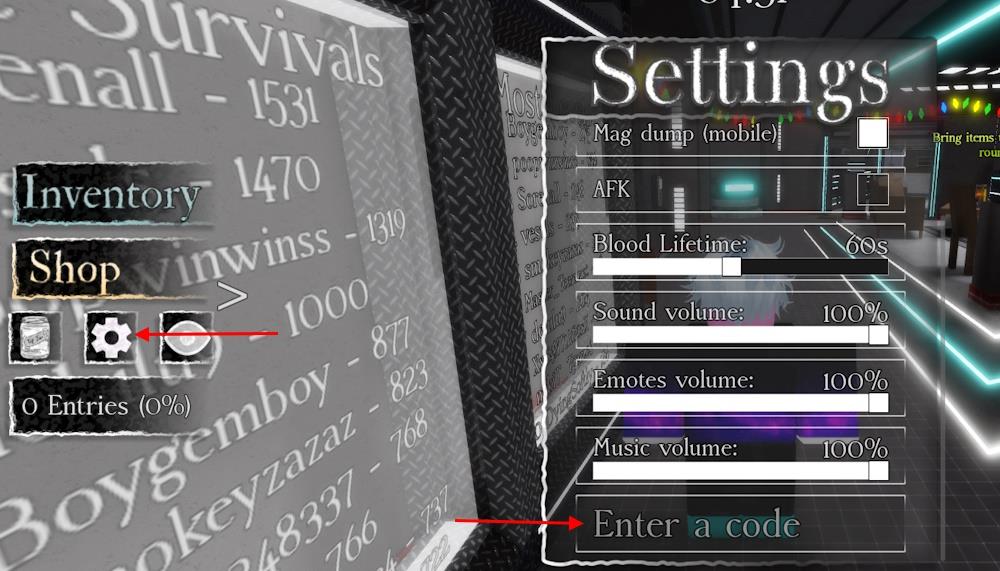
- Click the Gear button from the left menu.
- Type a working code in the ‘Enter a Code’ area.
- Click the Enter button to claim the rewards.
How to Get More Massacre Codes
Boost your stack by completing daily and weekly missions, collecting event tokens, and trading codes from trusted community channels to maximize Massacre Code drops.
If you do not feel like hunting for new codes every day, you can let us do the work. We update this page the moment fresh codes appear, and we move the expired ones aside so nothing gets mixed up. Add it to your bookmarks and keep your run smooth.
Even seasoned survivors need a little help at times. If you want updates straight from the source, join the official Massacre Discord server. It is the only verified place where new codes are posted, and you will find them neatly listed in the ‘updates’ channel. Scouring through the announcement to get the codes for Massacre can get tricky, so we suggest you stick to our list.
Why Are My Massacre Codes Not Working?
If your massacre codes aren’t working, double-check that you’re entering the exact code and that it’s still valid for January 2026. Make sure you’re on a supported Roblox server version, not in a private test environment, and that you’ve met any required in-game conditions (like being in the correct area or having enough in-game credits). If issues persist, verify the code’s expiration date and look for any recent updates or changes in the guides or official announcements.
When new Massacre codes arrive, the game usually pushes a fresh client update, so give the servers a moment to reset before you try anything. If you see an error while redeeming, look for small typing mistakes. The safest option is to copy the code directly from our list. Some codes run on strict timers, so if one stops working, it likely means it has already expired. Visit our page again and see if it has been moved to the expired section.
How do I redeem Massacre codes in-game
Redeeming Massacre codes in Roblox is straightforward using the in-game settings menu. Follow these steps to claim free rewards like credits, perk crates, or skills.
Redemption Steps
Launch Massacre on Roblox. Click the cogwheel (gear) or settings icon on the left side of the screen, typically between the soda can and eye buttons. Scroll to the bottom if needed, enter the code exactly (case-sensitive, including prefixes like “!code”), and press Enter to receive rewards instantly.
Troubleshooting Tips
Codes must be typed precisely without extra spaces; copy-paste from reliable lists to avoid errors. They redeem once per account and expire quickly, so test active ones first-if invalid, check for updates via the game’s Discord. Rewards appear right away if successful.
Show the exact steps to find the cogwheel in Massacre
Finding the cogwheel icon in Roblox Massacre requires checking the game’s main interface after loading into a server. This gear-shaped button opens the settings menu for code redemption.
Exact Steps
Join a Massacre server on Roblox and wait for the lobby or match screen to fully load. Look on the left side of your screen for a vertical toolbar with icons-the cogwheel (⚙️ gear symbol) sits between the soda can (for health/potions) and the eye (for map or spectate) buttons. Click it directly to expand the menu, then scroll to the “Enter a Code” field at the bottom if it’s not immediately visible.
Visual Location
The cogwheel is always present in the free-for-all lobby before matches start, not hidden during active rounds. On mobile, it may appear slightly lower due to screen adjustments but remains in the same left-side cluster.
