Collect powerful rewards and upgrade your experience with the latest Roblox Destroy codes for October 2025-fresh bonuses, rare boosts, and exclusive items waiting to boost your gameplay before they expire.
However, it’s not that easy, as you’ll need a lot of Cash and XP to get your desired Superheroes. That’s when the Destroy Codes come in handy with free cash and other free boosts. Use the freebies to your advantage and annihilate the lobby.
All New Destroy Codes
The October 2025 update brings fresh Destroy Codes that grant players new rewards and bonuses in Roblox. These codes can provide items, boosts, and other special perks to enhance progress while playing. Be sure to redeem them quickly, as many have limited availability and may expire without notice. Keep checking for new additions to stay ahead in your game strategy and maximize your in-game benefits.
- BETA: $15,000 (NEW)
- YGDS!: $15,000 (NEW)
- DESTROY: x2 Mastery and XP boost for 15 Min (NEW)
Expired Destroy Codes
Currently, there are no expired codes in this Roblox experience. Once the above codes expire, we will move them to this section.
While waiting for more free rewards, you can check some other popular games on Roblox, like Blue Lock Rivals and Volleyball Legends. If you are looking for more fun games, check our Roblox game codes list. Meanwhile, why don’t you try some of the top Roblox games, like Grow a Garden, and 99 Nights in the Forest.
How to Redeem Destroy Codes
To redeem Destroy codes in Roblox, open the game and wait for it to load completely. Then, click the “Codes” button, usually found on the main menu or settings screen. A text box will appear-enter your active code carefully and press “Redeem.” If the code is valid and active, the reward will appear in your account instantly. Make sure to enter each code exactly as shown, since capitalization and spacing can affect whether it works.
Redeeming codes for Destroy is very simple; however, you must complete the tutorial before you can redeem them. Once done, you can follow the steps listed below to redeem the codes.
- Launch the Destroy game on Roblox.
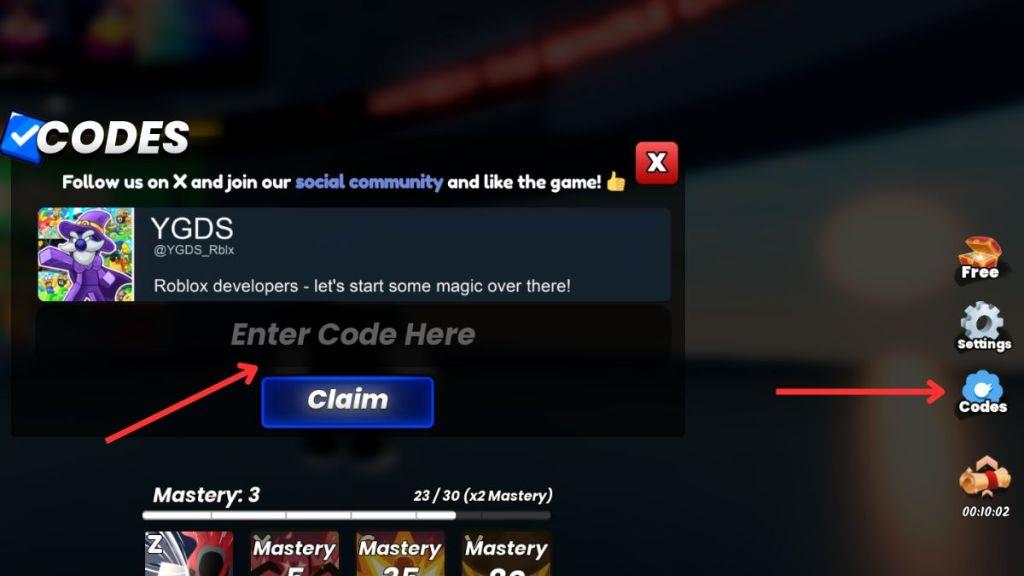
- Click on the Codes button on the right side of your screen.
- Type a working code in the pop-up box.
- Click the Claim button to receive the rewards.
How to Get More Destroy Codes
Master the codes by checking the official Roblox event pages, following trusted creators on social platforms, and watching up-to-date guides from reputable Roblox communities to stay current with the latest releases.
To get more codes in the game, you can consider joining the official Destroy Discord server. Once you have joined, navigate to the #codes channel. All the new codes are announced in that channel, and you can turn on the notifications for the codes. You can also get new codes from the @YGDS_Rblx X account, the developers of the game.
You can consider bookmarking this page if you feel stressed finding all the codes by yourself. Since we update the list timely manner, you will never miss out on the new rewards. We also remove the inactive codes and move them to the expired section to clear any confusion.
How to redeem codes in Roblox Destroy step by step
Redeeming codes in Roblox Destroy requires completing the tutorial first. Follow these steps for quick rewards like cash and mastery boosts.
Step-by-Step Guide
-
Launch Destroy on Roblox and log into your account.
-
Complete the short tutorial to unlock the codes feature-this is mandatory.
-
Locate and click the Codes button on the right side of the screen.
-
Enter the code exactly as shown (case-sensitive) into the Enter Code Here text box that appears.
-
Press the Claim button to receive your rewards instantly.
Common Fixes
Copy-paste codes to avoid typos, restart the game for server updates, or switch servers if errors occur-many codes expire quickly. Each code works once per account.
Open the in-game Codes menu location and steps
The Codes menu in Roblox Destroy appears on the right side of the screen after completing the tutorial. No additional verification is needed beyond that.
Opening Steps
-
Launch Destroy and finish the tutorial to enable codes.
-
Look rightward for the Codes button (icon often resembles a gift or scroll).
-
Click it to open the input field for entering codes like “1M” or “BETA”.
Visual Location
Positioned vertically on the right UI panel, below shop or leaderboard icons but above chat-scroll if on mobile. If missing, rejoin or restart post-tutorial.