Quirky ducks, powerful evolutions, and hidden rewards await! The latest Duck Evolution codes for September 2025 bring fresh boosts and rare items to help your flock grow faster in this Roblox favorite.
All New Duck Evolution Codes
The latest Duck Evolution codes for September 2025 bring players fresh rewards to boost their progress and customize their ducks with fun new items. These codes can be redeemed for coins, boosts, and other in-game bonuses that help you evolve faster and compete with others. Make sure to use them soon, as some may expire quickly and new ones are added regularly.
- Dalaxy: EXP Potions (NEW)
- Release: Win Potions
Expired Duck Evolution Codes
Currently, there are no expired codes for now, so you might want to redeem the current ones before they expire.
While you are waiting for more codes, try out some of the other popular games using our Roblox games code list. Start with Blue Lock Rivals and Grow a Garden, both of which are extremely popular on Roblox. Next, check out Anime Last Stand and All Star Tower Defense X for some good old-fashioned TD action.
How to Redeem Duck Evolution Codes
To redeem Duck Evolution codes, open the game on Roblox and press the Twitter bird icon on the main screen. A code box will appear-enter a valid code exactly as shown, including capitalization, and press the Redeem button. If the code is active, your free rewards such as coins or boosts will be added to your account instantly. Make sure to check for new codes regularly, as old ones may expire without notice.
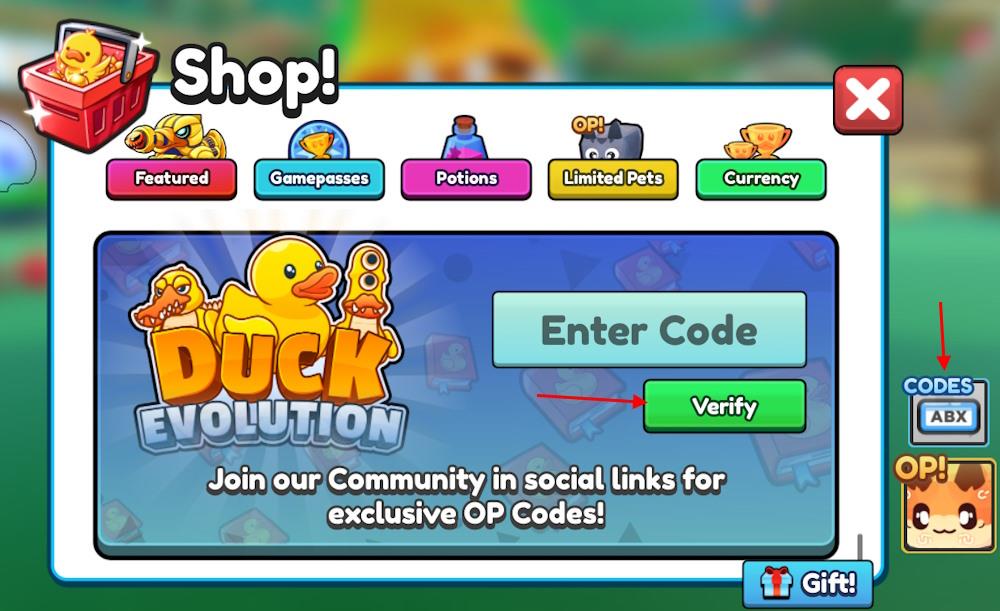
Like many other Roblox games, redeeming the codes for Duck Evolution is easier than getting through the tough levels in it. Here is how to do it:
- Launch the Duck Evolution experience on Roblox.
- Click the Shop option from the left menu.
- Press the Codes button and type a working code.
- Click the Verify button to claim rewards.
How to Get More Duck Evolution Codes
Join the official Duck Evolution Discord server and follow the game’s social media pages on platforms like X and YouTube, where new codes are often posted during updates or events. Keep an eye on seasonal promotions and developer announcements, as limited-time codes are sometimes shared to celebrate milestones or new features. You can also bookmark fan sites or Roblox code directories that regularly update with the latest working Duck Evolution codes.
Keeping up with the codes for this experience is a breeze if you are on our page. We will update this list regularly, moving expired codes to the ‘expired’ section. That is why we suggest you bookmark this page for the codes for Duck Evolution that have not expired yet.
However, you can scour through the game’s socials for codes by yourself. The Duck Evolution Discord server is the ideal place to find the working ones. If you are in the Discord server, go to the announcements channel to find all the codes.
The game is fairly new, so make sure you are not late on the redemption. Check for typos if you are getting an error while redeeming them. We suggest you copy the code from our list for no hassle. The codes are Caps Lock sensitive; you must check that before the redemption as well.
How do I redeem codes in Duck Evolution step by step
Redeeming codes in Duck Evolution is straightforward and takes just a few clicks once you’re in the game. Follow these steps carefully to claim your rewards, such as EXP or Wins Potions.
Step-by-Step Guide
-
Launch Duck Evolution on Roblox and enter the game lobby.
-
Locate and click the Shop button on the left side of the screen.
-
In the Shop menu, click the Codes button (sometimes labeled “Codes ABX” or found by scrolling down).
-
Enter the code exactly as shown in the text box (codes are case-sensitive).
-
Press Verify or Enter to redeem; rewards appear instantly if valid.
Codes can only be used once per account, and expired ones won’t work-double-check spelling if you get an error. Test in a private server if issues persist.
Open the Shop in Duck Evolution where is the Codes button located
The Codes button in Duck Evolution appears inside the Shop menu for easy access. Open the Shop first, then locate Codes within the pop-up interface.
Shop Location
The Shop button sits on the left side of the screen, often as an icon near other menus like inventory.
Codes Button Details
-
Once Shop opens, look for the Codes button (blue, labeled “Codes ABX” or simply “Codes”) inside the pop-up window-typically on the right side or main tab.
-
Some guides note it near the bottom or as a small button requiring a scroll in the Shop interface.
-
Click it to reveal the code entry field and Verify button.
Exact placement may vary slightly with updates, so scan the Shop window carefully after opening. If missing, rejoin the game or check for patches.
